Happy Hare
Universal Automated Filament Changer / MMU driver for Klipper
Happy Hare is the original open-source filament changer controller for multi-color printing. Its philosophy is to provide a universal control system that adapts to your choice of MMU (Multi-Material Unit): switch hardware and the software transitions seamlessly with you.
It's implemented as a Klipper extension, driving the hardware directly and
exposing everything else through ordinary Klipper macros - if you can write a
gcode_macro, you can customize how Happy Hare behaves. It helps to think of
it in web-browser terms: Klipper is the browser, and Happy Hare is an extension
that adds a whole new capability, without changing anything about how Klipper
works underneath.
Now in it's 4th generation, it supports every MMU/AFC with rich integration to Klipper, Moonraker, Mainsail, Fluidd, Klipperscreen and other ecosystems. It is super flexible and now even easier to install and setup.
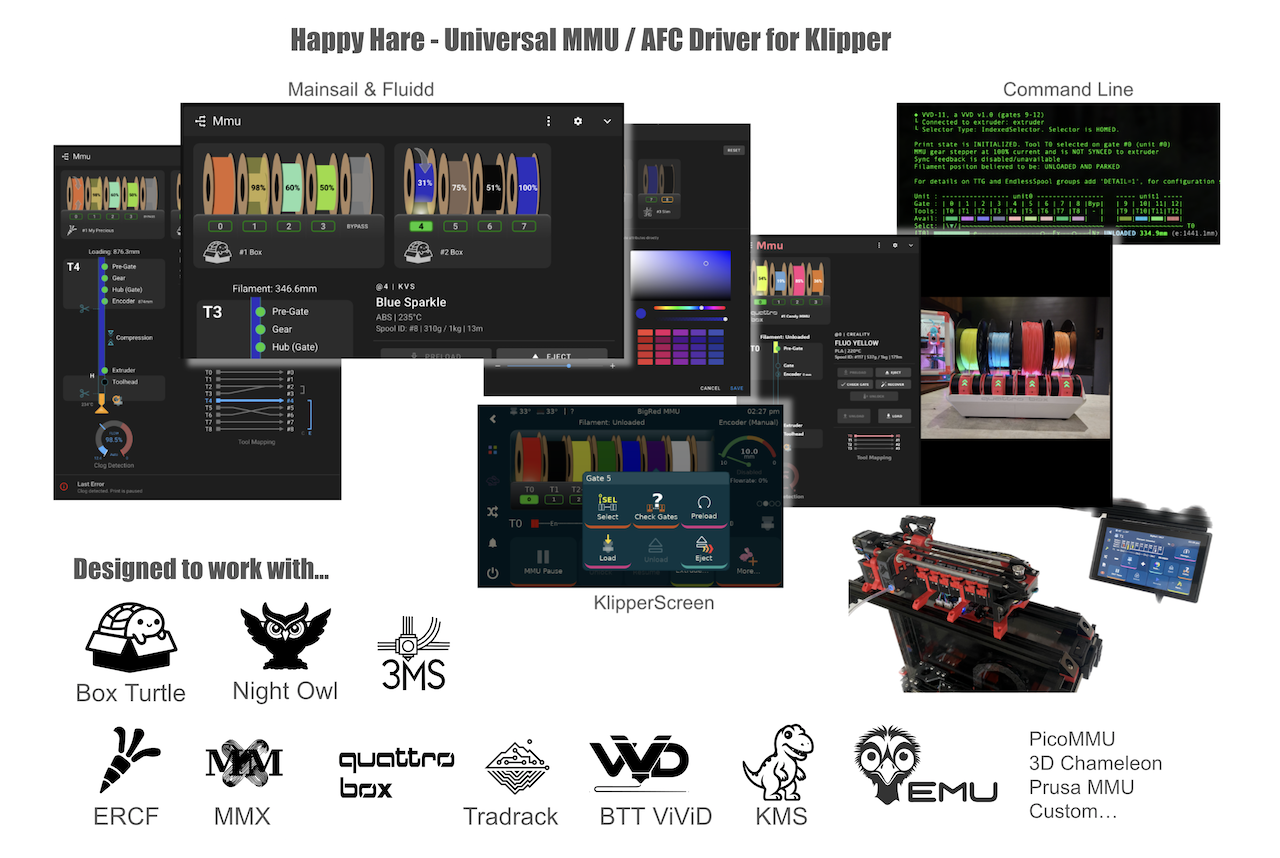
What it drives
Happy Hare isn’t tied to a single hardware design. It supports most community-built MMU/AFC systems, including ERCF, Tradrack, gear-per-gate designs such as EMU and Box Turtle, and fully custom builds, with more being added over time. See What is an MMU? to understand how these designs differ and which family yours belongs to. That page is the main reference for supported hardware, so this page does not repeat the same details.
Pair it with KlipperScreen for Happy Hare for dedicated touchscreen control, or drive everything from the native Mainsail and Fluidd Happy Hare panel - both are shown above.
What it does
Happy Hare brings the MMU, printer, slicer, spool inventory and user interface together as one system:
- Automated filament changing from gate selection and preloading through load, unload, eject and complete toolchanges, with a filament bypass for ad hoc single-spool printing.
- Flexible multi-MMU control for selector and gear-per-gate designs, including independent units, dissimilar hardware and multiple toolheads on the same printer.
- Guided calibration and hardware validation for selectors, drive gears, encoders, bowden paths, toolheads, motors and sensors.
- Gate, slicer and tool-to-gate maps that track every filament and remap any slicer tool to any physical spool, backed by upload-time G-code preprocessing.
- Runout, clog and tangle protection using filament-path sensors, encoders and FlowGuard, with automatic EndlessSpool handoff to a replacement spool.
- Quality-focused filament movement with synchronized gear/extruder control, sync-feedback buffers, encoder flow verification, tip forming or cutting and smart purging, and guided cold pulls.
- Spool intelligence including material, color, temperature and availability, full Spoolman/Filament Hub integration, and beta NFC/RFID tag reading for automatic spool identification.
- Active spool and enclosure hardware with eSpooler rewind and assist, functional LEDs, physical eject buttons, temperature-controlled fans and managed filament drying.
- Persistent state and deep diagnostics including calibration and map recovery, toolchange statistics and maintenance counters, dedicated logging, built-in help, hardware tests and soak testing.
- Complete UI control through native MMU panels in Mainsail and Fluidd, plus the dedicated KlipperScreen Happy Hare extension for touchscreen operation.
- Macro-level customization for parking, pause/recovery, load/unload sequences, print lifecycle hooks and other printer-specific behavior.
How this site is organized
These pages are organized by what you're trying to accomplish, rather than the type of MMU:
- Getting Started walks through a real
menuconfiginstall for one MMU type, screen by screen - the closest thing to "follow along and end up with a working setup". - Calibration covers measuring the handful of physical dimensions that are specific to your build - selector position, gear rotation distance, encoder resolution, bowden length, toolhead geometry - and which of those actually apply to your MMU.
- Concepts covers terminology and hardware taxonomy that's shared across every MMU type - worth reading once, regardless of which hardware you have.
- Features has one page per capability (Spoolman, NFC, eSpooler, and so on) - dip into whichever ones you actually plan to use.
- Macros covers tuning and extending the gcode macros Happy Hare ships with - tip forming/cutting, parking, purging, pause/resume - one page per macro group, each with its own menuconfig screen.
- Advanced Customization covers replacing Happy Hare's own internal logic with your own macros - expert-level, and rarely needed.
- Slicer & Toolchange covers the slicer-side setup an MMU print needs, and how toolhead parking/movement works around a toolchange.
- Operation is day-to-day use once everything's configured - the console/UI commands you'll actually run, and what to do when a print pauses.
- Tuning is print-quality dialing-in once the basics work - toolhead dimensions, blobbing, and stringing.
- Reference is the flat lookup layer: every
MMU_*command andprinter.mmu.*variable generated straight from Happy Hare's source, plus every config and macro-tuning parameter documented from the real shipped templates. - Developer Guide is for contributing to Happy Hare itself, not for running it - skip it unless you're reading or changing the code.
A few notational conventions carry across all of them: MMU_LIKE_THIS is a
gcode command, like_this.cfg is a config file, and printer.mmu.like_this
is a printer variable that can be read from a macro or UI panel.
A warning box means something that can genuinely bite you if skipped;
a plain tip is a shortcut, not a requirement.
Donations
Happy Hare is a labor of love, not a funded project - but it's a genuinely large undertaking to maintain: tens of thousands of lines of driver and installer code, thousands of lines of macros and config, a comparable amount of documentation with hundreds of images and illustrations, and dedicated integrations with KlipperScreen, Mainsail and Fluidd alongside it all.
If you've found value in Happy Hare and want to contribute, donations are welcome via PayPal. Any support goes toward improving the experience for whichever MMU/AFC you're running. Thank you!

Getting help
Join the Happy Hare Discord - there are channels dedicated to each MMU type as well as the main extensions. The GitHub issue tracker works too, checked on a less immediate cadence.
Whichever avenue you use, having the following ready up front will provide context and a faster answer:
klippy.logandmmu.log
UseMMU_TEST_CONFIG LOG_FILE_LEVEL=3or=4to dynamically increasemmu.loglevel to debug or trace without restarting Klipper- version info (
MMU_STATUS SHOWCONFIG=1output) - the exact error text
- what you were doing when it happened, and a picture or video if it's a physical issue
Tip
The easiest way to grab logs is through Mainsail: Machine tab → the dropdown at top → Logs → right-click the file you want → Download.
Where to start
-
Getting Started
New to Happy Hare? Walk through installing and configuring an MMU from scratch,
menuconfigscreen by screen.Box Turtle guide →
EMU guide →
ERCF guide →
Tradrack guide →
ViViD guide → -
Calibration
Which calibration steps your MMU actually needs, what's mandatory versus safe to skip, and the order to run them in.
-
Concepts
Terminology, selector mechanisms, and which vendors use which - read this once regardless of which MMU you have.
-
Features
One page per capability - Spoolman, NFC/RFID, eSpooler, encoder, and more.
-
Macros
Tuning and extending the gcode macros Happy Hare ships with - tip forming/cutting, parking, purging, pause/resume, and more.
-
Advanced Customization
Replacing Happy Hare's own load/unload logic with your own macros - expert-level, and rarely needed.
-
Slicer & Toolchange
Setting up your slicer's start/end gcode, and how toolhead parking works around a toolchange.
-
Operation
Day-to-day commands, and what to do when the MMU pauses mid-print.
-
Tuning
Dialing in toolhead dimensions and toolchange movement to eliminate blobbing and stringing.
-
Reference
Every
MMU_*command andprinter.mmu.*variable, generated straight from the source. -
Developer Guide
Code layout and object ownership, the Kconfig/installer pipeline, and running Happy Hare - tested or interactively - with no printer attached.