Feature: NFC/RFID Reading
Concept
An NFC/RFID reader scans the tag on a filament spool and reports its UID - a fixed identifier unique to that tag. On its own, a UID is just a string; what makes it useful is Spoolman, which resolves that UID to a spool record and, from there, to filament attributes and gate assignment. This page covers the readers and the scan itself; what happens with a resolved spool is Feature: Spoolman / Filament Hub. The two pages cross-reference constantly - if you're setting this up for the first time, read both.
Happy Hare supports two reader arrangements, and a unit can have either or both at once:
- A shared reader. One reader, presented with a spool by hand - not
built into any particular gate. It polls automatically once configured;
present a tag and Happy Hare resolves it in the background. The result is
held as a pending spool ID until the next filament is loaded or
preloaded, at which point it's applied to that gate - the same "pending"
mechanism
MMU_GATE_MAP NEXT_SPOOLID=uses, and governed by the samespoolman_pending_id_timeout. - Per-gate readers. One reader per gate, positioned to see the tag on whatever spool is loaded into that specific gate. These aren't polled continuously - see Per-gate readers below for exactly when they're read.
A read can be shallow or deep:
- UID-only - just the tag's identifier. Enough to resolve a spool that's already registered in Spoolman.
- Deep read (
nfc_deep_read, on by default) - also parses the tag's own stored data, when the tag carries any. Several third-party tag formats are recognized (Bambu, Creality, and the plain NDEF format used by OpenSpool/OpenTag-style tags and printable QR/NFC combo tags), giving material, color, vendor and temperature straight from the tag - useful on its own, and it's also what feeds Spoolman auto-create for a tag Spoolman has never seen before. A tag in a format Happy Hare doesn't recognize still yields its UID; it just won't have parsed metadata.
Hardware Setup
Examples below use the default unit name unit0. Substitute your configured
Klipper object name in unit-specific
sections, object references and pin prefixes.
Enable this in menuconfig with Has NFC reader(s) for RFID tag? under _RFID (BETA), which opens an NFC reader h/w config menu:
Shared reader (toggle Has common NFC reader?):
Reader settings by type
| Setting | Purpose |
|---|---|
NFC reader name |
Klipper object name - defaults to <unit>_nfc |
Reader type |
Select RC522 / SPI |
CS pin |
Required chip-select pin |
SPI bus name |
Optional hardware SPI bus; blank uses the MCU's default bus |
SPI speed |
Defaults to 1MHz; RC522 supports up to 10MHz |
Receiver gain |
0 keeps the chip default (33dB); selectable values are 18, 23, 33, 38, 43, or 48dB |
| Setting | Purpose |
|---|---|
NFC reader name |
Klipper object name - defaults to <unit>_nfc |
Reader type |
Select PN5180 / SPI |
CS pin |
Required chip-select pin |
SPI bus name |
Optional hardware SPI bus; blank uses the MCU's default bus |
SPI speed |
Defaults to 1MHz; PN5180 supports up to 7MHz |
BUSY pin |
Required; signals when a command has completed |
RST pin |
Required; lets the driver recover an unresponsive reader |
Receiver gain |
0 keeps the chip default (50dB); selectable values are 33, 40, 50, or 57dB |
| Setting | Purpose |
|---|---|
NFC reader name |
Klipper object name - defaults to <unit>_nfc |
Reader type |
Select PN532 / I2C |
I2C MCU name |
MCU that owns the I2C bus |
I2C address |
Fixed at 0x24 |
I2C bus type |
Hardware I2C, or software I2C on a dedicated GPIO pair |
(hardware) I2C bus name |
Select a board-routed hardware bus, or Custom bus name; a blank custom name uses the MCU default |
(software) SCL pin, SDA pin |
Required bit-banged bus pins; give each PN532 on the same MCU its own pair |
I2C speed |
Defaults to 100kHz |
Receiver gain |
0 keeps the chip default (33dB); selectable values are 18, 23, 33, 38, 43, or 48dB |
| Setting | Purpose |
|---|---|
NFC reader name |
Klipper object name - defaults to <unit>_nfc |
Reader type |
Select PN532 / UART |
Serial device path |
Stable /dev/serial/by-id/ path for the reader's host USB-serial adapter |
Baud rate |
Defaults to 115200; one reader requires one adapter |
Receiver gain |
0 keeps the chip default (33dB); selectable values are 18, 23, 33, 38, 43, or 48dB |
| Setting | Purpose |
|---|---|
NFC reader name |
Klipper object name - defaults to <unit>_nfc |
Reader type |
Select PN532 / SPI |
CS pin |
Required chip-select pin |
SPI bus name |
Optional hardware SPI bus; blank uses the MCU's default bus |
SPI speed |
Defaults to 1MHz |
Receiver gain |
0 keeps the chip default (33dB); selectable values are 18, 23, 33, 38, 43, or 48dB |
| Setting | Purpose |
|---|---|
NFC reader name |
Klipper object name - defaults to <unit>_nfc |
Reader type |
Select PN7160 / I2C |
I2C MCU name |
MCU that owns the I2C bus |
I2C address |
Defaults to 0x28; selectable range is 0x28-0x2B |
I2C bus type |
Hardware I2C, or software I2C on any GPIO pair |
(hardware) I2C bus name |
Select a board-routed hardware bus, or Custom bus name; a blank custom name uses the MCU default |
(software) SCL pin, SDA pin |
Required bit-banged bus pins |
I2C speed |
Defaults to 100kHz |
VEN pin |
Optional reader-enable pin |
IRQ pin |
Optional but recommended; lets the presence probe check the line directly |
Receiver gain |
0 keeps the protocol-profile defaults (53dB for NFC-A, 51dB for ISO15693); selectable values are 18, 26, 32, 39, 44, 51, 53, or 60dB |
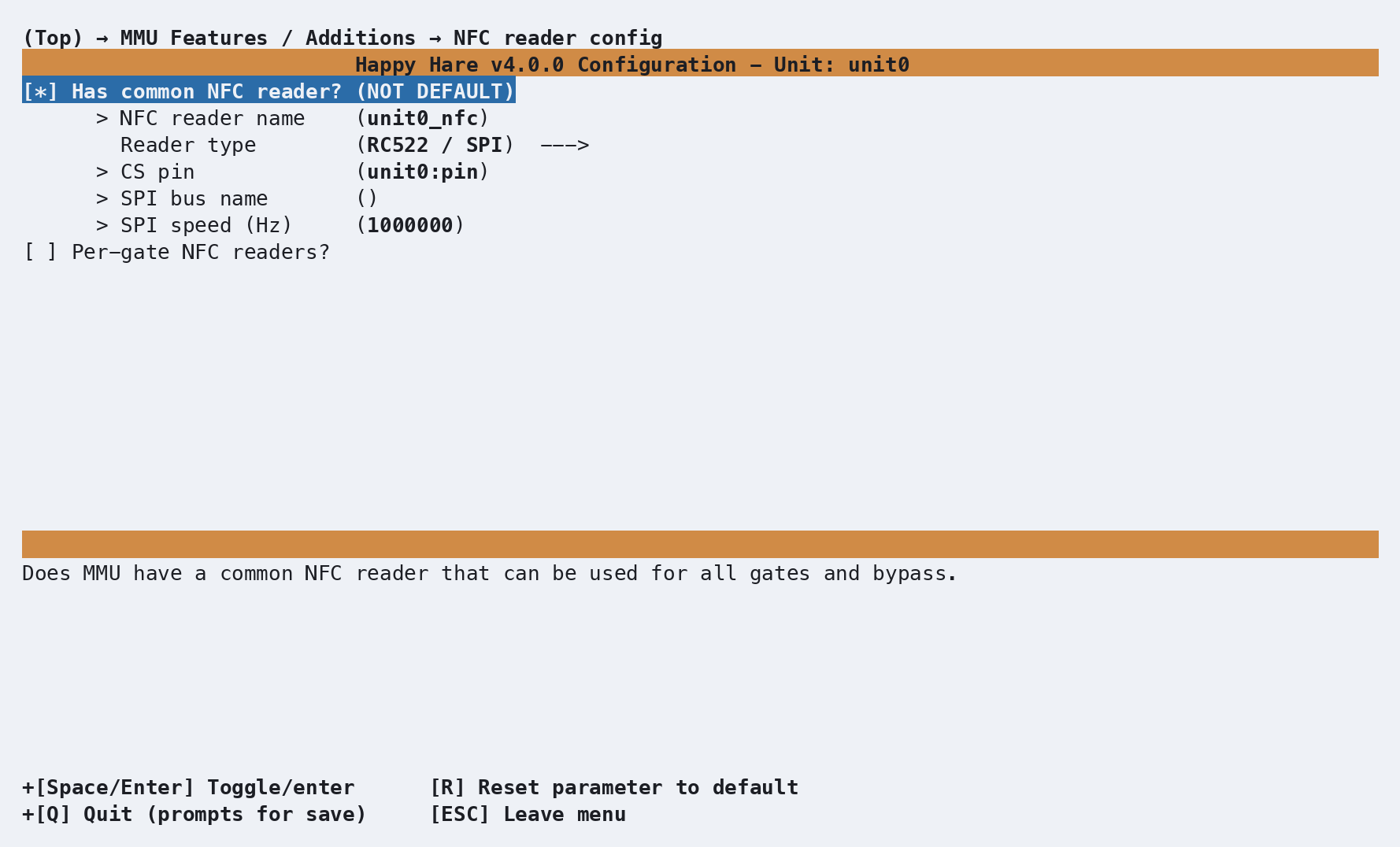
A single shared reader - one physical reader a spool is presented to by hand, not built into any gate - fits a moving-carriage design like ERCF above particularly well, since there's naturally only one place on the machine to put it. Per-gate readers (below) are available on any MMU type regardless of selector design - it's purely a choice of how much reader hardware you want to build, not something ERCF's mechanism precludes.
Per-gate readers (toggle Per-gate NFC readers?): the same setting
group repeats per gate, each independently pointed at its own reader -
useful for the software-I2C case above, where every gate gets its own bus
and the shared 0x24/0x28 address stops being a conflict.
That produces one [mmu_nfc_reader <name>] section per reader in
mmu_hardware.cfg. A shared RC522 over SPI:
[mmu_nfc_reader unit0_nfc]
reader_type : rc522
cs_pin      : unit0:PA4
spi_speed   : 1000000
debug       : 0
A per-gate PN532, wired for software I2C so each gate gets an independent
bus at the shared 0x24 address:
[mmu_nfc_reader unit0_nfc0]
reader_type          : pn532
i2c_mcu              : unit0
i2c_address          : 36
i2c_software_scl_pin : unit0:PB8
i2c_software_sda_pin : unit0:PB9
i2c_speed            : 100000
debug                : 0
A per-gate PN532 wired for UART (HSU) instead - the only reader type that doesn't connect to an MCU at all:
[mmu_nfc_reader unit0_nfc0]
reader_type : pn532
interface   : uart
serial      : /dev/serial/by-id/usb-1a86_USB_Serial-if00-port0
baud        : 115200
debug       : 0
PN532 over UART (HSU)
This reader plugs into a USB-serial adapter on the host, not into any
MCU - Klipper opens the serial port itself, so there are no pins to set
beyond the reader's own serial lines (serial, and optionally baud,
which defaults to 115200). Set the breakout board's mode pads to
SEL0=0, SEL1=1 (SPI mode uses SEL0=0, SEL1=0 instead - easy to
mix up), then wire adapter TX→PN532 RX, RX→TX, plus GND and power. Use
the /dev/serial/by-id/ path (list them with ls /dev/serial/by-id/)
rather than /dev/ttyUSB0 - the latter isn't stable across reboots or
replugs and can silently point at a different device afterwards. One
reader per adapter, exclusively - for more than one reader, use software
I2C instead (above).
An unplugged or disconnected adapter doesn't stop Klipper from starting -
the reader just comes up reporting alive=0. Reconnect it and run
MMU_RFID_INIT (or MMU_NFC ... INIT=1) to bring it back without a
restart.
The owning [mmu_unit] in the same file then names the reader(s) it uses -
nfc_reader for a shared reader, or nfc_readers (one name per gate, blank
for a gate with none) for per-gate:
nfc_reader  : unit0_nfc               # Shared reader
nfc_readers : unit0_nfc0, unit0_nfc1  # Per-gate, one per gate slot
Tip
A single unit can mix both: a shared reader for spools you present by hand, plus per-gate readers on the gates that have room for one.
Parameter Setup
In mmu_parameters.cfg (per unit):
nfc_deep_read               : 1        # Parse full tag contents, not just the UID
nfc_gate_jog_scan_window    : -50, 50  # Max retract/extrude (mm) when jogging to find a tag during MMU_NFC_SCAN. "0, 0" disables jogging
nfc_preload_jog_scan_window : -50, 50  # Same, but for the compound NFC/gate home MMU_PRELOAD runs (see Tuning). Defaults to nfc_gate_jog_scan_window's value
nfc_neighbor_check          : 0        # Refuse a tag identified as a neighboring gate's own, instead of misattributing it (see Tuning). 0 = off (default)
nfc_field_probe_reads       : 3        # How many times to probe a gate's reader for "anything in this field?" - only used with nfc_neighbor_check/_evict_distance
nfc_neighbor_evict_distance : 0        # Also jog a neighbor's filament out of the field before reading (mm, signed - see Tuning). 0 = off (default)
nfc_led_segment             : auto     # auto | status | exit | entry - which LED segment shows read/fail feedback
nfc_deep_read gates everything metadata-related: with it off, readers
still resolve tags to spools by UID, but never parse tag contents, never
populate the gate map from tag data directly, and never feed Spoolman
auto-create. nfc_gate_jog_scan_window and nfc_preload_jog_scan_window
only matter for per-gate readers - each is the range a different operation
will jog the filament while hunting for a tag that isn't already sitting on
the reader: MMU_NFC_SCAN uses the former,
MMU_PRELOAD's automatic reader/endstop race (see Tuning) uses
the latter. They're independently tunable because preload frequently homes
against a different endstop (the gate's own entry sensor) than a normal gate
load does, making the two moves' safe jogging range not always the same -
but nfc_preload_jog_scan_window defaults to whatever
nfc_gate_jog_scan_window is set to, so most setups never need to touch it
separately. Keep both inside your gate's safe travel, and size them
generously (480mm+) if you want a full spool rotation's worth of reach.
nfc_led_segment: auto follows the reader type - status for a
shared/bypass reader, exit for a per-gate one. nfc_neighbor_check and
nfc_neighbor_evict_distance only matter with per-gate readers spaced close
enough that one gate's field can reach a spool parked at the gate next door
- see Noisy neighbors below for when to turn them on.
nfc_field_probe_reads only affects those two: a tag right at the edge of a
field reads intermittently, so it controls how many probes it takes before
deciding "nothing there" is really nothing there.
Spoolman's side of this - spoolman_nfc_auto_create (create an unknown tag
as a new spool) and spoolman_pending_id_timeout (how long a shared read
stays pending) - live in mmu.cfg and are documented on
Feature: Spoolman / Filament Hub.
Commands
Full parameter reference: MMU_NFC,
MMU_NFC_SCAN,
MMU_GATE_MAP, and
MMU_SPOOLMAN_TAG.
MMU_NFC is the day-to-day status/control command, addressing either the
shared reader, one gate, or several:
MMU_NFC                        # Status of every configured reader
MMU_NFC DETAILS=1              # As above, but show the actual cached UIDs
MMU_NFC GATE=3 READ=1          # Read the reader on gate 3 once, report the result
MMU_NFC SHARED=1 READ=1 DEEP=1 # Read the shared reader and report parsed tag metadata
MMU_NFC SHARED=1 REGISTER=1    # Read + resolve/auto-create in Spoolman, report only (no gate map change)
MMU_NFC GATE=2 REGISTER=1      # Read on gate 2 and apply to the gate map, as if auto-scanned
MMU_NFC GATE=2 REGISTER=1 APPEND=1  # Read a 2nd tag on gate 2 and bind it onto the spool already assigned there
MMU_NFC GATE=2 ENABLE=0        # Hard-disable the reader on gate 2 (a disabled reader is never read)
MMU_NFC GATE=2 INIT=1          # (Re)initialize a reader that isn't responding
MMU_NFC INIT_ALL=1             # (Re)initialize every reader on every unit
MMU_NFC CLEAR_PENDING=1        # Discard a staged tag and its resolved spool ID
CLEAR_PENDING=1 cancels the shared reader's staged tag and the spool ID
resolved from it, preserving any TD-1 measurement or
hand-set spool ID staged without a tag. It does not renew the pending
window; the countdown ends only when nothing remains to apply. A tag left
on the reader does not immediately re-stage after this explicit clear.
The option is CLEAR_PENDING=1, not CANCEL_PENDING=1.
Use MMU_TD1 CLEAR_PENDING=1 to discard only a pending TD-1 measurement,
or MMU_GATE_MAP NEXT_SPOOLID=0 to cancel all pending data. Tags, spool IDs
and TD-1 measurements share the same timeout, renewed by a new staging from
any of them. Even an unresolved UID with no metadata expires; it simply
does not activate the pending LED countdown on its own.
MMU_NFC DETAILS=1
MMU NFC readers:
shared:  enabled=1 active=1 alive=1 tag=none
gate 0:  enabled=1 active=1 alive=1 tag=E2003412
gate 1:  enabled=1 active=0 alive=1 tag=none
MMU_NFC_SCAN re-reads the tag on a gate that's already parked - useful if
you swapped the spool without unloading/reloading, or a reader missed the
tag the first time. It jogs the filament within
nfc_gate_jog_scan_window until the tag reaches the reader, reads it, then
re-parks:
MMU_NFC_SCAN        # Scan the current gate
MMU_NFC_SCAN GATE=2 # Scan a specific gate
Managing stored RFID UIDs
Happy Hare keeps two related values: the gate RFID, which is the single UID physically observed at a gate, and the Spoolman RFIDs, which are all UIDs registered to a spool.
Successful NFC reads update the gate RFID automatically. A shared-reader UID is applied when its gate is loaded or preloaded. You can also set or clear the value manually:
MMU_GATE_MAP GATE=2 RFID=AABBCCDD # Set the UID observed at gate 2
MMU_GATE_MAP GATE=2 RFID=''       # Clear it
The value must be one even-length hexadecimal UID. It is normalized to uppercase; comma-separated or otherwise invalid values are ignored. Resetting a gate or marking it empty also clears its gate RFID. Spoolman synchronization never replaces this value, so it continues to identify the tag the printer actually observed.
Use MMU_SPOOLMAN_TAG to manage the complete set of UIDs stored against a
Spoolman spool. Identify the spool directly with SPOOLID=, or use GATE=
to target the spool currently assigned to a gate:
MMU_SPOOLMAN_TAG SPOOLID=45 RFID=AABBCCDD          # Replace the spool's UID set
MMU_SPOOLMAN_TAG SPOOLID=45 RFID=AABBCCDD,EEFF0011 # Replace it with multiple UIDs
MMU_SPOOLMAN_TAG GATE=2 RFID=AABBCCDD              # Replace by assigned gate instead
MMU_SPOOLMAN_TAG GATE=2 RFID=EEFF0011 APPEND=1     # Add a UID without removing the others
MMU_SPOOLMAN_TAG GATE=2 RFID=''                    # Clear every UID from the spool
UIDs are normalized and duplicates removed. To register a gate's already
observed UID against an existing spool, use REGISTER=1; add APPEND=1 to
preserve that spool's other UIDs:
MMU_SPOOLMAN_TAG GATE=2 SPOOLID=45 REGISTER=1
MMU_SPOOLMAN_TAG GATE=2 SPOOLID=45 REGISTER=1 APPEND=1
Alternatively, read and resolve a tag directly through the gate's NFC reader:
MMU_NFC GATE=2 REGISTER=1          # Resolve the UID, or auto-create a spool from its metadata
MMU_NFC GATE=2 REGISTER=1 APPEND=1 # Attach a second tag to the gate's assigned spool
APPEND=1 on an NFC read only makes sense when the addressed per-gate reader
already has a spool assigned (from an earlier scan, or set manually with
MMU_GATE_MAP/MMU_SPOOLMAN).
The newly read tag is bound directly onto that spool instead of being
resolved or auto-created as an unknown tag. Two cases fall back instead of
binding:
SHARED=1 REGISTER=1 APPEND=1- the shared reader has no gate assignment to bind onto, so this is rejected; useMMU_SPOOLMAN_TAG SPOOLID=<id> RFID=<uid> APPEND=1directly instead, naming the spool explicitly.- The addressed gate has no spool assigned yet -
APPEND=1is ignored (logged, not an error) and the read falls back to normal resolve/ auto-create, the same as withoutAPPEND=1.
See Registering an unresolved tag for a complete after-the-fact workflow, and Feature: Spoolman / Filament Hub for Spoolman support-mode restrictions and assignment details.
Advanced: raw per-reader commands
Each [mmu_nfc_reader <name>] also answers three low-level commands that
talk to that one reader chip directly, bypassing Happy Hare's gate map,
Spoolman lookup, and enabled/active guards entirely - useful for bench-
testing a reader in isolation, less useful for normal operation (prefer
MMU_NFC for that): MMU_RFID_INIT, MMU_RFID_READ [TIMEOUT=0.5],
MMU_RFID_RELEASE. All three take NAME=<reader>, only required if more
than one reader is configured.
Printer variables exposed
printer.mmu.nfc is a list of per-unit dicts, present only when at least
one unit has a reader configured:
{'unit': 'unit0', 'polling': True,
 'shared': {'enabled': True, 'active': True, 'alive': True, 'present': False, 'uid': None},
 'gates': {0: {'enabled': True, 'active': True, 'alive': True, 'present': True, 'uid': 'E2003412'}}}
gate_spool_rfid (per-gate list, on printer.mmu) holds the same cached
UID, indexed by global gate number instead of nested by unit - the more
convenient form for a macro that only cares about one gate. Full reference:
Printer Variables: NFC.
If LEDs are configured, reads and failures get a brief flash on the segment
nfc_led_segment selects - there's no separate persistent NFC indicator
beyond that transient effect.
Tuning
Shared reader workflow
- Present the spool's tag to the reader.
- Happy Hare resolves it via Spoolman in the background - nothing to run
manually. If it resolves to a known spool, configured LEDs (see
Feature: LEDs) pulse a slow purple
breathing effect (
effect_pending_spoolid) to show a spool ID is waiting to be claimed - the same overlayMMU_GATE_MAP NEXT_SPOOLID=uses, since it's the same underlying pending mechanism either way. - The pulse speeds up (
effect_pending_spoolid_expiring) a few seconds beforespoolman_pending_id_timeoutruns out, as a last warning before the assignment is voided and the tag would need to be re-presented. - Load or preload filament as normal (
MMU_PRELOAD, or just load into the gate if you have entry sensors) before the timeout expires. The resolved spool ID is applied to whichever gate that operation targets, and the pulsing overlay stops.
This is the same underlying mechanism as Spoolman's generic external-reader workflow - a shared NFC reader is simply one source that can produce a pending spool ID; a QR code scanned by hand is another.
Per-gate readers: automatic reads during preload
A gate with its own reader doesn't need a separate scan step in the normal
case: running MMU_PRELOAD on that gate automatically homes against
whichever comes first of the gate's physical endstop and its reader. The
console banner changes to confirm it - "Preloading gate N with NFC
scan...". Two outcomes:
- The reader triggers first (tag was between the park position and the endstop): the tag is read immediately, then homing continues on to the physical endstop as normal.
- The endstop triggers first (tag is further in): Happy Hare sweeps
forward through
nfc_preload_jog_scan_windowlooking for the tag, then re-homes back to the endstop before parking.
Use MMU_NFC_SCAN instead when the gate is already parked and
you want to (re-)read its tag without a full unload/preload cycle - e.g.
you physically swapped spools without telling Happy Hare.
Auto-creating spools from unknown tags
To have an unregistered tag mint a new Spoolman spool automatically instead of just failing to resolve:
nfc_deep_read: 1on the unit (default) - auto-create needs the parsed tag data, not just a UID.spoolman_nfc_auto_create: 1inmmu.cfg.spoolman_support: pushorpullinmmu.cfg-off/readonlynever write to Spoolman, so auto-create is suppressed regardless of this setting in those modes.
With all three set, scanning a brand-new tag that carries recognizable filament data (see Concept) creates the spool in Spoolman and registers the tag against it in the same step - the next scan of that same tag resolves normally.
Registering an unresolved tag after the fact
Auto-create needs a tag that actually carries usable filament data - a blank tag, or one in a format Happy Hare can't parse, has nothing for auto-create to work from and just won't resolve, even with everything above enabled. That's fine - the UID is still recorded on the gate regardless of whether it resolved (see Concept), so nothing about the scan needs to be redone once a matching spool exists. A typical sequence for a per-gate reader:
- Remove the old spool, unbox the new filament, and stick a blank (or otherwise unregistered) tag on it.
MMU_PRELOADit into the gate as normal. The console confirms the scan happened ("Preloading gate N with NFC scan...", or "tag ... recorded for gate N (no usable filament data)" for a blank tag) - but with no match in Spoolman and no metadata to auto-create from, nothing resolves.- Create the spool in Spoolman by hand, away from the printer - often easiest with the new filament's box in front of you to copy its parameters across.
- Back at the printer:
MMU_SPOOLMAN_TAG GATE=LAST SPOOLID=456 REGISTER=1-GATE=LASTpicks up whichever gate was just preloaded, so there's nothing to look up. Happy Hare binds the gate's already-cached UID onto spool 456, and the gate map updates as a result, no re-scan needed.
See Feature: Spoolman / Filament Hub: MMU_SPOOLMAN_TAG
for the command in full, including why REGISTER=1 needs
spoolman_support: readonly or push specifically.
Registering a second tag on the same spool
A spool can carry more than one physical tag - e.g. one stuck on each side, so it resolves correctly no matter which way round it gets loaded. Reading a second, previously-unseen UID normally treats it as an entirely different, unregistered tag; it has to be bound onto the existing spool explicitly instead. Two equivalent ways to do that:
- Scan it in - load (or preload) the gate that already has the first
tag's spool assigned, present the second tag to that gate's reader, then
MMU_NFC GATE=<n> REGISTER=1 APPEND=1binds whatever it reads onto that gate's already-assigned spool. - Type it in - if both UIDs are already known, skip the reader
entirely:
MMU_SPOOLMAN_TAG SPOOLID=<id> RFID=<new-uid> APPEND=1.
Either path ends up calling the same underlying Spoolman write, so the result is identical - pick whichever is more convenient at the time. A UID that turns out to already be registered against a different spool is moved over automatically either way (and the move is logged), rather than silently leaving both spools claiming it - useful if a tag was bound to the wrong spool by mistake earlier.
Multiple same-address readers
PN532 is fixed at I2C address 0x24 and PN7160 at 0x28-0x2B - two
PN532s (e.g. one per gate) can't share a hardware I2C bus. Give each its
own software I2C pin pair instead (see Hardware Setup)
and the fixed address stops mattering, since each is now its own private
bus. Each software bus needs its own pull-up resistors on both lines -
unlike a hardware I2C bus, which gets pull-ups built into the MCU/board, a
bit-banged pin pair has none, and without them reads fail or come back
garbled intermittently rather than with a clean error.
Noisy neighbors
With per-gate readers spaced closely, a spool parked at a neighboring gate
can sit inside this gate's own RF field. Since most spools carry a tag on
both faces, that neighbor's tag can trigger this gate's preload NFC endstop
or an MMU_NFC_SCAN before the filament has moved at all, misattributing
the neighbor's spool to this gate. Two independent settings address it,
both off by default so a stock setup pays no extra reader I/O:
nfc_neighbor_check: 1- before trusting a read, check the tag's UID against the gate map first. A tag that's unregistered, or already registered to this gate, is read normally; a tag registered to a different gate is refused rather than attributed - the read fails cleanly instead of silently assigning the wrong spool.nfc_field_probe_reads(default 3) controls how many times the reader is probed when asking "is anything in this field at all?" before deciding - a tag right at the edge of the field reads intermittently, so a single probe can miss it.nfc_neighbor_evict_distance- adds motion on top of the check above: instead of just refusing a neighbor's tag, temporarily load that neighbor gate and jog its filament this far (mm) off its park position until the field clears, then re-park it - even if the eviction attempt fails. Signed: positive jogs the neighbor forward of its own gate, negative behind it. Must fit inside the matching half of that gate'snfc_gate_jog_scan_window. A forward jog is only safe whengate_homing_endstopis the per-gatemmu_exitsensor - on a shared exit path, jogging a neighbor forward would push its filament into the very gate you're trying to read rather than clearing it, so use a negative (backward) distance there instead. 0 disables eviction (the default) - reducing reader gain is not an equivalent fix, since a neighbor's tag can simply be physically closer than your own gate's tag ever gets.
Tip
Both settings only ever engage on a per-gate reader whose gate is about
to preload or MMU_NFC_SCAN - the shared-reader workflow has no
"neighbor" concept, since nothing else is ever near a spool presented by
hand.
Troubleshooting
- Reader reports
alive=0- check wiring and the pin/address settings match the physical board; tryMMU_NFC ... INIT=1(orINIT_ALL=1) after fixing anything, since a reader that came up dead at boot isn't retried automatically. On a PN532/UART reader this is also the normal symptom of an unplugged or not-yet-connected USB-serial adapter - Klipper still starts fine either way; just reconnect and re-runINIT=1. - Reads report
enabled=0- the reader was explicitly disabled (MMU_NFC ... ENABLE=0, or it starts that way); re-enable withENABLE=1, which also re-initializes it. - A deep read returns the UID but no metadata - the tag isn't in one of the recognized formats (see Concept), or it's genuinely blank. UID-only resolution still works if the tag is already registered in Spoolman.
MMU_NFC_SCANerrors "gate is empty" - it homes filament to find the tag, so there has to be filament in the gate first; preload it (MMU_PRELOAD) or, if that's wrong, mark the gate available withMMU_GATE_MAP GATE=<n> AVAILABLE=1.- A shared-reader tag never resolves - confirm Spoolman is reachable and at a compatible version (see Feature: Spoolman / Filament Hub troubleshooting); an unresolved tag also won't retry on its own until it's removed and re-presented.
- A scan logs "tag ... was registered to spool X - moving it to spool Y" - informational, not an error: the tag was already bound to a different spool and Happy Hare re-pointed it to the one just scanned (see Registering a second tag on the same spool). Expected after re-tagging a spool or fixing a mistyped UID; worth double-checking the spool IDs named in the message if it appears unexpectedly.
- A per-gate reader occasionally picks up a neighboring gate's spool -
see Noisy neighbors under Tuning; turn on
nfc_neighbor_check(and, if that alone isn't enough,nfc_neighbor_evict_distance) rather than trying to fix it by lowering reader gain.
See also
- Feature: TD-1 Filament Measurement - stage a bench measurement alongside a tag
- Feature: Spoolman / Filament Hub - what a resolved tag actually does: activation, attributes, auto-create
- Command Reference:
MMU_NFC - Command Reference:
MMU_NFC_SCAN - Command Reference:
MMU_SPOOLMAN - Command Reference:
MMU_SPOOLMAN_TAG - Command Reference:
MMU_GATE_MAP - Printer Variables: NFC