Feature: EndlessSpool & Runout Detection
Concept
A "runout" is Happy Hare noticing that filament has stopped where it's expected to be present - detected by whichever switch sensors sit along the filament path (a gate or entry sensor going from triggered to open), and/or an encoder if one is fitted. Before doing anything about it, Happy Hare settles a genuinely important question: is the filament actually gone (a runout), or still physically present but stuck (a clog or tangle)? If the switch sensors alone can't answer that - no entry sensor fitted, for example - and an encoder is available, Happy Hare gives the gear motor a brief, gentle nudge and watches whether the encoder sees any movement before concluding either way.
That distinction decides what happens next:
- Clog or tangle - always pauses the print for manual intervention. EndlessSpool has nothing to do with this case; a stuck filament isn't something swapping to a different gate can fix.
- Genuine runout, EndlessSpool off (the default) - also pauses, exactly like a clog. You replace or splice the filament and resume by hand.
- Genuine runout, EndlessSpool on - Happy Hare marks the empty gate as such, finds another gate in the same group that isn't already known to be empty, remaps the current tool to it, and continues printing automatically. No pause at all.
A "group" is just every gate loaded with the same filament (typically the same color and material, on separate spools) - EndlessSpool cycles through a group's gates in order, skipping any it already knows are empty, and gives up (falling back to a pause) only once every gate in the group has been tried. The same mechanism can also apply at the start of a load rather than mid-print: with apply automatically when loading an empty gate enabled, asking for a tool on a gate Happy Hare already knows is empty triggers the same group lookup immediately, instead of erroring.
Hardware Setup
Nothing to wire specifically for this feature - it's built entirely on
sensors your MMU design already provides (gate or entry sensors) and/or an
encoder, both covered on their own pages. Use
MMU_SENSORS to check what's currently
fitted and active.
Parameter Setup
Two checkboxes live under Software Options in menuconfig:
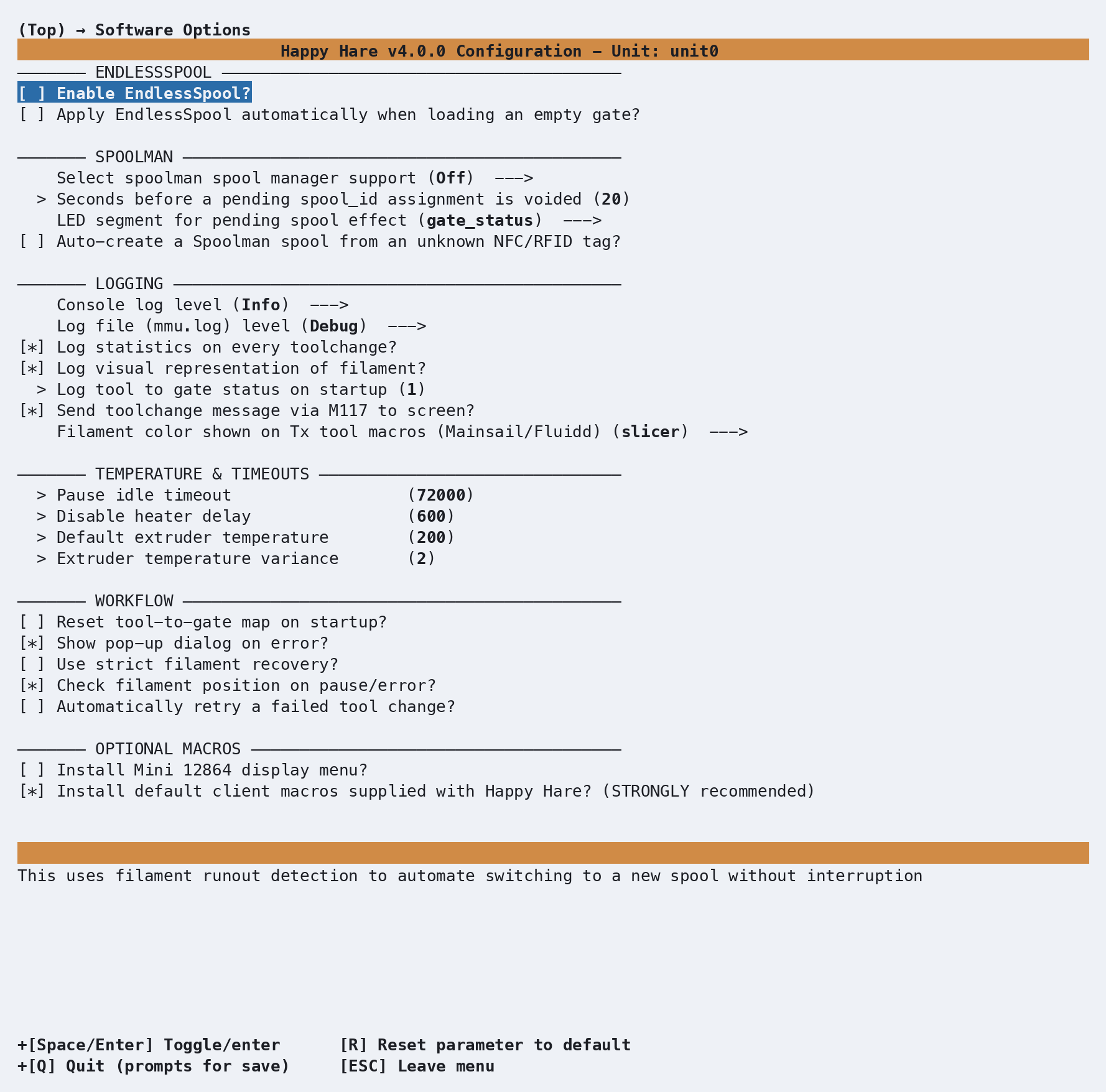
Both default off. They set two plain settings in mmu.cfg, alongside two
more that only a hand-edit reaches:
endless_spool_enabled    : 0    # 0 = disable, 1 = enable EndlessSpool
endless_spool_on_load    : 0    # 0 = don't apply on load, 1 = run EndlessSpool if the gate is empty
endless_spool_eject_gate : -1   # Which gate to eject filament remains to. -1 = current gate
endless_spool_groups     :      # Group membership per gate, comma-separated (blank = no groups defined)
endless_spool_groups is easier to manage from the console than by hand -
see Commands below. endless_spool_eject_gate lets a design
with a moving selector send the leftover filament fragment somewhere other
than back through the gate it just came from - useful if your buffer design
tends to let that fragment drift into a neighboring gate's buffer and
tangle it. Set it to the gate number you want to use (it must be 1 or
higher - 0 isn't accepted here, so gate 0 can't be the designated waste
gate). Two things worth knowing before turning it on:
Important
Selecting a waste gate this way disables entry-sensor runout detection for that specific gate, because the filament fragment now needs to pass completely through the gate before the selector is free to move away from it - an entry sensor watching that gate would otherwise never see it clear. This trade-off is scoped to the waste gate itself, not every gate.
It also assumes a selector that can be commanded to visit an arbitrary gate on demand - a design with no moving selector, or one where reaching a specific gate independent of the print isn't practical, generally won't benefit from this option.
Commands
Full parameter reference: MMU_ENDLESS_SPOOL.
MMU_ENDLESS_SPOOL                     # Report current status and groups
MMU_ENDLESS_SPOOL GROUPS=1,1,2,2      # Gates 0+1 share a group, gates 2+3 share another
MMU_ENDLESS_SPOOL RESET=1             # Back to the default grouping (normally one gate per group)
MMU_ENDLESS_SPOOL ENABLE=0 QUIET=1    # Turn EndlessSpool off without any console/log output
MMU_ENDLESS_SPOOL
EndlessSpool is enabled
EndlessSpool Groups:
Group A: Gates: 0, 3, 6
Group B: Gates: 1, 4, 7
Group C: Gates: 2, 5, 8
Groups are numbered when you set them (GROUPS=0,1,2,1,...) but reported
back lettered (Group A, Group B, ...) - group 0 is A, group 1 is
B, and so on. GROUPS= must list exactly one entry per gate; anything
else is rejected with an error rather than partially applied.
A worked cycle: with the Group A: Gates: 0, 3, 6 grouping above, T0
mapped to gate 0, and gate 3 already known empty from an earlier runout,
gate 0 running dry mid-print produces:
Gate 0 is empty! Checking for alternative gates for T0 in EndlessSpool Group A (checked gates: 3,6)
Remapping T0 to gate 6
The search always starts from the gate that just ran out and walks forward through the rest of the group, wrapping around - gate 3 is skipped because it's already marked empty, and gate 6 is the first one found that isn't. If every other gate in the group is also empty, the print pauses instead (same as EndlessSpool being off):
Gate 0 is empty!
No alternatives gates available after checking for T0 in EndlessSpool Group A (checked gates: 3,6)
To rehearse the whole thing without an actual runout, use
MMU_TEST_RUNOUT:
MMU_TEST_RUNOUT            # Simulate a runout - triggers EndlessSpool if enabled
MMU_TEST_RUNOUT TYPE=clog  # Simulate a clog/tangle instead - always pauses
Printer variables exposed
| Variable | Meaning |
|---|---|
endless_spool_enabled |
0 off, 1 on |
endless_spool_groups |
Group membership per gate |
gate_status |
Per-gate empty/available state - what a runout actually updates |
The deprecated endless_spool variable (under the gate-map group) still
works for now since KlipperScreen and the Mainsail/Fluidd interfaces still
read it, but new macros should use endless_spool_enabled instead.
Tuning
- Set up groups before you need them, not during a print. Work out which
gates share the same filament (color and material) and assign them the
same group number with
MMU_ENDLESS_SPOOL GROUPS=...- a gate with no match of its own should get a group number no other gate shares. - Rehearse with
MMU_TEST_RUNOUTfirst. It exercises the exact same group lookup and gate remap a real runout would, without needing to actually run a spool dry - a good way to confirm your groups are set up the way you think they are. - Consider
endless_spool_on_loadalongside the mid-print behavior. It's the same mechanism applied to a manual or macro-driven tool change onto a gate you already know is empty, so the two settings are usually worth enabling together. - Only reach for a designated waste gate if you have a real tangling problem. It's a fix for a specific buffer-crowding symptom, not a default-on best practice - the trade-off in the warning above applies permanently to whichever gate you pick.
Troubleshooting
- A runout pauses instead of continuing, even with EndlessSpool on - most
likely every other gate in that group is already marked empty (check
gate_statusorMMU_GATE_MAP), or the gate that ran out isn't actually assigned to a group with any other member. A group of one gate can never have an alternative to fall back to. - A stuck-filament situation isn't being handled by EndlessSpool - this is expected. Clogs and tangles always pause for manual intervention; EndlessSpool only ever acts on a confirmed runout.
- Runout isn't detected at all - check
MMU_SENSORSto confirm the relevant sensor is actually active, not disabled. Conversely, a sensor that's become flaky and is firing false runouts can be disabled on its own without losing runout detection everywhere else - see Feature: Sensors. GROUPS=was rejected - it needs exactly one comma-separated, non-negative integer per gate; a mismatched count or a stray character fails the whole command rather than applying part of it.
See also
- Command Reference:
MMU_ENDLESS_SPOOL - Command Reference:
MMU_TEST_RUNOUT - Command Reference:
MMU_SENSORS - Printer Variables: gate and tool maps
- Feature: Sensors - naming/addressing, querying, and enabling/disabling any sensor at runtime