Feature: Sensors
Concept
Happy Hare builds up a picture of where filament actually is from whichever sensors your MMU design has fitted, rather than just trusting whatever gcode it last sent. Depending on your hardware and menuconfig choices, that can include per-gate entry/exit switches, a shared gate endstop, an extruder-entry or toolhead sensor, a sync-feedback buffer's compression/ tension switches (or its analog proportional sensor), and an encoder. Each of those has its own Feature page for wiring, parameters and tuning - this page covers the layer common to all of them: how sensors are named and addressed, how to query their state, and how to enable or disable one at runtime without touching a wire.
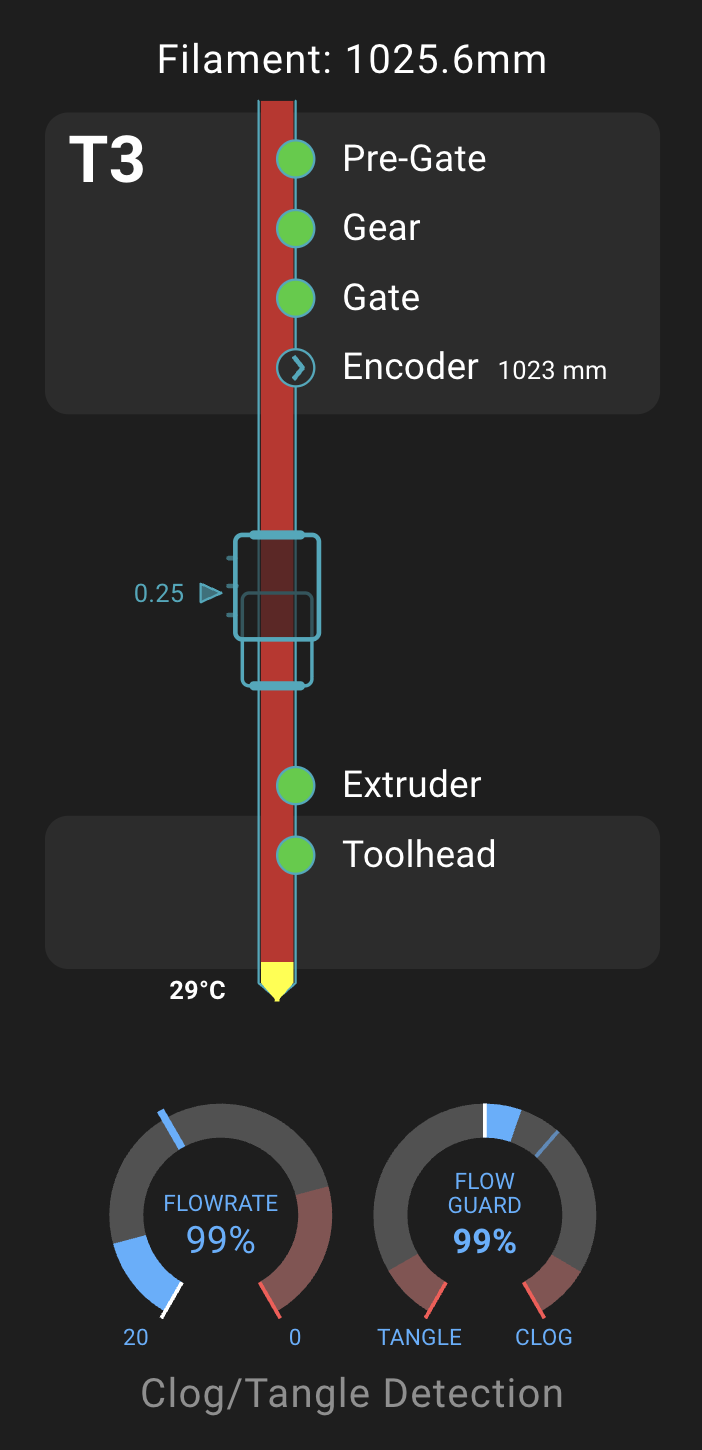
The labels above (Pre-Gate, Gear, Gate, Encoder, Extruder,
Toolhead) are generic positions along the filament path the UI groups
sensors into for display, not the names you'll actually type - those follow
the rules below.
Naming and addressing
A per-gate sensor's name carries its gate number as a suffix -
mmu_entry_0, mmu_exit_3. A sensor that belongs to a unit, a buffer, an
encoder or a toolhead rather than to one specific gate (mmu_shared_exit,
filament_compression, filament_tension, filament_proportional,
encoder, extruder, toolhead) is qualified with that component's name
when there's more than one of it on the machine, joined with a colon -
unit0:mmu_shared_exit, unit0:filament_tension. On a single-unit machine
the bare, unqualified name always works. On a multi-unit machine, a bare
name that matches more than one unit's sensor is rejected as ambiguous
rather than silently resolved against whichever gate happens to be selected
right now - name it with UNIT=, or use the fully-qualified form
MMU_SENSORS itself prints.
The unit0 prefix in these examples is the default
Klipper object name. Use the actual
component name shown by MMU_SENSORS for your configuration.
Hardware Setup
Nothing new to wire for this page specifically - it's the query/enable layer sitting on top of sensors your MMU design already provides. See Getting Started and Parameters Reference for gate entry/exit and extruder/toolhead sensor pins, and Feature: Sync-Feedback Buffer / Feature: Encoder for those sensor types.
Parameter Setup
Nothing here either - which sensors exist follows your hardware and
menuconfig choices, documented on each sensor type's own page. The
enabled/disabled state this page covers is runtime state, not shipped
config: it's persisted automatically the same way everything else on
Feature: State Persistence is, not something
you hand-edit into a .cfg file.
Commands
Full parameter reference: MMU_SENSORS.
MMU_SENSORS                                          # Report every sensor on every unit, disabled ones included
MMU_SENSORS UNIT=1                                   # Same, but only unit 1's own sensors
MMU_SENSORS SENSOR=mmu_exit_0                        # Report just that one sensor, even if disabled
MMU_SENSORS SENSOR=unit0:mmu_shared_exit ENABLE=0    # Persistently disable it (sticky across restarts)
MMU_SENSORS SENSOR=mmu_exit_0 ENABLE=1               # Persistently re-enable it
MMU_SENSORS
filament_compression  --> Open
filament_tension      --> TRIGGERED
mmu_entry_0           --> Open
mmu_entry_1           --> Open
mmu_entry_2           --> Open
mmu_entry_3           --> Open
mmu_exit_0            --> Open
mmu_exit_1            --> Open
mmu_exit_2            --> Open
mmu_exit_3            --> Open
mmu_shared_exit       --> Open
From here on, that one sensor carries a (DISABLE) tag in every report that
covers it, whether or not SENSOR= is used to ask about it specifically -
a report never hides a disabled sensor that's in scope for it, only tags
it. (A UNIT=-scoped report simply won't mention a sensor that belongs to
a different unit at all, disabled or not - that's normal scoping, not the
tag.)
MMU_SENSORS SENSOR=mmu_exit_0 ENABLE=0
Sensor 'mmu_exit_0' disabled
mmu_exit_0            --> Open (DISABLE)
ENABLE= always requires SENSOR= naming the sensor to change - MMU_SENSORS
ENABLE=0 on its own is rejected rather than guessing which sensor you meant.
Klipper's own SET_FILAMENT_SENSOR command, and the plain on/off toggle
Mainsail and Fluidd already show for every sensor they can see, drive the
exact same enabled/disabled state as MMU_SENSORS ... ENABLE= - disable via
one, re-enable via either of the others, restart, and it comes back exactly
how you left it:
SET_FILAMENT_SENSOR SENSOR=mmu_exit_0 ENABLE=0
The one thing MMU_SENSORS can reach that the other two can't: a sensor
that's never registered as a plain Klipper filament sensor in the first
place - a virtual endstop built out of another sensor, or the analog
proportional buffer sensor - has no Mainsail/Fluidd toggle and no
SET_FILAMENT_SENSOR name to aim at. MMU_SENSORS SENSOR=... ENABLE= is
the only way to disable those.
Shared-gate endstops
mmu_shared_exit, extruder and encoder can each double as the gate
homing endstop shared across every gate on a unit. Disabling one of
these persistently defeats the check that stops one gate's filament
being driven into another gate's at the hub during crossload, preload
or an NFC scan - MMU_SENSORS warns you when you disable one of these
specifically. Re-enable it once the underlying problem is fixed rather
than leaving it off indefinitely.
Printer variables exposed
| Variable | Meaning |
|---|---|
sensors |
Dict keyed by sensor name, scoped to the currently selected gate (generic names, no gate suffix): True/False if enabled (triggered or not), None if disabled |
Tuning
A flaky sensor doesn't have to mean a paused print
A miswired, failing, or simply not-yet-fixed sensor doesn't have to stay
a live problem until you can get to the wiring. Disable it - via
MMU_SENSORS, SET_FILAMENT_SENSOR, or the Mainsail/Fluidd toggle, even
mid-print - and Happy Hare treats it exactly as if it had never been
fitted at all: every place that queries it (status reports, runout/clog
detection, FlowGuard's clog/tangle dispatch) sees "no information" for
that sensor rather than a false trigger, and falls back to whatever
Happy Hare already does when that sensor type is genuinely absent. See
Feature: EndlessSpool & Runout Detection,
Feature: Sync-Feedback Buffer and
Feature: FlowGuard for what that fallback looks
like for each sensor type. Re-enable it once it's fixed - a sensor left
disabled goes on being invisible everywhere, not just to the problem you
disabled it for.
Troubleshooting
- A report doesn't look right for a sensor you disabled - check for the
(DISABLE)tag in theMMU_SENSORSoutput first; a disabled sensor still appears in every report, it just can't confirm anything. SENSOR=nameis rejected as ambiguous - a bare name matched more than one unit's sensor on a multi-unit machine. AddUNIT=, or use the fully-qualified name (unit0:name)MMU_SENSORSitself prints.ENABLE=was ignored/rejected - it requiresSENSOR=naming a sensor; used alone it errors rather than doing anything.SENSOR=namesays "Unknown sensor" - run plainMMU_SENSORSfirst to see the exact names currently valid for your machine.
See also
- Command Reference:
MMU_SENSORS - Feature: EndlessSpool & Runout Detection
- Feature: Sync-Feedback Buffer
- Feature: Encoder
- Feature: FlowGuard
- Feature: State Persistence
- Printer Variables: Sensors