Feature: FlowGuard
Concept
FlowGuard is the layer that turns raw sensor movement (or its absence) into a clog, tangle, or runout decision. It doesn't have hardware of its own - it activates automatically once a unit has a sync-feedback buffer, an encoder, or both, and combines whichever of the two is fitted:
- Sync-feedback buffer. Happy Hare tracks how far the buffer has moved from neutral since the last reset - a relief movement. Drifting too far towards compression signals a clog (something's blocking the filament from advancing); too far towards tension signals a tangle (something's resisting it from behind, at the spool). A proportional sensor also enables tangle prevention - boosting the gear stepper's current automatically while tension is high, to help pull through minor spool resistance before it becomes a genuine tangle.
- Encoder. With no encoder movement seen over some amount of extruder travel, FlowGuard raises a clog/tangle event too - it just can't tell which of the two it is this way, unlike the buffer's directional signal.
Either source feeds the same runout/clog-vs-tangle decision logic already covered on the EndlessSpool & Runout Detection page - FlowGuard is what detects the event; what happens next (a pause, or a genuine runout handled by EndlessSpool) is the same either way, whether the trigger came from a switch sensor, the encoder, or the buffer.
Hardware Setup
No hardware of its own - FlowGuard's own menu only appears once a sync-feedback buffer and/or encoder is configured. See Feature: Sync-Feedback Buffer and Feature: Encoder for wiring either sensor.
Parameter Setup
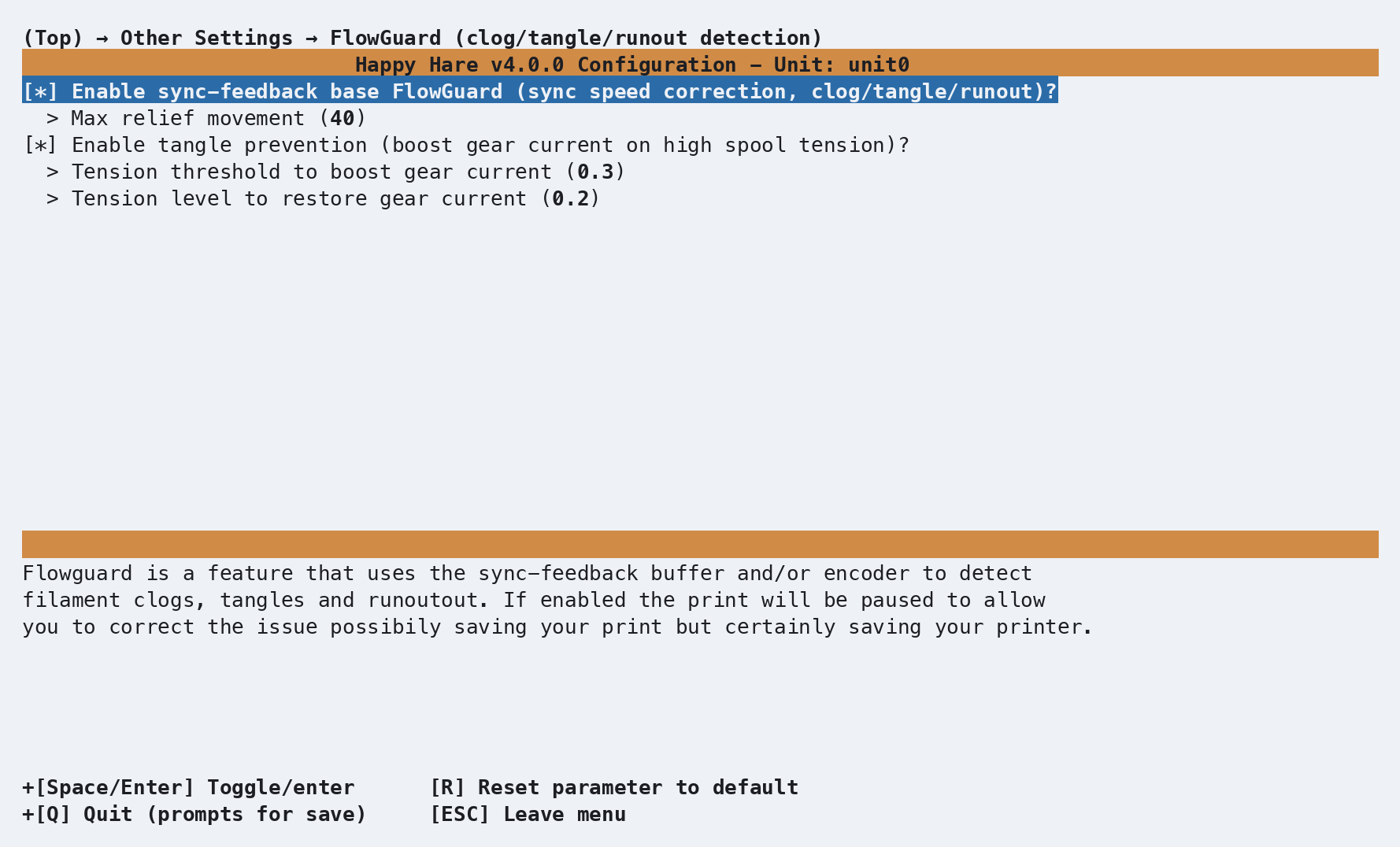
flowguard_enabled            : 1     # 0 = FlowGuard disabled entirely, 1 = enabled

# Sync-feedback buffer detection (only shown with a buffer fitted)
flowguard_max_relief         : 40    # mm of relief movement tolerated before triggering a clog/tangle

# Tangle prevention (only shown with a buffer fitted - needs a proportional sensor to actually do anything)
tangle_prevention_enabled    : 1     # 0 = disabled, 1 = enabled
tangle_prevention_threshold  : 0.3   # Tension level (0.2-0.9) that boosts gear current to 100%
tangle_prevention_release    : 0.2   # Tension level (0.15-0.8) that restores normal current - must be below threshold

# Encoder detection (only shown with an encoder fitted)
flowguard_encoder_mode       : 2     # 0 = off, 1 = static detection length, 2 = autotuned detection length
flowguard_encoder_max_motion : 20.0  # mm - only used in mode 1 (static); mode 2 tunes this itself and persists it in mmu_vars.cfg
A smaller flowguard_max_relief triggers sooner - start high and reduce it
if you want more sensitivity, since how much relief movement is normal
depends heavily on filament "spring" in the bowden tube, friction, and your
buffer's own buffer_range.
Proportional sensors can generally run a lower value than switch sensors.
tangle_prevention_threshold/_release are both shown regardless of
sensor type, but only take effect with a proportional sensor fitted - the
gap between the two thresholds is deliberate hysteresis, so the current
boost doesn't thrash on and off right at the trigger point.
Tip
As with most mmu_parameters, every setting here can be changed live
with MMU_TEST_CONFIG <var>=<value> - no Klipper restart needed.
Commands
MMU_FLOWGUARD                    # Status report
MMU_FLOWGUARD ENABLE=0           # Disable on the active unit
MMU_FLOWGUARD ENABLE=1 UNIT=ALL  # Enable on every unit
Full parameter reference: MMU_FLOWGUARD.
MMU_FLOWGUARD
FlowGuard monitoring feature is enabled and currently active on unit0
or, disabled:
MMU_FLOWGUARD
FlowGuard monitoring feature is disabled on unit0
Trying to enable it on a unit with neither a buffer nor an encoder fitted warns instead: "FlowGuard requires sync feedback enabled on buffer or encoder to function."
Printer variables exposed
See flowguard
and tangle_prevention
in the printer variable reference - both are dicts, present whenever the
active unit has a buffer and/or encoder.
Tuning
- False triggers on a buffer-based setup - raise
flowguard_max_relieffirst; it's the single most direct lever.sync_feedback_debug_log: 1(see Sync-Feedback Buffer tuning) gives you a telemetry log if you need to see exactly how relief movement behaves during a real print before deciding how far to raise it. - False triggers on an encoder-based setup - see Encoder
tuning: try raising
desired_headroombefore switching from automatic (mode: 2) to a fixedflowguard_encoder_max_motion(mode: 1). - Tangle prevention boosting too eagerly, or not enough - lower or
raise
tangle_prevention_thresholdrespectively; widen the gap totangle_prevention_releaseif the current audibly thrashes on and off near the trigger point. - Just want detection off without unwiring anything -
MMU_FLOWGUARD ENABLE=0(orflowguard_enabled: 0) turns off clog/tangle detection while leaving the underlying buffer/encoder readings (AutoTune, flow rate, manual position tracking) working normally.
Tuning with telemetry
Reading the error message from a real trigger (see the Troubleshooting
warning below) is usually enough. For genuinely dialing in early detection,
sync_feedback_debug_log: 1 writes a per-gate telemetry log to
~/printer_data/logs/sync_<gate>.jsonl - deleted and recreated at the start
of every print, so copy one elsewhere first if you want to keep it.
sync_feedback_debug_log: 0 # 0 = normal operation, 1 = write a telemetry log for tuning
From the Happy Hare checkout, use the plotting target. It creates or reuses the repository's virtual environment, installs the plotting dependencies, lists the available telemetry files, and opens the selected log in the interactive viewer:
cd ~/Happy-Hare
make plot_sync
Log discovery defaults to Klipper's logs directory (normally
~/printer_data/logs). Override it when the files are elsewhere:
make plot_sync PLOT_LOG_DIR=/tmp
Available FlowGuard telemetry logs:
  1) Gate 0  /tmp/sync_0.jsonl
  2) Gate 12  /tmp/sync_12.jsonl
Choose a log [1-2]:
The target also saves sync_feedback_plot.png in the Happy Hare checkout.
Use LOG=/path/to/sync_5.jsonl to select a file directly and skip the picker,
or PLOT_OUT=/path/to/graph.png to change the saved image path.
Warning
Don't plot telemetry on the Pi during an active print - it's
CPU-intensive enough to trigger a Timer Too Close (TTC) shutdown. Copy
the .jsonl file to another machine with Happy Hare installed and run
make plot_sync there instead.
Interactive Plot Viewer
Tuning is usually a one-time activity, so it's worth doing on a desktop
or laptop rather than the Pi: install Happy Hare there too and copy the
telemetry file across. Run make plot_sync PLOT_LOG_DIR=<directory>
from a graphical session (not piped through SSH); the target installs
its own plotting dependencies and opens an interactive viewer with zoom
and pan controls for inspecting a specific region closely:
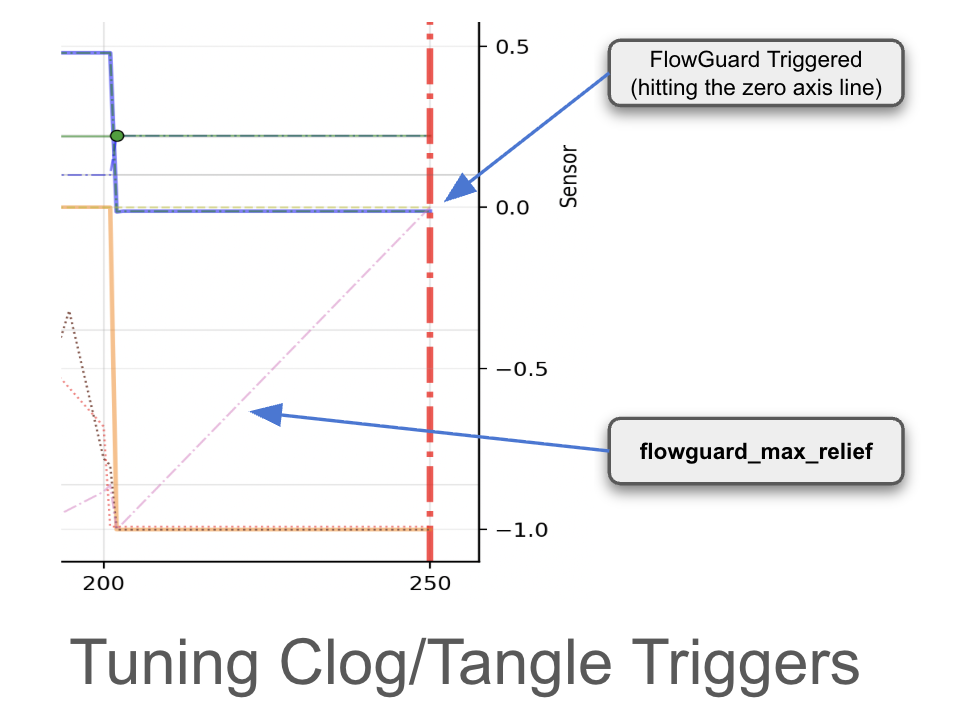
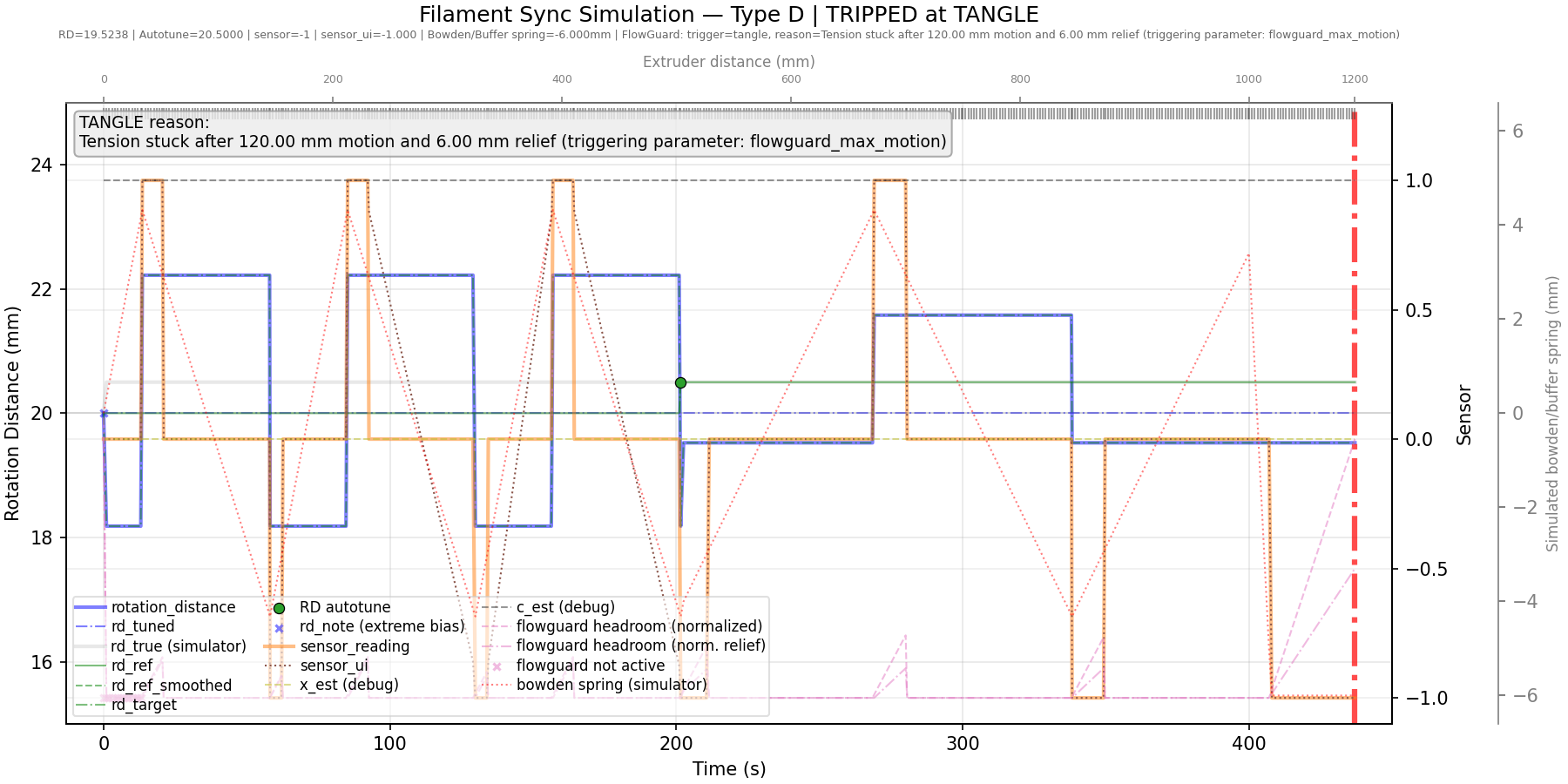
Reading the plot: the fine red "ramp" trace is the key signal - a
dash-dotted line rising toward the flowguard_max_relief threshold, with
the trigger point itself marked by a heavy vertical bar where it crosses
zero. Green dots mark AutoTune correction points; small × marks show where
FlowGuard was inactive (during a load/unload or purge, when readings aren't
meaningful). A false trigger is almost always "play" in the filament path -
a large-ID or long bowden lets filament coil up inside it, which reads as
more relief movement than a "perfect", play-free system would actually see.
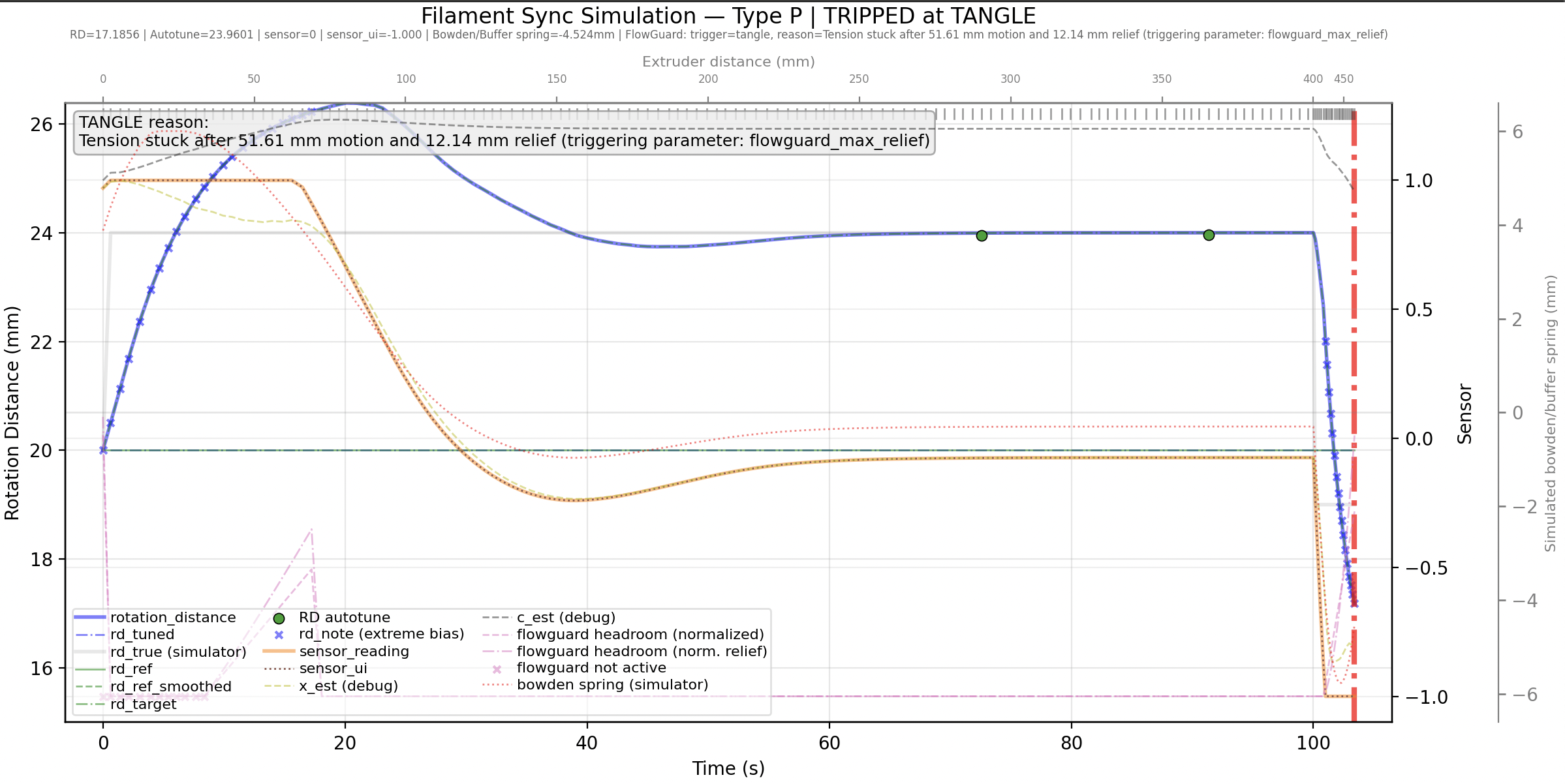
A full simulated example, tripping a tangle on a Type-P (proportional)
sensor - the same shape a real print's telemetry takes when
flowguard_max_relief is set tighter than the filament path's actual play:
Note
The equivalent Type-D simulation
mislabels its own trigger reason as flowguard_max_motion - a labeling
bug in the plot itself, not a real setting; the actual parameter is
flowguard_max_relief, as correctly shown in the Type-P plot above.
Troubleshooting
- A print paused for a "clog" or "tangle" that wasn't real - the error message names exactly which setting tripped it:
FlowGuard detected a tangle.
Reason for trip: Tension stuck after 63mm motion and 8.3mm relief (triggering parameter: flowguard_max_relief)
Raise the named parameter - see Tuning above; this is a threshold that
needs adjusting for your specific mechanism, not a fault. Every setting
here can be changed live with `MMU_TEST_CONFIG <parameter>=<value>`, no
restart needed, so it's cheap to try a higher value immediately.
- Tangle prevention never seems to boost current - confirm you have a proportional (type P) sync-feedback sensor; switch-type sensors (TO/CO/D) can't report the tension level this feature needs.
- FlowGuard won't enable on a unit - it needs a buffer and/or an encoder configured on that specific unit; neither being fitted is why the command refuses.
- A trigger paused the print instead of switching to the next EndlessSpool gate - see EndlessSpool & Runout Detection - EndlessSpool only acts on a confirmed runout, and a clog/tangle always pauses regardless of whether EndlessSpool is configured.
See also
- Command Reference:
MMU_FLOWGUARD - Feature: Sync-Feedback Buffer
- Feature: Encoder
- Feature: EndlessSpool & Runout Detection
- Printer Variables: sync feedback, FlowGuard and tangle prevention
- Feature: Sensors - naming/addressing, querying, and enabling/disabling any sensor at runtime, including the buffer/encoder sensors that feed FlowGuard