Feature: eSpooler
Concept
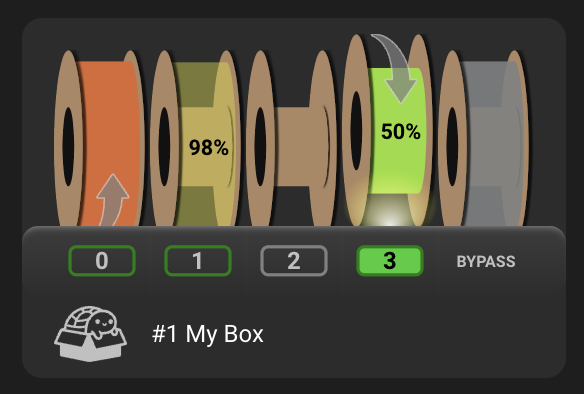
An eSpooler is a small DC motor (typically an N20 gearmotor) mounted so it can drive a filament spool directly, one per gate. Its primary job is respooling filament as it unloads so it doesn't tangle, but it can also assist loading or even relieve spool drag during a print. Happy Hare drives it in one of four modes, tracked independently per gate:
rewind- runs during an unload move (filament traveling back towards the spool) to take up slack as it comes off the buffer/bowden, so it doesn't pile up loosely and tangle.assist- runs during a load move (filament being drawn off the spool towards the extruder) to overcome the spool's own rotational inertia and friction, so the gear stepper isn't fighting the spool's mass every toolchange.print- a sticky per-gate mode, not a continuous drive: Happy Hare arms it automatically once filament is loaded into the extruder, and it stays armed for whichever gate is currently in use, for as long as printing continues. While armed, the motor itself is idle at 0% until something triggers a short burst in the assist direction (see below) - the intent is to periodically relieve spool tension during a print without ever letting the DC motor spin fast enough to overrun and dump loose filament.off- motor stopped. Always reachable regardless of current mode, including interrupting an in-progress burst.
Only one gate at a time can hold "print assist" mode; selecting a different gate cancels it for the previous one. See Printer variables exposed below for how the UI screenshot above is driven.
Continuous operation: gear speed drives PWM
During an ordinary load/unload move, rewind/assist aren't fixed-power -
the motor's power tracks the gear stepper's speed for that move, so the
espooler naturally spins faster for a fast bowden move and throttles down for
a slow calibration move:
power = (gear_speed / espooler_max_stepper_speed) ^ espooler_speed_exponent
capped at 100% once gear_speed reaches espooler_max_stepper_speed, and
skipped entirely (no motor signal at all) if the move is shorter than
espooler_min_distance or slower than espooler_min_stepper_speed. assist
additionally scales that result down by espooler_assist_reduced_speed (a %
of the rewind curve) - deliberately, since over-driving assist can unspool
faster than the gear stepper is pulling and dump loose filament, whereas
over-driving rewind just means the motor is idle sooner. This happens
automatically on every qualifying load/unload move - there's nothing to
trigger manually. See espooler_speed_exponent
below for a worked example of the curve's shape.
In-print bursts: two independent trigger sources
With print mode armed and espooler_printing_power: 0 (the default), the
motor stays at 0% until a burst is triggered by exactly one of:
- Extruder movement (default) - an extruder-movement monitor fires a
burst every
espooler_assist_extruder_move_lengthmm of extruder movement. - A physical tension-switch trigger pin (
espooler_assist_burst_trigger:
   1
) - a switch onassist_trigger_pin_<gate>fires a burst when it closes, and again on every re-trigger while it stays closed, up toespooler_assist_burst_trigger_maxback-to-back bursts (a safety cap - Happy Hare logs an error and stops if the sensor looks stuck closed). This is the more reliable option where the hardware supports it - closed-loop feedback on actual filament tension, rather than a fixed schedule that fires whether or not the spool has actually drifted loose.
Either way, the burst runs the motor at espooler_assist_burst_power% for
espooler_assist_burst_durations and then automatically returns to print
mode (or off, if print mode was cancelled in the meantime). A burst already
in progress for a gate blocks a second one from starting on that same gate.
Filament drying (MMU_HEATER ... ROTATE=1, see the Heater & Environment Manager
feature) uses the same burst mechanism, just in the rewind direction, to
periodically rotate a spool a fraction of a turn while it dries - unrelated to
printing but sharing the same espooler_rewind_burst_* settings.
Hardware Setup
Examples below use the default unit name unit0. Substitute your configured
Klipper object name in unit-specific
sections, object references and pin prefixes.
Each gate needs up to four pins on the eSpooler unit, all optional independently - a gate with only a rewind pin gets rewind-only behavior, for example:
| Pin | Purpose |
|---|---|
respool_motor_pin_<gate> |
Drives the motor in the rewind (respool) direction |
assist_motor_pin_<gate> |
Drives the motor in the forward/assist direction |
enable_motor_pin_<gate> |
Separate digital enable line, only needed on boards that require one (e.g. AFC Lite) |
assist_trigger_pin_<gate> |
Optional tension-switch input for the sensor-based in-print burst trigger |
Enable this in menuconfig with Has eSpooler? under MMU Features /
Additions (Box Turtle ships with it fixed on already, since it's an
eSpooler design by default), which then opens an eSpooler config menu -
the tuning knobs from Parameter Setup first, then a pin
row per gate at the bottom:
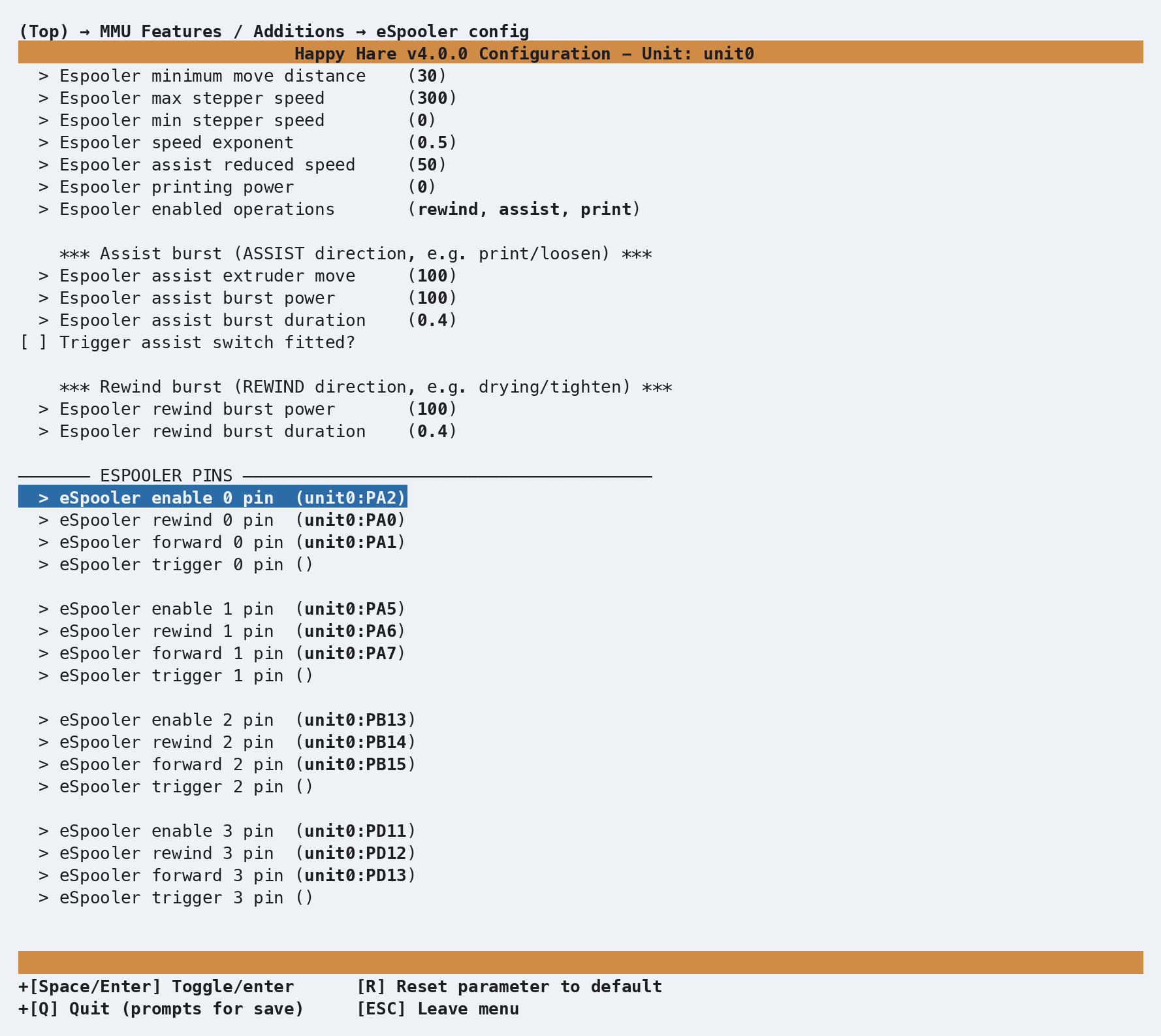
That produces one [mmu_espooler <unit_name>] section in mmu_hardware.cfg
per unit with the feature enabled, with the pins you chose filled straight
in:
[mmu_espooler unit0]
pwm                  : 1        # 1=PWM control (typical), 0=digital on/off control
hardware_pwm         : 0        # See klipper doc
cycle_time           : 0.1      # See klipper doc
scale                : 1        # Scales the PWM output range
value                : 0        # See klipper doc
shutdown_value       : 0        # See klipper doc

respool_motor_pin_0  : unit0:PA0
assist_motor_pin_0   : unit0:PA1
enable_motor_pin_0   : unit0:PA2   # only on boards that need a separate enable line
assist_trigger_pin_0 :
# ...repeated per gate
pwm/hardware_pwm/cycle_time/scale/value/shutdown_value apply to
every gate on the unit at once - Happy Hare assumes all of a unit's motor
drivers are wired the same way, so there's no per-gate override for these.
An empty pin is simply omitted from that gate's capability (no rewind pin
configured means rewind silently does nothing for that gate, it isn't an
error).
The owning [mmu_unit <name>] section gets an espooler: key pointing at the
[mmu_espooler ...] section above - each physical MMU in a multi-unit machine
can have its own independently-named and independently-configured eSpooler:
[mmu_unit unit0]
espooler : unit0     # Name of [mmu_espooler unit0] above
Tip
If you're converting a printer that used a manual, macro-driven respooler before adopting this feature, remove the old macros and pin assignments first - Happy Hare's own eSpooler pins will conflict if both try to drive the same physical pin.
An eSpooler and a filament (catchment) buffer both exist to solve the same "manage slack in the filament path" problem in different ways, so most designs only fit one or the other in practice.
Parameter Setup
Per-unit tuning in mmu_parameters.cfg, only shown by menuconfig/MMU_TEST_CONFIG
on units that have the feature enabled - the same eSpooler config screen
shown under Hardware Setup above, before its pin rows:
espooler_min_distance: 50                    # Individual stepper movements less than this distance will not activate espooler
espooler_max_stepper_speed: 300              # Gear stepper speed at which espooler will be at maximum power
espooler_min_stepper_speed: 0                # Gear stepper speed at which espooler will become inactive (useful for non-PWM control)
espooler_speed_exponent: 0.5                 # Controls non-linear espooler power relative to stepper speed (see below)
espooler_assist_reduced_speed: 50            # % of the "rewind" speed applied to assisting load (rewind should be faster than assist)
espooler_printing_power: 0                   # If >0, fixes the % of PWM power while printing; 0 enables burst-mode assist instead
espooler_operations: rewind, assist, print   # Which operations are permitted at all, independent of what's wired

espooler_assist_extruder_move_length: 100    # Distance (mm) extruder needs to move between each assist burst
espooler_assist_burst_power: 50              # % power of the assist burst move
espooler_assist_burst_duration: 0.4          # Duration (s) of the assist burst move
espooler_assist_burst_trigger: 0             # 0=extruder-movement trigger, 1=tension-switch trigger
espooler_assist_burst_trigger_max: 3         # Max back-to-back bursts before assuming the trigger sensor is stuck

espooler_rewind_burst_power: 50              # % power of the rewind burst move (drying rotation, TIGHTEN)
espooler_rewind_burst_duration: 0.4          # Duration (s) of the rewind burst move
The supplied defaults are a good starting point, and unused settings are
harmless to leave in place - for example if no assist_motor_pin is wired,
assist/print in espooler_operations simply never has anything to do.
That makes espooler_operations most useful as a way to explicitly turn a
mode off even though the hardware for it exists.
espooler_speed_exponent
This shapes how power ramps up as the gear stepper speeds up, not the overall
power ceiling. With espooler_max_stepper_speed: 300 (the default):
  espooler_speed_exponent: 1 (linear):
    gear speed 300 mm/s -> power 100%   (300/300)^1
    gear speed 150 mm/s -> power 50%    (150/300)^1

  espooler_speed_exponent: 0.5 (the default, non-linear):
    gear speed 300 mm/s -> power 100%   (300/300)^0.5
    gear speed 150 mm/s -> power 71%    (150/300)^0.5
A value below 1 front-loads power at low speed and flattens out approaching
espooler_max_stepper_speed - useful because DC gearmotors often need more
than a linear share of power to overcome static friction before they'll turn
at all. The power range is further scaled by the hardware scale setting in
[mmu_espooler], if set.
espooler_min_stepper_speed
The gear speed below which the espooler stays off entirely. Most useful for a non-PWM (digital on/off) motor, where there's no ramp to taper into - set this as the effective on/off threshold instead.
espooler_assist_reduced_speed
A % of the calculated rewind power for that same gear speed. You want the
espooler to keep tension tight on rewind, but you don't want it to over-feed
on assist and get ahead of the gear stepper - the default 50 runs assist at
half of what rewind would do at the same speed. This never drops below the
print-mode power floor.
espooler_printing_power
A fixed % of power applied to the motor for as long as printing continues -
just enough to "release the braking effort" of the spool's own resistance,
not enough to spin it on its own. Recommended starting point is 0
(burst-mode assist instead, see below); if you do use a fixed value, keep it
low and confirm it isn't dragging filament off the spool uncontrolled.
Tip
As with most mmu_parameters, every setting on this page can be changed
live with MMU_TEST_CONFIG <var>=<value> - no Klipper restart needed.
Changes made this way are only in effect until the next restart.
Commands
Full parameter reference: MMU_ESPOOLER.
MMU_ESPOOLER                          # status of every gate's espooler
MMU_ESPOOLER GATE=0 OPERATION=rewind  # continuous rewind at default power
MMU_ESPOOLER GATE=0 OPERATION=off     # stop
MMU_ESPOOLER GATE=0 TIGHTEN=1         # one rewind burst (take up slack by hand)
MMU_ESPOOLER GATE=0 LOOSEN=1          # one assist burst (loosen by hand)
MMU_ESPOOLER GATE=0 OPERATION=assist BURST=1 POWER=50  # manual burst, explicit power
BURST=1 combined with OPERATION=assist or OPERATION=rewind jogs the
motor for one burst using that operation's configured (or overridden) power
and duration, then returns to whatever mode the gate was already in - off
or print are both valid starting states for this, so you don't strictly
need to arm print mode first just to test a burst. TIGHTEN=1/LOOSEN=1 are
shorthand for exactly that combination at the gate's configured rewind/assist
burst power and duration. OPERATION=print arms in-print assist manually on
a gate - mostly useful for testing burst behavior outside of an actual print,
since Happy Hare arms it automatically once filament reaches the extruder.
TRIGGER=1 fires a burst exactly as the real trigger source would, for
testing without extruder movement or a physical switch. RESET=1 clears
in-print assist mode for the unit's current gate.
Tip
MMU_ESPOOLER ALLOFF=1 is the quickest way to force every gate's
espooler off at once, regardless of what mode each one is currently in.
Printer variables exposed
See espooler
in the printer variable reference - a per-gate list of
''/off/rewind/assist/print (empty string for a gate on a unit with
no espooler). The deprecated espooler_active variable predates the print
and off states and should not be used in new macros.
Espooler UI
Mainsail and Fluidd render this status directly as a directional arrow overlay on each gate's spool icon in their MMU panel - no separate configuration needed:
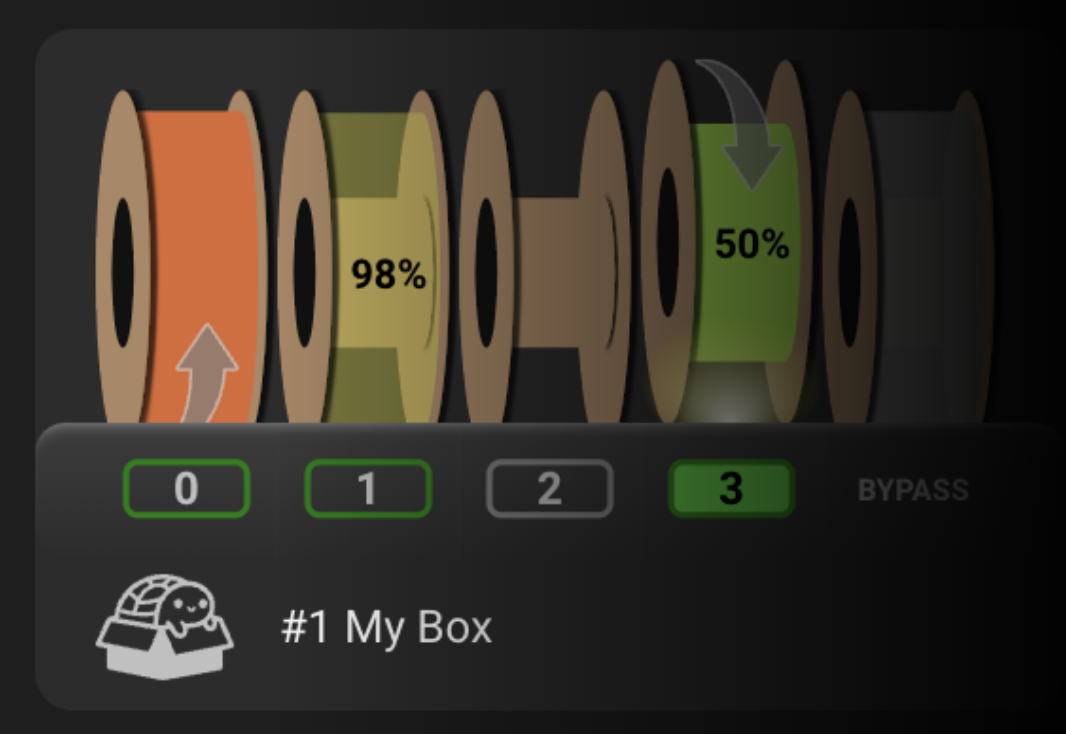 Assisting gate/lane 0 (load and in-print) |
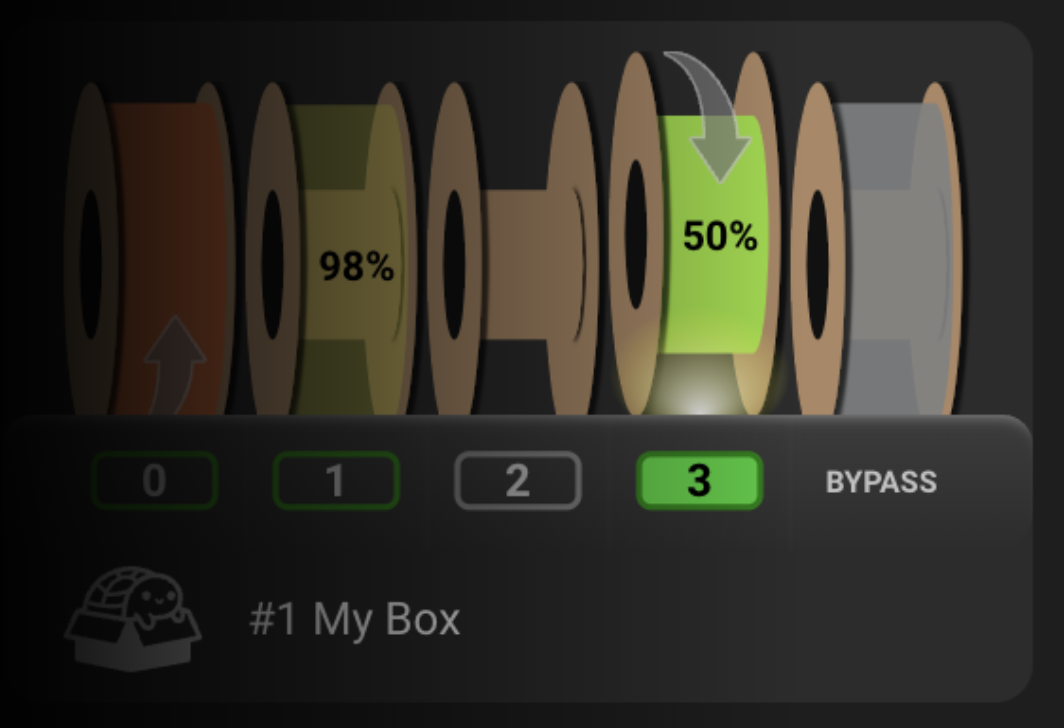 Rewinding gate/lane 4 (respooling) |
The same information is available as text from the console (remember Klipper can't run another command until the current one finishes):
MMU_ESPOOLER
0 : off     (0%)
1 : print   (0%) [assist for 0.4s at 50% power on trigger, max 3 bursts]
2 : off     (0%)
3 : off     (0%)
Tuning
- Start with rewind only. Configure the rewind pin and tune
espooler_min_distance,espooler_max_stepper_speed,espooler_min_stepper_speed, andespooler_speed_exponentagainst real unload moves before touching assist or print - rewind has no failure mode worse than "spool spins a bit more than needed," while assist run too hard can overrun and dump loose filament off the spool. - Leave
printout ofespooler_operationsinitially and add it back once rewind/assist are confirmed working - it's the mode most likely to need per-printer tuning of burst power/duration. - Prefer the trigger-pin burst source over extruder-movement if you have the hardware for it (see In-print bursts above).
Setting up each mode
Important
Test each mode with the motor disconnected from a real spool the first few times, or with a scrap spool - an overpowered assist/rewind can dump loose filament off a spool fast enough to tangle before you can react.
Rewind (respool):
- Wire
respool_motor_pin_<gate>(andenable_motor_pin_<gate>if your board needs one). - Tune
espooler_min_distance,espooler_max_stepper_speed,espooler_min_stepper_speed,espooler_speed_exponent. - Confirm
rewindis inespooler_operations. - Test:
MMU_ESPOOLER GATE=0 OPERATION=rewindthenMMU_ESPOOLER GATE=0 OPERATION=off.
Forward (load assist):
- Wire
assist_motor_pin_<gate>(andenable_motor_pin_<gate>if needed). - With rewind already tuned, set
espooler_assist_reduced_speed(% of the rewind curve to use for assist). - Confirm
assistis inespooler_operations. - Test:
MMU_ESPOOLER GATE=0 OPERATION=assistthenMMU_ESPOOLER GATE=0 OPERATION=off.
Basic in-print assist:
- Wire the assist pin as above.
- Set
espooler_printing_powerto a small % - just enough to release the spool's own braking effort, not enough to let it spin freely. - Confirm
printis inespooler_operations. - Test:
MMU_ESPOOLER GATE=0 OPERATION=printthenMMU_ESPOOLER GATE=0 OPERATION=off.
Intelli-assist, extruder-movement trigger:
- Complete basic in-print assist above, then set
espooler_printing_power:
   0
to switch from a fixed power to burst mode. - Set
espooler_assist_burst_power/espooler_assist_burst_durationfor the jog itself. - Test:
MMU_ESPOOLER GATE=0 OPERATION=print POWER=0to arm, thenMMU_ESPOOLER GATE=0 OPERATION=assist BURST=1to fire a burst by hand - you should see it jump to burst power/duration and settle back to 0%.
Intelli-assist, tension-switch trigger:
- Complete the extruder-movement version above (same burst power/duration).
- Wire
assist_trigger_pin_<gate>, an ordinary switch input. - Set
espooler_assist_burst_trigger: 1andespooler_assist_burst_trigger_max(back-to-back burst safety cap). - Test the same way, or trigger the physical switch and watch it burst; use
MMU_ESPOOLER ALLOFF=1to reset out of intelli-assist mode.
Troubleshooting
MMU_ESPOOLERreportsnot fittedfor a gate you expect to have one - the gate's unit either has no[mmu_espooler <name>]section, or that gate's rewind/assist pins are both empty. Checkmmu_hardware.cfgand that the owning[mmu_unit]'sespooler:key points at the right section name.- Espooler never engages during a load/unload move - check
espooler_min_distance(move too short) andespooler_min_stepper_speed(move too slow) first; both silently suppress activation rather than erroring. - Repeated "temporarily suspended" errors during printing - the trigger
pin is reporting more than
espooler_assist_burst_trigger_maxconsecutive triggers with no gap, which usually means the tension switch is mechanically stuck closed rather than a software problem.MMU_ESPOOLER RESET=1clears the suspended state once the switch is freed. - Spool overspins and dumps loose filament -
assist(orrewind) is running too fast for the mechanism; reduceespooler_max_stepper_speedorespooler_assist_reduced_speedrather than the burst power settings, since the continuous curve is almost always the one actually driving normal load/unload moves.
See also
- Command Reference:
MMU_ESPOOLER - Heater & Environment Manager - its
MMU_HEATER DRY=1 ROTATE=1drying option reuses the espooler's rewind burst mechanism - Printer Variables: per-gate arrays
for the
espoolerstatus field