Feature: Encoder
Concept
An encoder measures filament movement directly, as a small wheel or optical sensor turned by the filament passing through it. It has no direction sense - the position it reports only ever counts up, regardless of whether filament is moving into or out of the MMU - so Happy Hare always reads it as a distance traveled, not a direction.
That one measurement gets reused in several unrelated places once an encoder is fitted:
- A virtual filament-presence switch. Movement on the encoder counts as
"filament present", with no separate switch needed - it can stand in for a
gate or extruder endstop anywhere Happy Hare asks for one (
encoderis a valid choice for bothgate_homing_endstopandextruder_homing_endstopinmmu_parameters.cfg). - Bowden move verification. The distance the encoder measures during a bowden load/unload can be compared against the commanded distance, and optionally used to auto-correct a short move.
- FlowGuard. Encoder movement (or lack of it) feeds FlowGuard's clog/tangle/runout detection and its live flow-rate percentage - covered briefly under Parameter Setup below, with the deeper tuning left to FlowGuard's own page.
- Manual position tracking, via the
MMU_ENCODERcommand.
A calibrated resolution (mm of filament per sensor pulse) is what makes the
distance reading accurate - the value set during hardware setup below is
only ever a starting point, replaced once MMU_CALIBRATE_ENCODER
has run.
Hardware Setup
Examples below use the default unit name unit0. Substitute your configured
Klipper object name in unit-specific
sections, object references and pin prefixes.
Enable this in menuconfig with Has encoder? under _Encoder, which opens an Encoder config menu:
| Setting | Purpose |
|---|---|
Encoder name |
Klipper object name for this encoder - defaults to the unit name |
Use shared encoder? |
Reference an existing encoder instead of defining a new one; available for single-unit and multi-unit installations |
Shared encoder object name |
Name of the existing [mmu_encoder NAME] object, which must measure this unit's filament |
Type |
Selects a starting resolution: Binky 8/10/12-vane wheel, TCRT5000 (the sensor fitted to ERCF v1.1), or Other |
Uncalibrated encoder resolution |
The starting mm-per-pulse value, filled in from Type above |
Gate endstop to encoder distance |
How far the encoder sits past the gate endstop, if both are fitted (see Parameter Setup) |
Encoder pin |
The single digital input pin the encoder is wired to |
Register as virtual switch sensor |
Whether the encoder also shows up as a filament switch sensor in Mainsail/Fluidd - it's always usable as an endstop either way, this only controls UI visibility |
The Type choice's starting resolutions:
| Type | Starting resolution (mm/pulse) |
|---|---|
| TCRT5000 | 0.7059 |
| Binky 12-vane | 0.979 |
| Binky 10-vane | 1.175 |
| Binky 8-vane | 1.469 |
| Other | 1.0 |
With sharing disabled, this produces one [mmu_encoder <encoder_name>] section
in mmu_hardware.cfg. The encoder name defaults to the unit name but can be
changed independently:
[mmu_encoder unit0]
encoder_pin        : ^unit0:PA3
encoder_resolution : 0.979          # Starter value - OVERRIDDEN by calibration
desired_headroom   : 5.0            # FlowGuard: clog/runout headroom to maintain
average_samples    : 4              # FlowGuard: damping of automatic headroom adjustment
flowrate_samples   : 20             # How many extruder "movements" to average flow rate over
register_as_sensor : 1              # Make visible as filament switch sensor
no_movement_samples: 10             # Consecutive no-movement samples before the virtual sensor un-triggers
encoder_pin shouldn't need an inverted (!) modifier either way, but often
needs a pull-up (^) to read cleanly. If a second unit shares this encoder
(Use shared encoder? above), it has no [mmu_encoder] section of
its own: its [mmu_unit] references the existing encoder by object name.
The name can identify another unit's encoder or one defined in your own
configuration. Sharing does not create the referenced object.
Parameter Setup
One setting is exposed in mmu_parameters.cfg only when an encoder is
fitted:
gate_endstop_to_encoder : 10 # Distance between gate endstop and encoder (+ve if encoder is after the endstop)
This only matters when a gate also has its own endstop switch - it tells
Happy Hare how much of a homing move happens before the encoder can see it,
so measured movement isn't short by that fixed amount. It defaults to 10
when a gate exit endstop is also fitted, 0 otherwise.
A handful of advanced, non-menuconfig settings round out what the encoder enables for bowden moves - safe to leave at their defaults:
encoder_move_validation           : 1    # Use the encoder to sanity-check every movement (0 = faster, less safe)
bowden_pre_unload_test            : 1    # Verify filament is clear of the extruder before the fast unload pull
bowden_pre_unload_error_tolerance : 50   # % mismatch allowed by that check (100 = disabled)
bowden_move_error_tolerance       : 60   # % mismatch allowed for the bowden move itself (100 = disabled)
bowden_apply_correction           : 0    # 1 = trust the encoder and auto-correct a short bowden move
bowden_allowable_encoder_delta    : 20.0 # mm of mismatch bowden_apply_correction will try to close
bowden_apply_correction isn't recommended above roughly 350mm/s of load
speed - correction moves need a reliable reading, and a fast-moving encoder
is a noisier one.
FlowGuard's encoder-based clog/tangle/runout detection is switched on
separately, in the owning unit's flowguard_encoder_mode (0=off,
1=fixed detection length, 2=automatic) and flowguard_encoder_max_motion
settings - the encoder just supplies the movement signal FlowGuard acts on.
Feature: FlowGuard covers tuning that in depth; this
page stops at the console output in Commands below.
Tip
As with most mmu_parameters, every setting on this page can be changed
live with MMU_TEST_CONFIG <var>=<value> - no Klipper restart needed.
Commands
Full parameter reference: MMU_ENCODER.
MMU_ENCODER          # Report current encoder position and FlowGuard status
MMU_ENCODER POS=0    # Reset the encoder position counter to (approximately) zero
MMU_ENCODER POS=100  # Set the encoder as close as possible to position 100mm
MMU_ENCODER
Encoder unit0 position: 743.5
FlowGuard/Runout: Active
- Detection mode: Automatic detection length
- Detection length: 10.2mm
- Remaining headroom before trigger: 8.3mm (min: 5.6mm)
- Flowrate: 99%
QUIET=1 reports just the position, dropping the FlowGuard lines. VALUE=
is an alias for POS=. Because resolution is finite, a requested position is
matched as closely as possible rather than exactly.
Printer variables exposed
See printer.mmu.encoder in the printer
variable reference for the full field list (encoder_pos, detection_length,
headroom, flow_rate, and friends) - it's only present on a unit that has
one fitted.
Encoder meter (Mainsail/Fluidd)
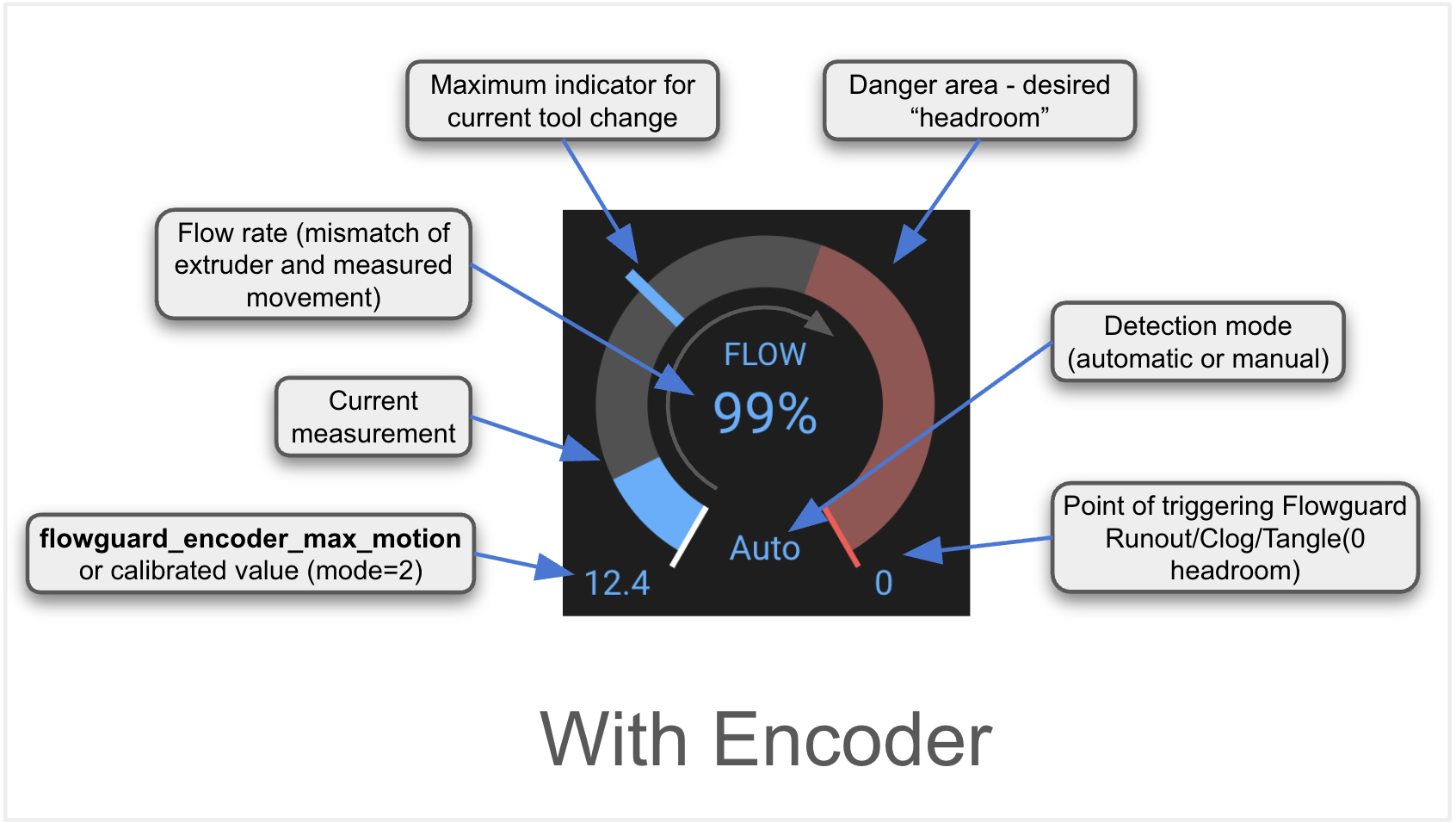
Mainsail and Fluidd render this as a gauge rather than plain numbers: the
blue arc is the live flow-rate reading, the red arc is the "danger zone"
inside the desired headroom, and the mode label (Auto above) shows whether
detection length is fixed or self-tuning.
Tuning
- Calibrate in order: gear, then encoder, then bowden. Each step's measurement depends on the one before it being accurate, so re-running an earlier step (e.g. after swapping a gear) means redoing everything after it too.
- Confirm the wiring before trusting any reading. Run
MMU_ENCODER, pull a length of filament back and forth through the encoder by hand, and re-runMMU_ENCODER- the position should have increased (remember, it never decreases). If it hasn't moved, double-checkencoder_pin- most encoders need the pull-up (^) even if they don't need inversion (!). - Use fresh filament for
MMU_CALIBRATE_ENCODER. Grooves worn into a well-used filament strand by the extruder gears can throw off the count. Also make sure the selector is properly aligned with the gate first - a selector that's off to one side tends to give noticeably different counts loading versus unloading. - If FlowGuard's automatic mode gives false triggers, increase
desired_headrooma little first before switching to a fixedflowguard_encoder_max_motion- a longer bowden tube or fast custom macros both eat into headroom faster than the default anticipates. - A flow-rate reading that consistently sits below roughly 94% usually means under-extrusion (printing too fast, or too cold) rather than a measurement problem - the figure is an average, so don't expect it to be instantaneously accurate.
Troubleshooting
- Encoder position never changes - check
encoder_pinis correct and try adding a pull-up (^) if one isn't already set; polarity/inversion (!) is rarely the actual problem. - "Encoder resolution ... was not found in mmu_vars.cfg. Probably not
calibrated" at startup - run
MMU_CALIBRATE_ENCODERat least once; until then Happy Hare is running on the menuconfig starter value only. - Bowden or gate moves report a movement mismatch - check
bowden_move_error_tolerance/bowden_pre_unload_error_tolerancearen't set tighter than your hardware's actual slack, and confirmgate_endstop_to_encodermatches your physical layout if a gate endstop is also fitted. - Repeated clog/runout triggers that aren't real clogs - see the Tuning
notes above on
desired_headroomandflowguard_encoder_max_motion; full false-trigger diagnosis is covered on Feature: FlowGuard.
See also
- Command Reference:
MMU_ENCODER - Command Reference:
MMU_CALIBRATE_ENCODER - Command Reference:
MMU_CALIBRATE_GATE-ALL=1(aliasMMU_CALIBRATE_GATES) uses a calibrated encoder to calibrate every gate's rotation distance in one pass, instead of measuring each by hand - Printer Variables:
encoder - Feature: FlowGuard - the clog/tangle/runout detection this page's movement signal feeds
- Feature: Sensors - naming/addressing, querying, and enabling/disabling any sensor at runtime