The Happy Hare Simulator
"The interactive console" is make console's own name for itself, but it's worth being
upfront about what it actually is: a full software simulation of a printer running Happy
Hare - real MMU logic, a fake Klipper and a fake Moonraker underneath, driven from a
terminal instead of a test file. Everything the test harness drives
programmatically, this drives by hand, live.
Here's what a real session looks like - the pinned status header (gate table, LED rows, selector position), a tool change, and a load in progress:
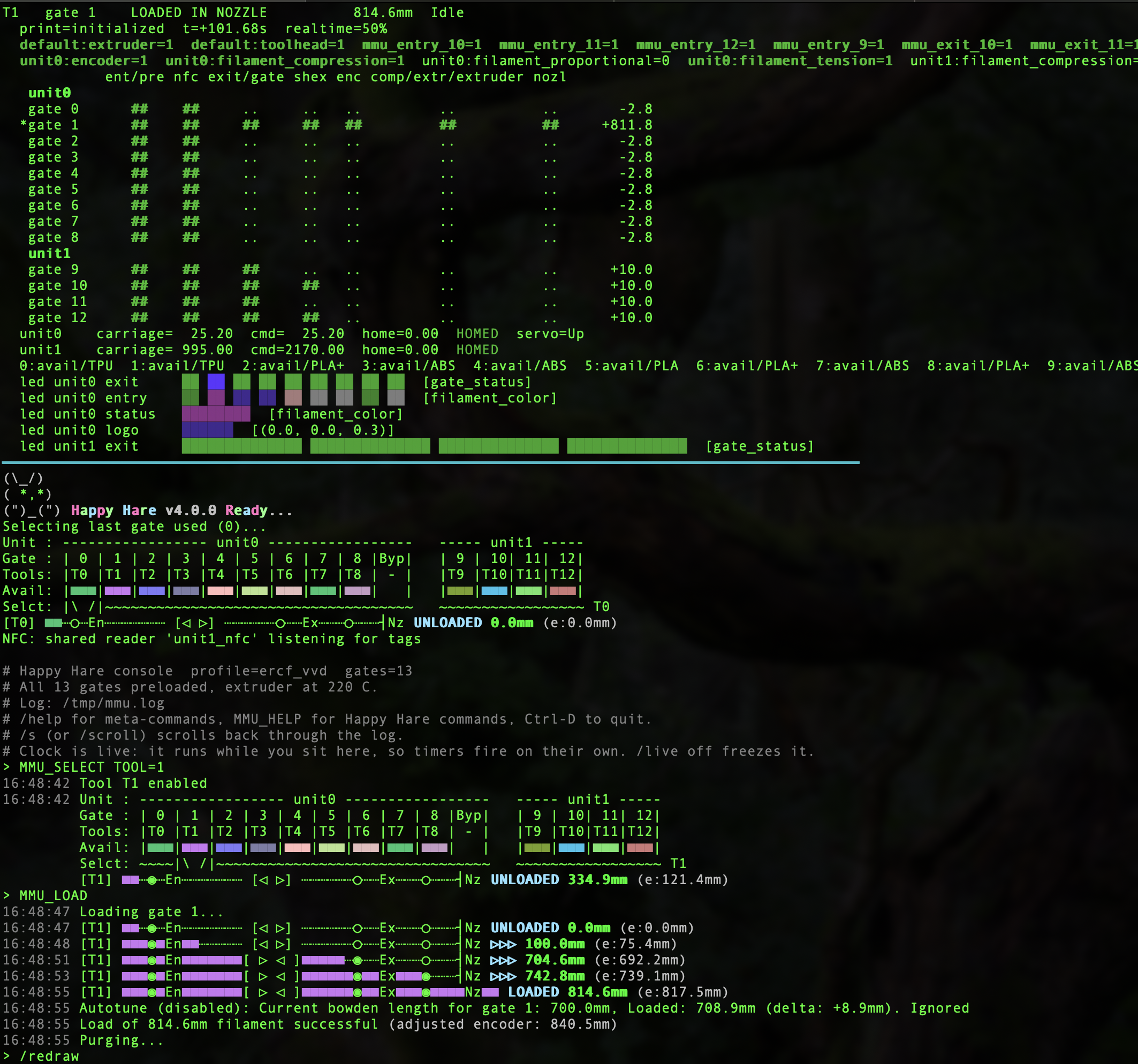
That header - the gate table, per-unit LED rows, selector position, tool/gate mapping - is pinned at the top of the terminal throughout; the log scrolls beneath it. The rest of this page is the detail behind every piece of that: starting it, reading it, and the things about it that will look like bugs the first time you see them.
make console
MMU_CHANGE_TOOL TOOL=1
Tool change requested: T1
...
------------------------------------------------------------------------
T1   gate 1    LOADED IN NOZZLE           868.0mm  Idle
  print=initialized  SYNCED  t=+2.51s  realtime=100%
  mmu_entry_1=1  mmu_exit_1=1  filament_compression=1  filament_tension=1  ...
            nfc pre ent exit/gate shex enc comp/extr nozl
   gate 0    ..  ..  ..     ..     ..   ..     ..     ..     -100.0
  *gate 1    ##  ##  ##     ##     ##   ##     ##     ##     +768.0
------------------------------------------------------------------------
Anything not starting with / is sent to the MMU as G-code. /help lists the
meta-commands, MMU_HELP lists Happy Hare's, and every HH command takes HELP=1.
The prompt is a bare > — the tool, the gate and the paused state are all on the first
line of the status section, so repeating them would only cost columns.
The status section is separated from the log window by a heavy rule.
When something scribbles on the terminal, /redraw puts it all back: it clears the
screen, re-reserves the pinned band, redraws the status section, repaints the log from the
scrollback, and resets autowrap and the cursor. /clear does exactly the same but throws
the log away instead of repainting it. Useful meta-commands beyond /help:
| Command | Does |
|---|---|
/advance N |
jump the virtual clock forward N seconds |
/live [on | off] |
run the clock while you sit at the prompt; on by default at a terminal, off is the reproducible mode |
/vars [mmu | machine] |
get_status() of the mmu object, the mmu_machine object, or both |
/redraw |
repaint the whole screen, log and all — the way back from a corrupted display |
/clear |
as /redraw, but empty the log rather than repaint it |
/scroll [N], /s |
scroll back through the log (see below) |
/sensor NAME on | off | enable | disable |
on/off drives the switch through its real button callback; enable/disable flips sensor_enabled so Happy Hare treats it as not fitted |
/place, /preload, /exhaust |
set the scene: filament at a gate, preloaded, or run out |
/log [N], /trace 0-4 |
the log file, and how much detail goes into it |
/timestamp [on | off] |
stamp MMU output with the virtual clock; on by default at a terminal |
Multi-unit
Multi-unit configs work, and ercf_vvd — the console default — is one: a real two-unit
machine, ERCF 1.1sb (9 gates, LinearServoSelector, encoder) plus ViViD 1.0 (4 gates,
IndexedSelector), 13 gates in total. You can also point --profile at a multi-unit install
directory. Either way the harness builds every unit, with gates numbered contiguously across
them (here unit0 0-8, unit1 9-12). Sensors
are qualified per unit (unit0:mmu_shared_exit), so the header keeps the prefix and /sensor
needs the qualified name — a bare name that matches more than one unit is rejected rather
than silently resolved. The filament view groups gates under their unit, and the LED view
shows every unit rather than only the selected one.
The clock is virtual. At a terminal it is also live: it runs at wall speed while you
sit at the prompt, so timers fire on their own — the 8-second boot LED rainbow finishes, the
20-second pending-spool timeout expires, and on an NFC machine the poll loop keeps turning
without being asked. /advance N jumps it forward by N seconds whether live or not.
/live off freezes it, which is the reproducible mode: with the clock stopped the same
commands always produce the same transcript however long you took over them, which is what
you want when you are pinning down a specific sequence. --no-live starts that way. Live is
off automatically for --script and anything that is not a terminal, so command files stay
deterministic.
How the live clock works, and why it is a signal rather than a thread
A `setitimer` handler, armed only around `input()` and disarmed for the whole of a dispatch. Not a background thread, and that is not a preference: the reactor is greenlet-based — which is what gives it Klipper-faithful `pause()` and completion semantics — and greenlets belong to the thread that created them. Pumping the reactor from a worker thread fails outright with `greenlet.error: Cannot switch to a different thread`. A signal handler runs on the **main** thread, so the greenlets stay consistent, and it does fire while blocked inside readline's `input()`. Arming only around `input()` is what keeps a tick out of a dispatch, where `advance()` asserts on re-entry and where the scrollback tee could be caught halfway through reassembling a line. Output produced by a tick is printed above the prompt and the prompt is then rebuilt from `readline.get_line_buffer()`, so a tick landing while you are mid-command cannot eat what you have typed. The tick fires every `LIVE_INTERVAL` = **0.5 s** and advances by the *real* time measured since the last one, not by that constant — so the interval sets how often the header is repainted, not how fast the clock runs. Halving it (it was 1.0 s) therefore costs a second repaint per second, not twice the reactor work, and it is what makes an `led_effect` animation legible: at `frame_rate: 24` a one-second sample showed every 24th frame, which reads as a jump rather than a fade. The clock itself costs under **1% of one core**: measured on `ercf_vvd`, `advance(60)` is 8.6 ms of CPU per virtual second, and live mode spends that over a real second. (It was 7.7 ms before unit0 gained its entry/status/logo segments — 16 more LEDs to animate.) Catching up is the expensive direction — an hour compressed into one call is ~30 s of CPU — which is why a tick is capped at a few seconds rather than jumping to "now" after the machine has slept. `/advance` is sliced for the same reason. One `advance()` call has an iteration cap and the LED effects animate at 24 fps, so on the default profile a single call dies partway through the seventh virtual minute — `/advance 600` used to stop at 444 s and raise. The counter resets per call, so the span is fed in 60-second slices; timers fire in the same order./timestamp shows that clock, dimmed, against each MMU reply — the time the simulator
started plus however far the reactor has been advanced since, so /advance 3725 really does
move it an hour and two minutes while however long you spent reading moves it not at all.
Seconds are shown because the virtual clock usually moves in fractions of one: at minute
resolution a whole session reads as a single instant. Only the first line of a reply is
stamped; the rest are indented to line up under it:
MMU_SENSORS
22:45:16 filament_compression  --> Open
         filament_tension      --> TRIGGERED
         mmu_entry_0           --> Open
/advance 3725
MMU_SENSORS
23:47:21 filament_compression --> Open
Useful flags — make console ARGS='...':
--profile boxturtle            # or tradrack, emu, encoder, nfc_single, nfc_spoolman, ...
                               # (default is ercf_vvd, a real 2-unit machine)
--profile /path/to/config      # your own installed config - see below
--header machine,sensors,filament,selector,gates,leds   # or 'all' / 'off'
--inline-header                # reprint above each prompt instead of pinning it
--scrollback 5000              # lines kept for /scroll; 0 disables it
--no-live                      # freeze the clock (default: live at a terminal)
--no-timestamp                 # no clock in the output (default: on at a terminal)
--color 256|truecolor|16|auto  # color depth (see below)
--log-dir /tmp                 # where mmu.log goes; --no-log to discard it
--trace 4                      # full Happy Hare narration
--no-preload                   # leave every gate empty
--no-calibrate                 # boot cold: no seeded calibration, no homing, no preload
--no-prime                     # leave the gate map blank instead of filling it in
--seed N                       # seed for the primed gate map (default 0, reproducible)
--no-moonraker                 # don't attach the fake Moonraker/Spoolman
--pace FACTOR                  # 0=instant, 0.5=twice as fast as real (default), 1=real time
--wall / --no-wall             # with --pace, whether to sleep in real time (default: interactive only)
--script FILE                  # run non-interactively (this is how it is tested)
Startup shows Happy Hare's real bootup output — the welcome banner and the unit summary
— because cmd_MMU_BOOTUP runs here exactly as it does on a printer. Calibration is seeded
inside boot(), before bootup runs, so a default session boots clean; --no-calibrate
boots the machine cold and the calibration warnings then appear for real.
Two more things happen at startup that a printer does for itself and a frozen clock does not:
- The gate map is primed — every gate gets a vendor, material, color and temperature, so
the gate table and the LED
filament_coloreffect have something to show instead ofUnknown | 200C | Unknown. Seeded, so a session is reproducible;--seed Nfor a different spread,--no-primefor none. effect_initializedis waited out. It is a unit-wide 8s state flash from bootup, and while it holds a unit every transient flash is dropped (mmu_led_manager.py:473) — so an NFC read acknowledgment, for one, silently does nothing.boot()stops the clock 2.5s in, so withoutSession.settle_leds()an interactive session would never leave that window.- A fake Moonraker + Spoolman is attached, seeded to agree with the primed gate map (gate
N's tag UID is
BADCAFE<NN>). TheMmuServerinside it is real, so the round trip exercises the actual contract both ways. Without it every call Happy Hare makes to Moonraker goes unanswered and an NFC read ends in "Automatic assignment of id timed out" 20s later — which is what--no-moonrakergives you, and what a printer with Moonraker down looks like.
Watching an operation happen — /pace
Moves complete instantly by default: an MMU_LOAD finishes without the virtual clock moving at
all. Fast, but nothing time-driven is observable — an LED effect never reaches a second frame,
and every action transition lands in the same instant.
/pace FACTOR spends that fraction of each move's real duration in virtual time: 0 is
instant, 0.5 twice as fast as real (the default), 1 roughly real time. While it is on, the
machine header carries realtime=<n>% next to the clock — that is the field it explains,
since t= only moves during an operation when pacing is on. Absent at 0. Each move's duration
is already known — MmuStepper._submit_move computes the real trapezoid — so this is HH's own
arithmetic, not an invented number.
The pacer advances the reactor, which runs timers (a pause() would only jump the clock,
see reactor._sys_pause). That is the whole point. It cannot run inside a reactor callback, so
it no-ops there; top-level dispatch, which is what the console and the tests use, is where
pacing applies.
Virtual time is free — advancing the clock 11 seconds costs milliseconds — so pacing alone
makes an operation report the right timings while still finishing in an instant. To actually
watch one, it has to sleep, which it does at an interactive prompt and never in a script, a
pipe or the test suite (--wall / --no-wall to force it either way).
A paced move is walked, not jumped — sliced at PACE_TICK (50ms), with the filament model,
the clock, the pinned-header repaint and the sleep all advancing together. One advance()
followed by one sleep() would freeze for the whole move: no LED frames, no repaint, no
intermediate position. A single 13-gate load produces ~240 updates, and the totals stay exact —
paced and unpaced end with the filament in the same place.
Every kind of move is paced, not just the plain ones: homing moves never reach
trapq_append, so until pace_move() became reusable an unload spent all of its seconds
inside the one bowden move while every home-to-sensor step happened in the same instant.
Tip forming and purging get a flat Session.MACRO_DURATION (4s at pace 1) rather than a
distance/speed figure. Their bodies never run here, and what the harness models of tip forming
is only its net retraction — but the real macros spend their time ramming, cooling, dipping
and wiping over that span, so dividing the net distance by any one of the macro's own speeds
badly understates it (unloading_speed_start put the whole retract at 0.5s). A round number is
the honest answer for work that is deliberately not modelled.
Note the log still arrives in blocks, because Happy Hare only logs at operation-step boundaries, not continuously. The header is what moves during a long move.
One known consequence. On boxturtle and emu — the shipped profiles with per-gate entry
sensors and gate_autoload — pacing makes them preload twice, and a subsequent load log a
spurious Operation not possible. Filament is loaded.
A preload is the operation that crosses the entry sensor (a load does not — the filament is
already past it), so it raises an insert event, and with gate_autoload set HH answers by
starting another preload. Happy Hare has the guard for exactly this
(wrap_suspend_insert_events, whose docstring describes it word for word) but applies it only on
the NFC-scan path. Unpaced it never surfaced, because the entry sensor's event_delay defers the
insert by 0.5s and no virtual time ever passed. Everything still completes correctly.
/timestamp on is what makes the pacing legible: output is stamped with the virtual clock as
of when Happy Hare produced the line, not when it was printed — _drain() runs after a
command returns, so stamping there gave every line of a load the same end-of-command reading.
/pace 1
MMU_LOAD
23:05:41 Loading filament...
23:05:41 [T9] ███◉█┈┈┈┈┈┈┈┈┈ ...  ▷▷▷    0.0mm
23:05:49 [T9] ███◉██████████ ...  ▷▷▷  680.0mm      <- the bowden move took 8s
23:05:53 [T9] ███◉██████████ ... LOADED 801.8mm
The gate map is seeded the same way, and for the same reason: bootup prints the gate
table, _preload_all() runs after boot() returns, and that table is the last thing on
screen when the prompt appears — so it used to report the whole machine unknown about one
that is fully loaded. Session.seed_loaded_gates() places filament at every gate and
persists mmu_state_gate_status before klippy:ready, which is exactly the state a real
printer restores from mmu_vars.cfg. Both halves are needed: the persisted map is the only
source for a unit with no per-gate switches (ERCF), and it is not enough for one that has
them (ViViD re-derives its gates from mmu_entry_9..12 at bootup and would overwrite a
seeded map with GATE_EMPTY). --no-preload and --no-calibrate skip it, so a cold start
is still a cold start.
Lines the console itself adds are dimmed and prefixed #, so there is never a question
about which of them came off the MMU:
(")_(") Happy Hare v4.0.0 Ready...          <- Happy Hare, exactly as on a printer
Unit : ------------- unit0 -------------
...
# Happy Hare console  profile=ercf_vvd  gates=13     <- the simulator
# All 13 gates preloaded, extruder at 220 C.
# Log: /tmp/mmu.log
# and not !: !! … is already a command that raised and ?? … one that does not
exist, so a lone ! would read as a quieter error rather than as a note.
The log
Happy Hare writes its own mmu.log, and the console keeps it at /tmp/mmu.log, replaced
fresh on every run. It is live, so the useful thing is to watch it in a second window:
tail -f /tmp/mmu.log
/log [N] prints the path and the last N lines without leaving the prompt. --log-dir DIR
moves it, --no-log leaves it in the session temp dir to be discarded on exit. Raise the
detail with /trace 4 (Happy Hare's own log_level).
The harness on its own still writes the log into a temp directory it deletes on close(),
which is right for tests; session(..., log_dir=...) is what keeps it. Note that
MmuLogger binds to the process-global logging.getLogger('mmu'), so the first session
to boot in a process fixes the log path for all of them — one session per process, which is
how the console runs.
If a warning shows up on a pink background
Run make console ARGS='--color 16'. Happy Hare's console messages carry HTML colors which
the console translates to ANSI, and 24-bit ESC[38;2;R;G;Bm is not safely ignored by a
terminal that lacks truecolor — the channels get read as separate SGR codes. HH's warning
color is #FF69B4, whose green channel is 0x69 = 105, and SGR 105 means bright magenta
background. So the warning arrives on a pink background.
--color defaults to auto, which only uses truecolor when $COLORTERM says truecolor
or 24bit and otherwise emits 256-color (38;5;N). --color 16 is the belt-and-braces
option: it emits nothing but plain 30-37/90-97, which no terminal can misread.
The header is pinned to the top of the terminal while output scrolls beneath it, and it
is redrawn after every command and every /advance. There is nothing to poll and no
refresh thread — since the clock is frozen at the prompt, state cannot change while you
are typing. /header GROUPS switches groups live, /header all turns every group on, and
/header off hides it and releases the pinned band. all and off work on the
--header flag too — both go through the same parser. On a pipe or with --inline-header
it falls back to reprinting above each prompt.
Reading the LED rows
  led unit0 exit     ██ ██ ██ ██ ██ ██ ██ ██ ██  [gate_status]
  led unit0 entry    ██ ██ ██ ██ ██ ██ ██ ██ ██  [filament_color]
  led unit0 status   ████████  [filament_color]
  led unit0 logo     ██████  [(0.0, 0.0, 0.3)]
  led unit1 exit     ██████████████ ██████████████ ██████████████ ██████████████  [gate_status]
One block per physical LED, in that LED's own color: ██ lit, ▓▓ lit but too dim to
show honestly, ·· off (grey). The LEDs of one gate run together and the gates are separated
by a space, so ViViD's seven-per-gate strip reads as four groups rather than 28
undifferentiated cells — and fits in 100 columns, which the ungrouped 117-column version did
not. [...] is the segment's effect from led_manager.effect_state; [?] means nothing has
painted it yet.
▓▓ is not a third state, just an honest one. black_light is (0.01, 0, 0.02) — what an
idle status segment under filament_color shows, and what any black filament shows — and
that paints to xterm 16, i.e. pure black, less visible than the grey used for off. Anything
below 25% is therefore painted at 25% with its hue kept, and the lighter glyph is what tells
you the brightness on screen is a floor rather than a reading.
A lit LED used to be ##, which was a problem rather than a shorthand: the glyph was painted
in the LED's color, and a white or grey LED — mmu_breathing_white_fast on selecting,
mmu_sparkle on complete, white_light for an uncolored gate under filament_color — came
out indistinguishable from ordinary text, because the terminal's default foreground is white.
A block in the same color still reads as a block.
All four segments are shown. ercf_vvd's unit0 configures every one of them (9 exit, 9 entry,
4 status, 3 logo) precisely so every effect path has somewhere to land. Note define_on in
config/base/mmu.cfg restricts most effects to exit/gates/status: only
mmu_breathing_red_slow, mmu_red_strobe and mmu_green_strobe_fast can run on logo. That
restriction is deliberate — it caps how many effect instances get pre-computed, which grows
with gate count — so widen it in your own config, not in the shipped template.
Scrolling back
Pinning costs you the terminal's own scrollback. The header is pinned with a DECSTBM scroll region, and a terminal only saves a row when it scrolls off the top of the full screen — rows that scroll out of a region are discarded. So the scrollbar and Cmd-Up show the session up to the moment the header was installed and nothing after it.
The console therefore keeps its own copy of every line it printed — which is also what
/redraw repaints from — and /s (or /scroll) opens a viewer over it, header still
pinned:
  ...the log, scrolled back...
 scrollback  15-40 of 66 (26 back)   up/down  pgup/pgdn  home/end   q to return
Inside the viewer, q/Esc/Enter returns you to the prompt and these scroll:
| Keys | |
|---|---|
Up/Down, or j/k |
a line |
b/f, or space |
a page |
g/G |
oldest / newest |
| PgUp/PgDn | a page — if your terminal lets them through, see below |
It is modal on purpose: it runs between input() calls, so readline is not active and
plain Up/Down keep meaning previous command at the prompt, which is the whole reason not
to bind the arrows to scrolling instead.
PgUp may never reach the console at all. Terminal.app and iTerm2 keep fn-Up/PgUp for their own window scrollback, and a key the emulator swallows cannot be seen by any program running in it — that is why the letter keys are listed first and appear in the status bar. If fn-Up scrolls your terminal window instead of the log, that is the emulator, not the console, and the window it scrolls is showing the session from before the header was pinned (see above for why).
/scroll N opens N rows back. --scrollback 0 turns the buffer off; /clear empties it
along with the log.
Shift-Up, and why it only works on some machines
Where readline permits it, Shift-Up and PgUp open the viewer too, and whatever you had half-typed is not lost: the binding is a readline macro bracketed with ctrl-a/ctrl-e, so your text comes back with one press of Up afterwards.
That only holds on GNU readline — Linux, and therefore the printers. On libedit,
which is what Python's readline module is on macOS, a key binding cannot do this at all:
libedit delivers only the first character of a macro immediately and holds the rest until
the next input event. A one-character macro fires at once; /scroll puts a lone / on the
line and stops, and the remainder is then flushed into whatever you type next — turning your
next command into /scroll MMU_STATUS. There is no readline API, in either flavour, to bind
a key straight to Python.
So the console checks the backend and simply does not bind the keys on libedit, rather than
installing one that corrupts the next line. /s is the two-keystroke stand-in, and the
startup banner says which of the two you have. /header off remains the escape hatch: it
drops the pinned band and gives you the terminal's own scrollback back.
Running against your own installed config
--profile takes a path as well as a profile name, so the console can run the config the
installer actually produced — hand edits included:
./install.sh -z -t                                       # writes /tmp/mmu_test
make console ARGS='--profile /tmp/mmu_test/printer_data/config'
Point it at the printer_data/config directory (its printer.cfg gives the authoritative
[include mmu/...] set and order) or straight at the mmu/ directory. mmu_vars.cfg is
skipped and [save_variables] is redirected into a scratch copy, so the console never
writes to your install.
Pick your real hardware in menuconfig when the installer offers it. A default config
generated non-interactively (make KCONFIG_CONFIG=... olddefconfig) does not boot: it
leaves the gate-0 gear pins empty and fails with Invalid pin description ''.
Three things that will look like bugs
- Macro bodies do not run. The fake
gcode_macrorecords a call and never renders the body, soT1, the print start/end and the park/cut/purge sequences produce silence. UseMMU_CHANGE_TOOL TOOL=1. The console notices a bareT<n>and says so. - A physical selector must be calibrated and homed before it can select a gate. The
console does that for you at startup (
boot(calibrate=True, pre_bootup=...)); in a test, callhh.boot(calibrate=True), orhh.boot()thenhh.calibrate(), thenMMU_HOME UNIT=<n>. Skip it and every selection fails with "Selector is not clibrated" (sic). Calibration is seeded by default for speed, butMMU_CALIBRATE_*genuinely works — see "Physical selectors, and what 'calibrated' means here" in Testing. - Pause is sticky. After a failed operation the MMU sits paused and later commands
refuse. The prompt shows
PAUSED; recover withMMU_UNLOCK/MMU_RECOVER.
One known limitation: commands are dispatched at top level, exactly as the tests do, so a
ReactorCompletion.wait() returns immediately instead of waiting. Dispatching inside the
reactor fixes that in theory but breaks MMU_PRELOAD in practice (every gate ends up
EMPTY), so the proven path wins — see the comment on _dispatch() in test/console.py
for the measurements.
Where to go next
- Testing - the non-interactive counterpart to this same harness.
- Code Layout - the real object graph this simulator boots, unmodified.