Menuconfig
The Happy Hare v4 Installer and Configurator is a dynamic, menuconfig based
configuration management system designed to streamline both initial installation
and ongoing maintenance of Happy Hare. It uses a structured, deterministic rules-based
workflow that exposes only the parameters and capabilities relevant to your specific
MMU hardware and enabled features.
Where appropriate, the installer applies recommended defaults and sensible settings
across hardware definitions, GPIO assignments, and Happy Hare features. Options
not applicable to your configuration are suppressed and omitted from the generated files
in the config/mmu/base/ folder.
This rules‑driven approach simplifies setup, reduces configuration errors and frustration, and provides a clear, maintainable foundation for upgrading, managing, and enabling Happy Hare capabilities.
Design Goal
The intention is for users to manage most configuration settings through the interactive
menuconfig installer (./install.sh -i), without needing to edit Happy Hare
configuration files directly. The rules‑driven interface ensures that all configuration
choices remain consistent with the selected MMU hardware and supported features.
Direct Modification of Configuration Files
Direct modification of Happy Hare configuration files remains possible when required,
with installer options available to control merge and overwrite behavior to suit your
preferred workflow. However, users are encouraged to rely primarily on the menuconfig
installer, which may require unlearning older habits of editing configuration files
directly.
All menuconfig selections are mastered and stored in the Happy-Hare/.mmu_config
settings file, with per-unit .mmu_config_<name> files in multi-unit mode. Copies
are maintained in printer_data/config/mmu/ so they are included in popular
GitHub-based printer configuration backup mechanisms.
Navigation
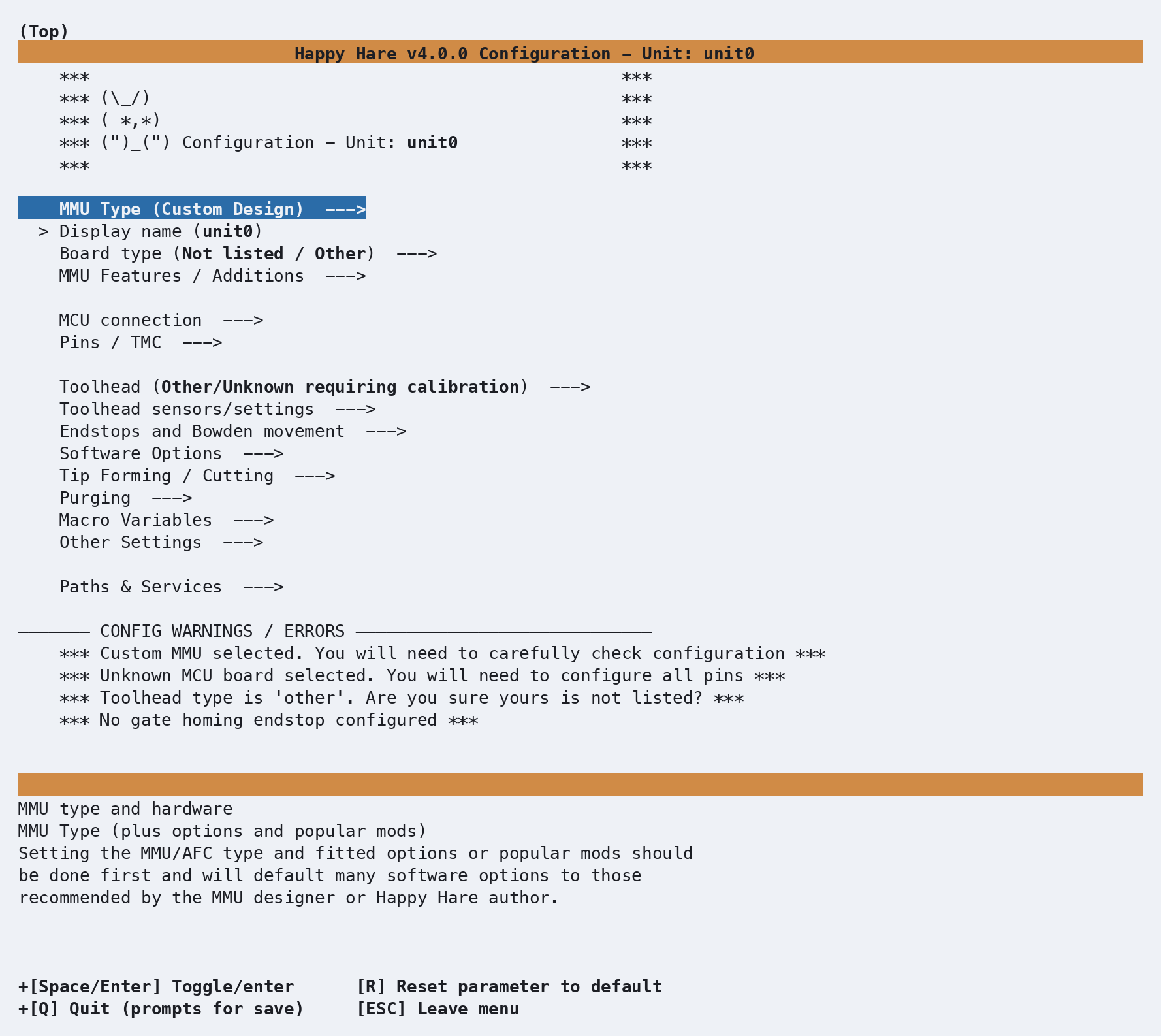
Navigation is intuitive and the same as any other menuconfig based interface.
| Key | Purpose |
|---|---|
| ↑ | move up |
| ↓ | move down |
| ↵ or space | select a menu or option |
| esc | go back to the previous menu |
| R | reset a setting to its default value (if available) |
| Q | quit: Y saves and continues the install, N discards your changes and stops the install, C returns to menuconfig |
The top-down flow guides you through the process in a logical, step by step manner. Depending on the MMU and selections you make, additional sub-menus and settings will appear, enabling you to configure relevant settings for your MMU.
Any non modifiable settings that have been enabled based on your MMU design or due
to prior selection will be preselected with
-*- and will include the (FIXED)
designation e.g. -*- Has LEDs? (FIXED)
Config Warnings / Errors are highlighted for you to review and correct before saving and applying updates to your configuration.
Unit names
The Name menu separates the Klipper object name used in configuration
from the Display name shown in the UI. The first unit defaults to unit0,
but you can choose another name during installation. In multi-unit mode, edit
object names in the shared MMU units list. See
Naming an MMU unit.
Managing Configuration Changes
When the menuconfig installer is launched after your initial setup and configuration,
you will be prompted to choose how it should apply and reconcile configuration changes with
locally applied settings. The installer supports two modes, Merge/Refresh and
Replace:
You are running an interactive install with existing menuconfig ('.mmu_config').

Read carefully, you have two options:

1) Merge/Refresh (select 1) (Default upgrade path)
   This KEEPS every change you made directly to your .cfg files. Before menuconfig opens,
   the simple settings your .cfg files hold are copied into menuconfig (you'll see the list
   and confirm), so menuconfig shows what you are actually running. Only the settings you
   then change in menuconfig are applied to your .cfg files, and new options are added.

2) Replace (select 2) (Recommended)
   This will OVERWRITE changes made directly to your .cfg files and create new default
   configuration based on choices made in menuconfig (which initializes to your previous config).
   This is RECOMMENDED if you make ALL your configuration changes via menuconfig. It is also
   useful if you get into trouble and want to reset your starting position or change MMU.

(Note that in all cases a BACKUP of your existing .cfg files will be made for reference)

Choose upgrade mode (1-2)?
-
Merge/Refresh (Option 1 — Default upgrade path)
Merge/Refresh keeps the values in your existing Happy Hare.cfgfiles. Beforemenuconfigopens, it lists the values from your.cfgfiles thatmenuconfigcan show and, if there are any, asks once whether to import them, somenuconfigshows what you are actually running. Only the settings you change inmenuconfigduring that run are applied to your.cfgfiles; every other option keeps its value, and new options required by the current Happy Hare release are added. The exceptions are macrogcode:bodies, a few structural optionsmenuconfigalways sets, and options the templates no longer contain; see the comparison. -
Replace (Option 2 — Recommended)
This is the recommended mode when all configuration changes are managed through menuconfig.
The Replace mode OVERWRITES any local changes you have made directly to your Happy Hare.cfgfiles, resetting and regenerating a new configuration based solely on the selections made inmenuconfig.
Both modes end with a summary of changes
to your .cfg files, listing each value changed as old -> new. See
Choosing an upgrade mode for a detailed
comparison, the import prompt, and what can be imported.
Renaming, removing or reordering installed units requires Replace (option 2). Appending a unit also works in Merge/Refresh. See Multiple MMU Units for the editor controls, migration of saved state, and checks after changing the unit list.
Notes
menuconfigwill never overwrite your existing configuration outright - it's copied to a timestamped backup directory before changes are applied (e.g.mmu.old-20260807-102329)../install.sh, with or without-i, always checks GitHub first and updates Happy Hare to the latest version of the branch you are on. To prevent this, launch./install.shwith the-zflag to skip the update check.- Following a klipper/kalico upgrade or hard reset, you may need to run
./install.sh -fto restore all klipper/moonraker symbolic links to make sure everything is where it needs to be. - If you need to restore your
menuconfigsetup after re-imaging and restoring your configuration from a backup, run./install.sh -i --last. It copies.mmu_config, and on a multi-unit setup each.mmu_config_<name>file, from~/printer_data/config/mmu/back into your Happy-Hare directory. With a non-standard config directory, copy them yourself first, e.g.cp ~/printer_data/config/mmu/.mmu_config* ~/Happy-Hare/. See Recovering Configuration from a Backup. - Merge/Refresh can import most simple values from your
.cfgfiles intomenuconfig, but not every hand edit. Before using Replace to reset your configuration baseline, run Merge/Refresh and accept the import, then re-apply each value it couldn't import: inmenuconfigwhere it has a setting, otherwise by editing the.cfgfile again after Replace (./install.sh -i -vlists them, with the reason for each). It's for this reason it's recommended to manage all configuration changes throughmenuconfigwhere possible.
Recovering Configuration from a Backup
Every normal install preserves the existing mmu configuration directory as a
timestamped backup alongside it. If a configuration change goes wrong, run the
installer with --prev (or its short form, -p) to choose which saved state to
restore:
./install.sh -i --prev
Available MMU configuration backups:
  1) mmu (current config)
  2) mmu.old-20260831-115007 (2026-08-31 11:50:07)
  3) mmu.old-20260830-174053 (2026-08-30 17:40:53)

Choose backup to restore from (1-3)?
The current mmu directory is listed first when it contains a saved
.mmu_config; timestamped backups then appear from newest to oldest. Choose a
number to restore that directory and continue through the normal installation.
If you select a timestamped backup, the installer first preserves your current
mmu directory as another timestamped backup, then restores the selected
directory and recovers its .mmu_config files into the Happy Hare checkout.
This means the configuration you are replacing remains available if you need to
return to it.
Use -i with --prev when you want to review or adjust the recovered settings
in menuconfig, as shown above. Without -i, the installer applies the recovered
settings directly through its normal safe re-install/upgrade path.
For unattended recovery, --last (or -l) recovers the saved .mmu_config
without showing the selection menu. It uses the current installed configuration
when available, otherwise the newest timestamped backup. --last and --prev
cannot be used together, and neither recovery option can be combined with
uninstall mode.