Feature: Heater & Environment Manager
Concept
An environment sensor lets you monitor an unheated filament enclosure. Add a heater to use the enclosure as a filament dryer. Happy Hare pairs a humidity/temperature sensor with one or more heaters and runs a managed drying cycle: pick a target temperature and time (or let Happy Hare recommend both from the filament types already loaded), and it heats, tracks progress, and shuts itself off - optionally venting warm humid air partway through, and gently rotating spools if an eSpooler is fitted so a respooled filament end doesn't just sit against one hot side of the spool the whole time.
Two hardware layouts are supported:
- Single heater / shared enclosure - one heater and one environment sensor for the whole enclosure. This is the common case, and everything on this page defaults to it.
- Per-gate heaters - each gate has its own heater and sensor (for example, the modular EMU design, where every gate is its own small enclosure). Each feature's hardware menu lists its gates, so you can configure the sensor, heater, fans and vent for each fitted compartment. A basic power-management queue limits how many heaters run simultaneously so you don't trip a PSU.
Warning
A drying cycle can keep a heater powered for hours. Build and wire the enclosure with that in mind, and don't leave it unattended for the first few cycles until you're confident nothing is misbehaving.
Hardware Setup
Examples below use the default unit name unit0. Substitute your configured
Klipper object name in unit-specific
sections, object references and pin prefixes.
Enable sensors under MMU Features / Additions → Has environment sensors?. The Heated Chamber group contains Has enclosure heater(s)?, heater fans and the optional vent servo. Shared layouts configure one enclosure; per-gate layouts list gates inside each feature's hardware menu.
A drying cycle requires an environment sensor, even when using only a timer.
Its temperature reading measures enclosure air; the heater's own sensor
controls the heater. A humidity-capable environment sensor also enables
humidity-based completion. Raw heater control with MMU_HEATER TEMP= does
not require an environment sensor.
For whole-system examples, start with Fans & Airflow.
Environment sensor
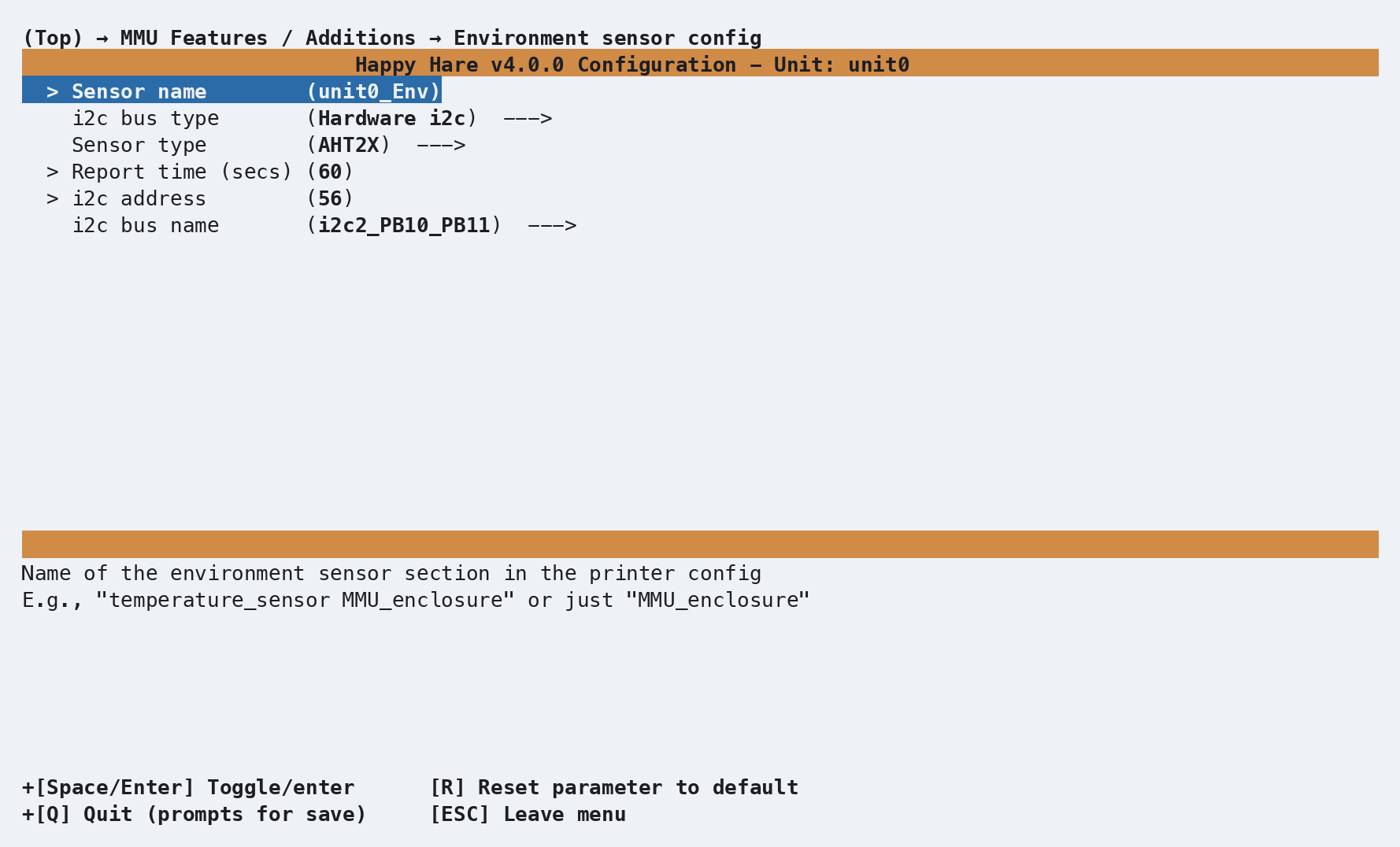
| Setting | Purpose |
|---|---|
Sensor name |
Klipper object name - defaults to <unit>_Env |
i2c bus type |
Hardware i2c (recommended) or software i2c |
Sensor type |
Match the installed chip: AHT, BME/BMP, HTU21D family, SHT3X or LM75; humidity availability depends on the chip |
i2c bus name |
Select a board-routed hardware bus, or Custom bus name to enter one; a blank custom name uses the MCU default |
i2c address |
Choose the address for the chip and its wiring; defaults include 56 (0x38) for AHT and 118 (0x76) for BME280 |
Report time (secs) |
Sensor reading interval where supported; 0 uses the Klipper driver default |
| SCL/SDA pins | Only shown for software i2c |
Choose AHT10 for older firmware where the newer AHT names are unavailable; menuconfig's sensor help describes compatibility. BME280/BME680 can report humidity; BMP chips and LM75 cannot. HTU21D-family sensors also offer resolution and hold-master options. Keep their defaults unless your sensor requires otherwise.
For example, the sensor association in the unit's [mmu_unit ...] section
of mmu_hardware.cfg can use the full Klipper object name:
environment_sensor : temperature_sensor unit0_Env
A per-gate design lists Gate N sensor entries in Environment sensor h/w config and produces a gate-aligned list. It can use one MCU for the whole unit or one MCU per gate; those choices are independent.
environment_sensors : temperature_sensor unit0_Env0, temperature_sensor unit0_Env1, ...
Heater(s)
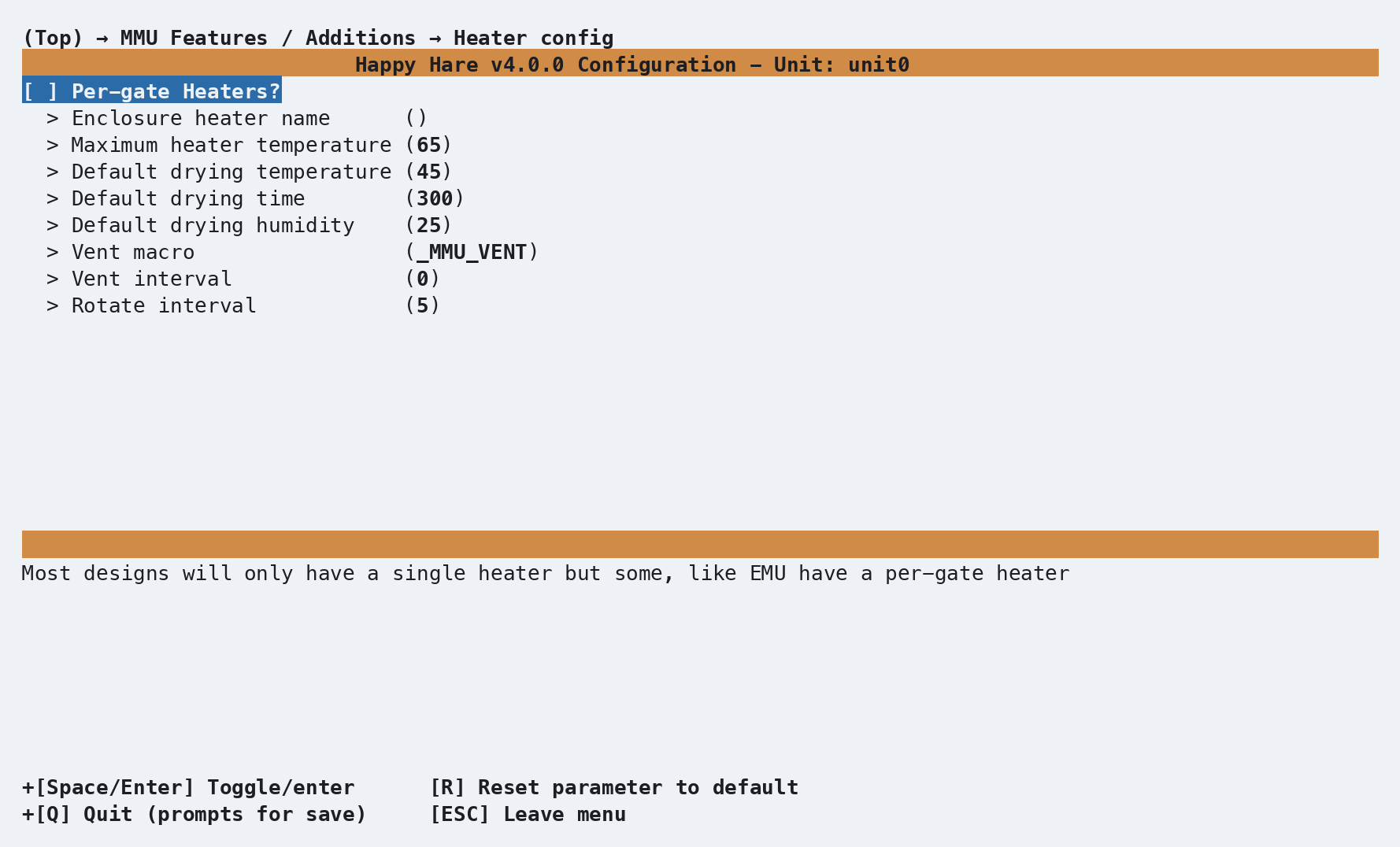
The generic heater setup associates an existing Klipper heater with the
MMU. Define its [heater_generic] section, heater pin, sensor and PID or
watermark control first. Some board profiles supply their own heater
configuration; follow the hardware-file hint shown by menuconfig for those.
For a shared enclosure, enter the existing
[heater_generic] object's name under Heater h/w config. In a per-gate
layout, open Heater h/w config, enable Gate N heater, and enter
that gate's object name.
| Setting | Purpose |
|---|---|
Enclosure heater name |
Existing Klipper heater object for a shared enclosure |
Gate N heater |
Per-gate switch that associates a heater with that gate |
Heater name |
Existing Klipper heater object for that gate |
Produces, alongside the sensor key in the same [mmu_unit ...] section:
filament_heater : heater_generic unit0_heater
or, per-gate:
filament_heaters       : heater_generic unit0_heater0, heater_generic unit0_heater1, ...
max_concurrent_heaters : 1
Optional heater fans follow their associated heater, including cooldown. Their hardware settings, controller fans for electronics cooling, and managed exhaust fans are covered in Fans & Airflow.
Vent servo
With the heater enabled, select Has enclosure vent servo? → Vent servo h/w config. A heater fan is not required. Set the servo pin and PWM range for the fitted servo; opening/closing angles and drive time are separate settings under Heater and humidity control.
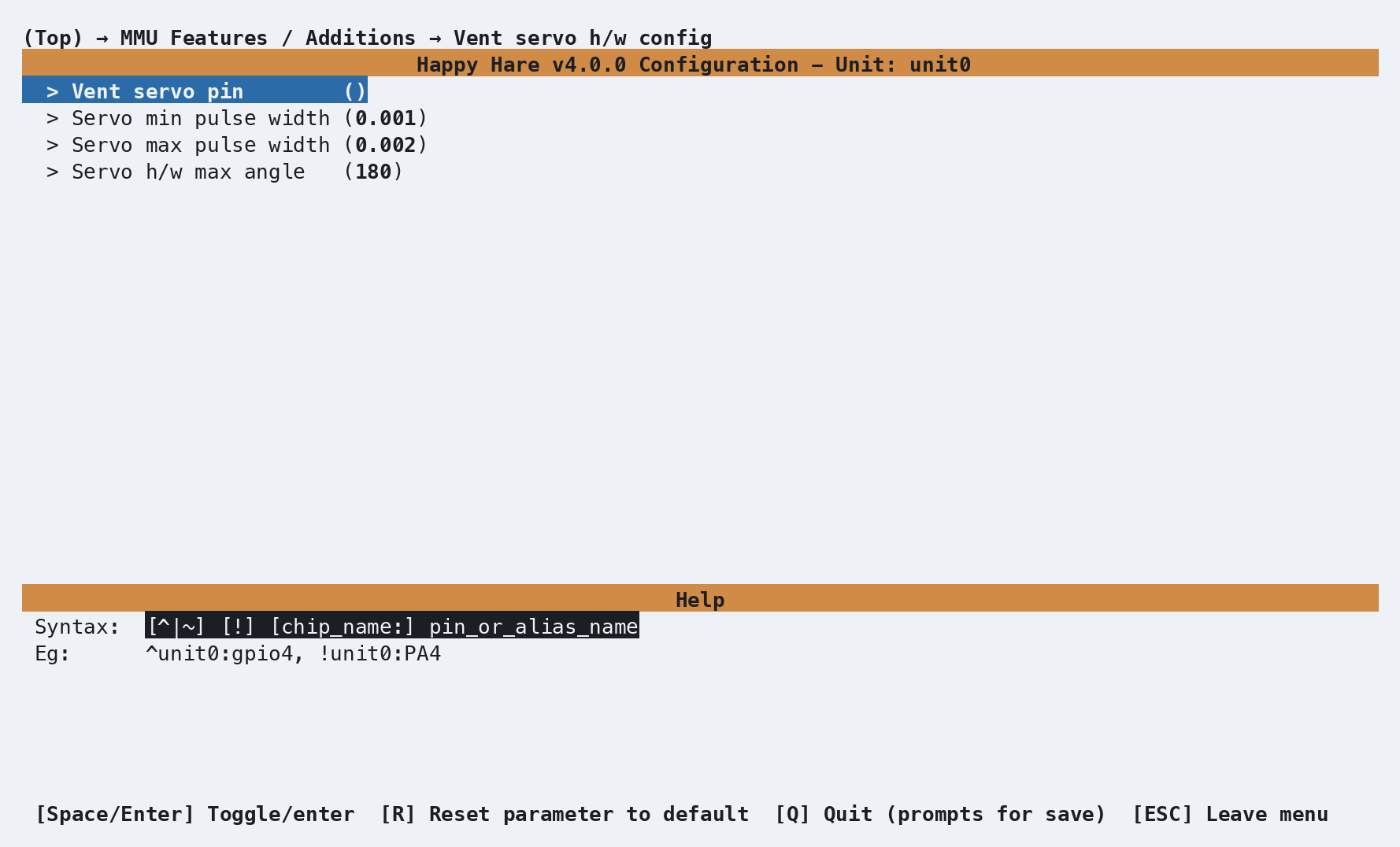
The default pulse range is 0.001–0.002 seconds with a hardware maximum
angle of 180 degrees. Per-gate layouts expose these settings separately
under Gate N vent servo, so different gates can use different servos.
Disable gates without a vent or leave their pin blank.
A shared vent generates an [mmu_servo unit0_vent_servo] object and this
association in [mmu_unit unit0]:
vent_servo : unit0_vent_servo
Per-gate vents preserve empty positions in their association list:
vent_servos : unit0_vent_servo0, , unit0_vent_servo2
A managed exhaust fan or optional macro can also provide venting without a servo. The venting recipe explains how they work together.
Parameter Setup
The Heater and humidity control submenu contains the drying limits and defaults. A per-gate layout also shows Maximum concurrent heaters here.
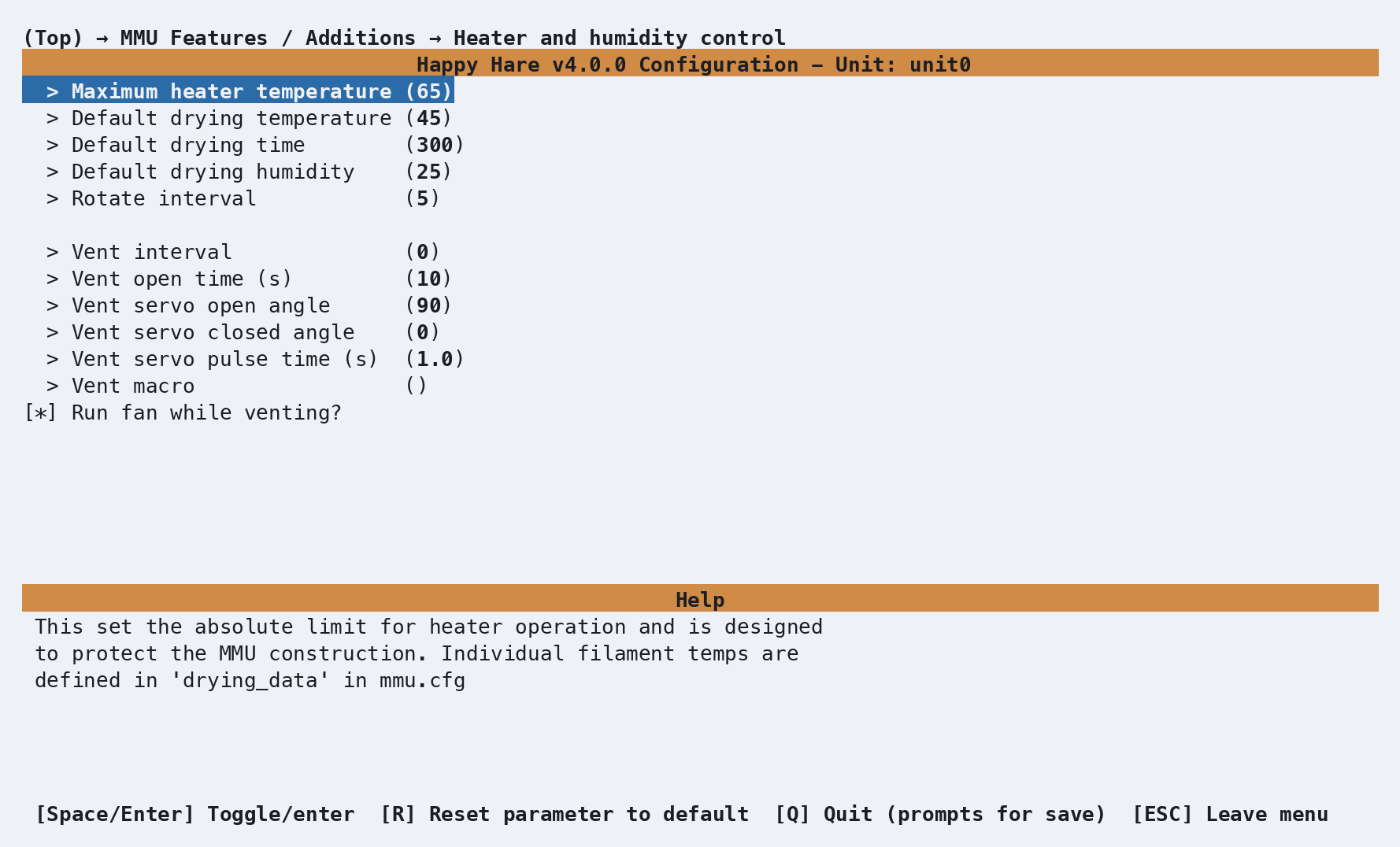
The heater controller's own tuning constants live in mmu_parameters.cfg;
the drying-recipe table ships in mmu.cfg in the same [mmu_parameters]
section:
heater_max_temp             : 65     # Absolute ceiling; drying never targets above this regardless of drying_data
heater_default_dry_temp     : 45     # Fallback drying temperature for an unrecognized or empty gate
heater_default_dry_time     : 300    # Fallback drying time in minutes
heater_default_dry_humidity : 25     # Default humidity % goal - drying ends early if reached
heater_rotate_interval      : 5      # Minutes between spool-rotation bursts, requires eSpooler and explicit GATES

drying_data : { 'pla': (45, 300), 'pla+': (55, 300), 'petg': (60, 300), 'tpu': (55, 300), 'abs': (70, 300),
                'abs+': (75, 300), 'asa': (65, 300), 'nylon': (75, 600), 'pc': (75, 600), 'pva': (75, 600),
                'hips': (75, 600) }
Venting settings also live in mmu_parameters.cfg:
| Setting | Default | Purpose |
|---|---|---|
heater_vent_interval |
0 min |
Minutes between openings during drying; 0 disables venting |
heater_vent_duration |
10 s |
How long the vent remains open |
heater_vent_run_fan |
1 |
Temporarily force managed fans on while open, then restore their modes |
heater_vent_open_angle |
90° |
Servo angle when open |
heater_vent_close_angle |
0° |
Servo angle when closed |
heater_vent_servo_duration |
1.0 s |
How long to drive the servo for each move; 0 keeps it powered |
heater_vent_macro |
Empty with a vent servo, otherwise _MMU_VENT |
Optional callback for additional vent hardware |
The servo angle and drive-time prompts appear when a vent servo is enabled. With per-gate servos, these operating angles and timings are shared across the unit; each servo's hardware PWM range is configured separately.
drying_data maps a material name (matched case-insensitively) to
(temperature_C, time_minutes). Starting a drying cycle without an explicit
TEMP/TIMER looks up each selected gate's assigned material here. A shared
heater uses the lowest recommended temperature and longest recommended time
across those gates; per-gate heaters use each gate's own recipe. Temperatures
are capped at heater_max_temp. A gate with no material assigned, or one
that is empty, falls back to heater_default_dry_temp and
heater_default_dry_time.
Extend the table with your own materials freely - it's a plain dict, and
MMU_HEATER DRYING_DATA=1 dumps whatever is currently configured. A
smaller, illustrative table showing just the shape of it:
drying_data: {'PLA': (45, 240), 'PETG': (55, 300), 'NYLON': (65, 480)}
- Values are
(temperature_C, time_minutes). - A material missing from the table falls back to
heater_default_dry_tempandheater_default_dry_time, same as an unrecognized material would.
Commands
MMU_HEATER                                     # Status report - heater state, or drying cycle progress
MMU_HEATER TEMP=50                             # Set/adjust heater temperature directly
MMU_HEATER DRY=1                               # Start a drying cycle, temp/time recommended from drying_data
MMU_HEATER DRY=1 TEMP=50 TIMER=240 HUMIDITY=12  # ...or override any of them
MMU_HEATER DRY=1 VENT_INTERVAL=10              # Open the vent every 10 minutes during drying
MMU_HEATER STOP=1                              # Stop the current drying cycle (or turn the heater off)
MMU_HEATER DRYING_DATA=1                       # List the configured drying-data table
Full parameter reference: MMU_HEATER.
Important
MMU_HEATER TEMP=50 outside a drying cycle sets the heater directly and
has no automatic timeout - it stays at that temperature until you turn it
off yourself with MMU_HEATER TEMP=0 or MMU_HEATER STOP=1. Prefer
DRY=1 for anything you intend to walk away from.
With per-gate heaters, use GATES= to select gates for drying, raw targets
or partial cancellation. Drying without rotation and raw temperature
control default to the selected unit's non-empty gates. STOP=1 without
GATES= stops the whole unit's cycle and turns off its heaters:
MMU_HEATER DRY=1 GATES=0,2,3       # Dry only these gates (subject to the concurrency cap)
MMU_HEATER TEMP=45 GATES=0,1       # Raw heater control for specific gates
MMU_HEATER STOP=1 GATES=1,3        # Cancel only these gates, leaving the rest of the cycle running
If more gates are selected than max_concurrent_heaters allows, the extra
gates queue and start automatically as active ones finish - the overall
cycle can take longer than any single gate's own timer as a result.
TEMP= on a gate behaves according to that gate's current state: queued -
only the stored target changes, the heater doesn't turn on yet; active - the
heater updates immediately; not part of the current cycle - it's just set
immediately, same as raw single-heater control.
MMU_HEATER STOP=1 GATES=1,3 cancelling only some gates behaves according
to each gate's current state too: an active gate has its heater turned
off immediately and is marked done; a queued gate is simply removed
from the queue and marked done, without ever having its heater turned on.
If cancelling leaves no gates still running or queued, the overall drying
cycle ends automatically.
With no drying cycle running and the shared heater off, MMU_HEATER reports:
MMU_HEATER
Not in drying cycle and heater is off
An illustrative status report while drying in single-heater mode with a servo and managed exhaust fan looks like this:
MMU is in filament drying cycle:
Drying filaments in gates: 1,2,6,7
Cycle time: 4 hours (remaining: 3 hours 46 minutes)
Target humidity: 25.0% (current: 63.6%)
Drying temp: 55.0°C (current: 48.3°C)
Venting operational (opening for 10s every 15 minutes, next in 11 minutes; vent servo, managed fan)
Spool rotation enabled (running every 5 minutes, next in <1 minute)
or, per-gate:
MMU is in filament drying cycle:
Drying filaments in gates: 1,2,5,6,7,8
Per-gate dryer mode (max concurrent heaters: 3). Humidity target 25.0%
Gate 1: (timer complete, final humidity: 22.3%)
Gate 2: Drying ABS 27.3°C (target 65.0°C), humidity 62.9%, 1 hour 1 minute remaining
Gate 5: Drying PLA 27.3°C (target 45.0°C), humidity 63.1%, 1 hour 1 minute remaining
Gate 6: Drying PETG 27.3°C (target 55.0°C), humidity 63.6%, 13 minutes remaining
Gate 7: (queued waiting for heater slot, target 45.0°C)
Gate 8: (queued waiting for heater slot, target 65.0°C)
Printer variables exposed
printer.mmu_machine.unit_N.vent_servo names a shared vent servo.
printer.mmu_machine.unit_N.vent_servos is a gate-aligned list for per-gate
vents, with blanks for gates without a servo. These describe configured hardware,
not whether a vent is currently open.
drying_state - a per-gate list of '' | queued | active | complete
| canceled. See
Per-gate arrays merged across every unit
in the printer variable reference.
UI
Mainsail/Fluidd shows an active drying cycle in the MMU display after
MMU_HEATER DRY=1 starts drying:
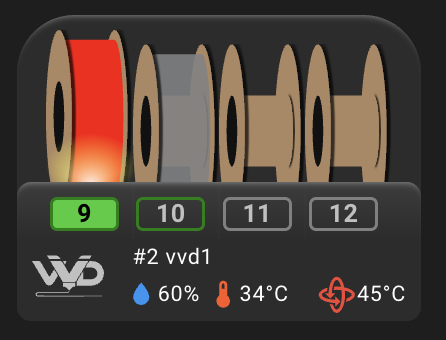
In this example, the environment sensor reports 60% humidity and 34°C, alongside the 45°C drying target.
The heater and environment sensor remain Klipper objects; their names are
listed in the unit metadata in
Printer Variables.
Use MMU_HEATER for drying progress and venting status. Fan visibility is
configured separately under each fan type's hardware menu; see
Fans & Airflow.
Tuning
Venting
Heating drives moisture from the filament into the enclosure air. Periodic
venting exchanges that humid air for fresh air. It operates only during a
drying cycle, not while holding a raw heater target with MMU_HEATER TEMP=.
An unheated desiccant box generally benefits from staying sealed.
- Configure the heater, environment sensor, and any vent servo or managed exhaust fan. Check the servo's travel before attaching a linkage that could bind at the configured angles.
- Set
heater_vent_open_angleandheater_vent_close_anglefor the flap. Setheater_vent_servo_durationlong enough to complete the move. Use0only if the vent needs continuous holding force; the servo can buzz or run warm when driven continuously. - For an exhaust fan, select managed fan OFF mode (
fan_forced: 0) and keepheater_vent_run_fan: 1. This avoids continuously exhausting heat when an AUTO threshold is reached. - Set a nonzero
heater_vent_intervaland an appropriateheater_vent_duration, or override the interval for one drying cycle. -
Run a short cycle with a temperature appropriate for the enclosure and filament, and check opening, airflow, closing and fan-mode restoration:
MMU_HEATER DRY=1 TEMP=45 TIMER=10 VENT_INTERVAL=1
MMU_HEATER
MMU_HEATER STOP=1
The drying controller checks the interval every 30 seconds. At an opening, it moves the servo, forces the relevant managed fans on if enabled, and calls any configured vent macro. After the open duration it closes the servo, restores the previous fan modes, and calls the macro again. Heater fans continue following their heaters independently.
Drying:       ---------------------------------------------------->
              <--- interval (minutes) ---> <--- open time --->
Vent:         closed                       OPEN               closed
Servo:                                     open angle         close angle
Managed fan:  previous mode                ON                 restore mode
Macro:                                     OPEN=1             OPEN=0
With per-gate heaters, venting targets the actively heating gates; queued gates wait. Per-gate vents and fans follow those targets. A shared vent or shared managed fan still serves the whole enclosure. Every configured vent servo closes at Klipper startup; an open vent also closes when drying ends or the MMU is disabled.
There is no dedicated manual vent command. Use the short drying cycle above to test the complete sequence. A humidity goal may finish it before the first vent opening, so check the reported cycle state as well as the flap.
Optional vent macro
Happy Hare already moves configured vent servos and runs managed fans.
Use heater_vent_macro only for extra hardware, such as another flap or a
relay. It receives:
| Parameter | Meaning |
|---|---|
UNIT |
Unit name |
OPEN |
1 to open, 0 to close |
GATES |
Actively heated gates, supplied only with per-gate heaters |
The supplied _MMU_VENT is a logging-only example. Copy it to your own
configuration file, rename it, add the hardware actions to its open and
close branches, and set heater_vent_macro to that name. This example shows
the callback shape; its comments must be replaced with your hardware commands:
[gcode_macro MY_MMU_VENT]
gcode:
    {% set unit = params.UNIT %}
    {% set opening = params.OPEN | int %}
    {% set gates = params.GATES | default('') %}
    MMU_LOG MSG="Vent callback: unit={unit}, open={opening}, gates={gates}"
    {% if opening %}
        # Operate additional hardware to open the vent
    {% else %}
        # Operate additional hardware to close the vent
    {% endif %}
The controller schedules closing; the macro does not need a delayed-close
timer. Callbacks can run during a print, so do not add delays or M400.
Leave heater_vent_macro empty when configured servos and fans provide all
the required venting.
Spool rotation
With an eSpooler, or a design whose gear motor can rotate the spool such as
ViViD, a drying cycle can periodically nudge each spool a
short distance in the rewind direction - just enough to stop a respooled
filament end from baking against one point of contact for hours. Start it
with MMU_HEATER DRY=1 ROTATE=1 GATES=1,3 - GATES must be given explicitly
whenever ROTATE=1 is used. Rotation only actually happens for gates that
are genuinely empty at the moment the timer fires (filament removed from
the MMU inlet and secured to the spool) - Happy Hare re-checks this every
heater_rotate_interval minutes rather than only once at the start, so you
can safely unload a gate and secure it mid-cycle. If a gate passed to
GATES= isn't empty yet when the cycle starts, Happy Hare warns about it
immediately rather than staying silent until the first rotation tick -
drying still proceeds normally, since a loaded gate simply can't rotate
until it's cleared. For an eSpooler, it uses the same
power and duration as an ordinary
rewind burst
(espooler_rewind_burst_power/espooler_rewind_burst_duration) - there's no
separate "rotate" setting to tune. ViViD uses its gear motor for rotation
only while the printer is not printing.
Choosing a temperature/time by hand
If your slicer's filament isn't in drying_data, either add an entry (it's
a plain dict you can extend) or pass TEMP=/TIMER= explicitly for that
cycle. HUMIDITY= ends a cycle as soon as the sensor reports at or below the
target, which is usually a better stopping point than a fixed timer if your
sensor supports humidity at all.
Troubleshooting
- Humidity always reports as missing - the sensor chip may not support humidity (some report temperature only), or the humidity reading isn't recognized. Drying still runs on the timer; humidity-based early termination just won't trigger.
- Venting never runs - confirm a drying cycle is active and
heater_vent_intervalis greater than0. Configure a servo, managed fan override or hardware macro; an empty macro is valid when the built-in hardware supplies venting. Check the status report and console for errors. - Vent options are missing - enable Has enclosure heater(s)? first.
- The servo moves but the flap does not stay open - check the linkage, angles and drive duration; continuous drive may be needed for a flap that cannot hold its position without power.
- Drying takes longer than expected in per-gate mode - gates queue when
max_concurrent_heatersis smaller than the number of gates you asked for; gates run in batches up to that limit, so total wall-clock time can exceed the longest individual timer. - Rotation never happens - no supported spool-rotation mechanism is
fitted,
ROTATE=1wasn't specified, or the gate genuinely wasn't empty (filament end secured to the spool) at the moment a rotation was due. No MMU heater configurederror -filament_heater/filament_heatersis empty; the manager needs at least one heater object configured beforeMMU_HEATERwill do anything.
See also
- Fans & Airflow - fan selection and example setups
- EMU - per-gate hardware menus
- Parameters - drying and vent defaults
- Command Reference:
MMU_HEATER - Feature: eSpooler - the mechanism spool rotation reuses
- Printer Variables: per-gate arrays
for the
drying_statefield