Feature: LEDs
Concept
Happy Hare can drive NeoPixel/WS2812 LEDs on the MMU for functional feedback - which gate is selected, whether it's empty, what color the loaded filament is - as well as a bit of "bling." Wiring is flexible: one continuous strip, several separate strips on different pins, or a mix of both, all combined into a single logical arrangement Happy Hare controls as one:
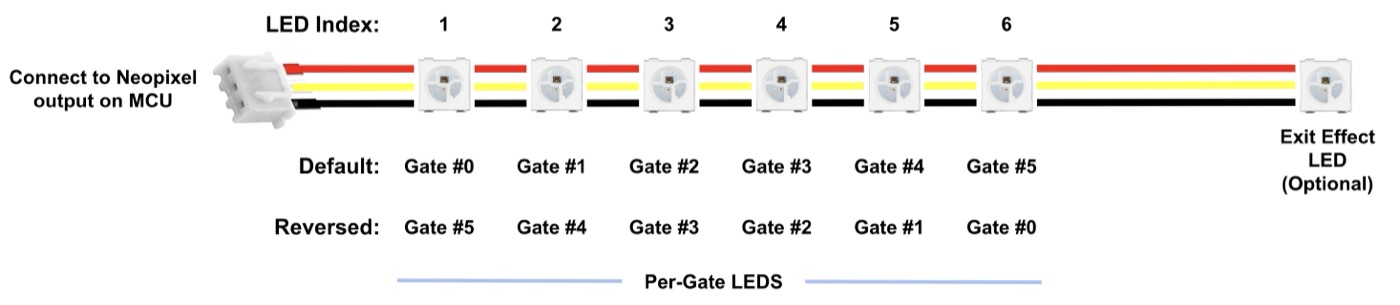
Physical LEDs are grouped into up to four logical segments, each optional:
exit- one (or more) per gate, typically mounted where filament leaves the MMU towards the bowden tube.entry- one (or more) per gate, typically mounted where filament enters the MMU. Having both entry and exit lets one show gate status while the other shows filament color, for example.status- represents the MMU/selected-filament as a whole; more than one status LED is fine.logo- purely decorative, doesn't change during operation.
LEDs are indexed 1..N along a chain, and a segment's range can run forward
or backward ((1-4) vs (4-1)), or even stitch together indexes and whole
chains from more than one physical strip - the only rule is that a segment
representing gates must be contiguous, ascending or descending. Physical
LEDs can even be wired in parallel to share one index - two LEDs, one
number, both driven identically - if you want two physical points lit for
what Happy Hare treats as a single logical position. Animated
effects need the separate LED Effects for
Klipper plugin
installed; without it, LEDs still work, just as static colors instead of
animations.
Hardware Setup
Examples below use the default unit name unit0. Substitute your configured
Klipper object name in unit-specific
sections, object references and pin prefixes.
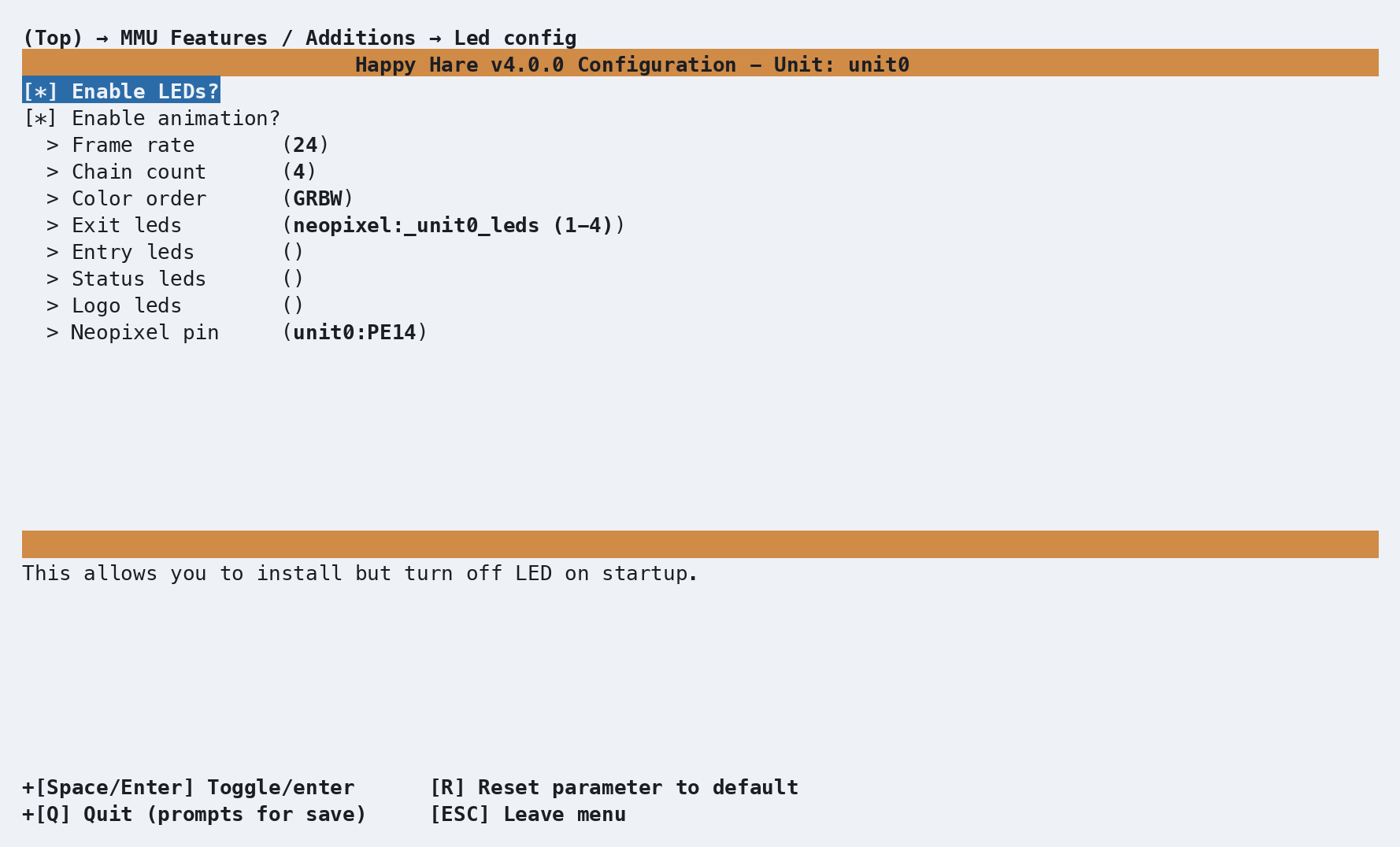
Enable under MMU Features / Additions:
| Setting | Purpose |
|---|---|
Enable LEDs? |
Master on/off - default on |
Enable animation? |
Default on; turn off to save a little load and run static colors only |
Frame rate |
6-32, default 24 |
Chain count |
Number of physical LEDs on the main chain - defaults to the gate count |
Color order |
Default GRBW; use a comma-separated list if mixing LED types on one chain |
Exit / Entry / Status / Logo LEDs |
The virtual-chain range for each segment (see Concept above) - blank means that segment isn't fitted |
Neopixel pin |
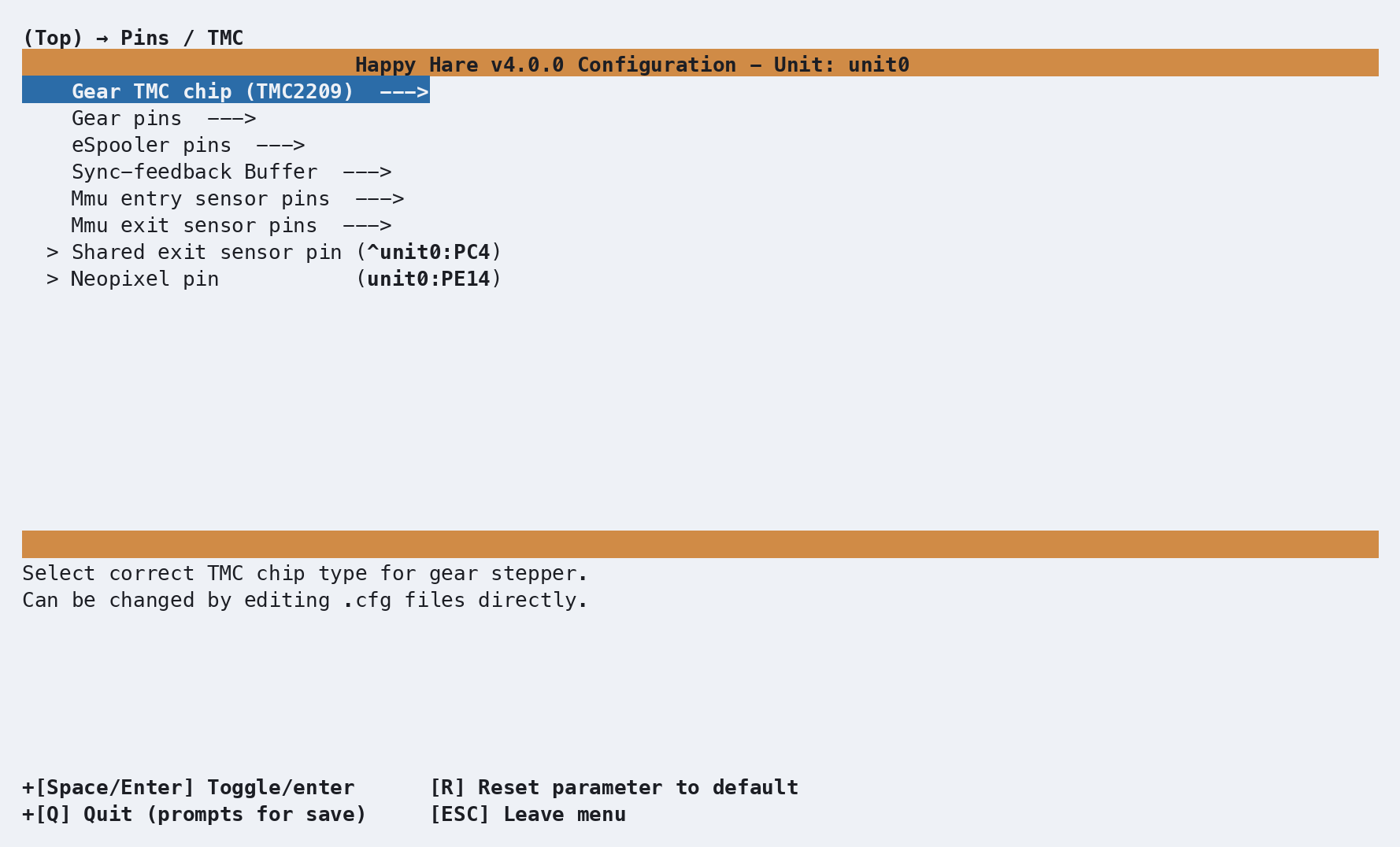
The physical pin driving the main chain - also reachable from the top-level Pins / TMC screen alongside every other MMU pin |
Together these produce, in mmu_hardware.cfg:
[neopixel _unit0_leds]
pin           : unit0:PA0
chain_count   : 4
color_order   : GRBW

[mmu_leds unit0]
entry_leds    :
exit_leds     : neopixel:_unit0_leds (1-4)
status_leds   :
logo_leds     :
frame_rate    : 24
Only exit_leds is populated by default - entry/status/logo are blank
until you fit and wire them yourself. Mixing multiple physical strips into
one virtual segment looks like this (two Box Turtles, one wired in reverse,
combined into a single 8-LED exit segment):
exit_leds: neopixel:bt_1 (4-1)
           neopixel:bt_2a
           neopixel:bt_2b
           neopixel:bt_2c
           neopixel:bt_2d
Important
entry/exit segment length must equal the gate count, or a whole
multiple of it. BTT ViViD, for example, uses 7 LEDs per gate (28 total
for 4 gates) - with more than one LED per gate, Happy Hare uses the
extra LEDs to animate loading/unloading across that gate's own little
strip rather than just switching a single LED.
Parameter Setup
The rest of [mmu_leds unit0] in mmu_hardware.cfg controls what each
segment shows by default, and the colors used for a few special cases:
enabled                 : True    # LEDs enabled at startup (MMU_LED can still toggle this)
animation                : True    # Use animated effects; False = static colors only
exit_effect             : gate_status      # off|gate_status|filament_color|slicer_color|r,g,b|<effect name>
entry_effect            : filament_color    # off|gate_status|filament_color|slicer_color|r,g,b|<effect name>
status_effect           : filament_color    # on|off|filament_color|slicer_color|r,g,b|<effect name>
logo_effect             : (0, 0, 0.3)       # off|r,g,b|<effect name>
white_light             : (1, 1, 1)         # RGB used for a filament with no color set
black_light             : (.01, 0, .02)     # RGB used for a filament color of pure black
empty_light             : (0, 0, 0)         # RGB used for an empty gate
filament_color_intensity: 0.5               # 0.0-1.0, dims the filament/slicer-color segments
gate_statusshowsprinter.mmu.gate_statusas a color (empty/available/unknown/buffered).filament_colorshows the loaded filament's actual color (printer.mmu.gate_color_rgb), falling back towhite_light/black_light/empty_lightas appropriate - there's no separate fixed color for "filament loaded."slicer_colorshows the color the slicer expects for that gate's tool (printer.mmu.slicer_color_rgb), set byMMU_SLICER_TOOL_MAP COLOR=...(normally done for you by the print-start macro) - empty until a print sets it.- Any of the four
*_effectsettings also accepts a plainr,g,bvalue, or the name of a defined effect (see below) - useful forlogo_effectespecially, which is usually just a fixed color.
Every state Happy Hare drives automatically has its own effect setting, each paired with a static RGB fallback used when animation is off:
effect_loading                 : mmu_blue_clockwise_slow,   (0, 0, 0.4)
effect_loading_extruder        : mmu_blue_clockwise_fast,   (0, 0, 1)
effect_unloading                : mmu_blue_anticlock_slow,   (0, 0, 0.4)
effect_unloading_extruder      : mmu_blue_anticlock_fast,   (0, 0, 1)
effect_heating                  : mmu_breathing_red_slow,    (0.3, 0, 0)
effect_selecting                : mmu_breathing_white_fast,  (0.2, 0.2, 0.2)
effect_checking                 : mmu_breathing_cyan_fast,   (0, 0.4, 0.5)
effect_preloading                : mmu_breathing_cyan_fast,  (0, 0.4, 0.5)
effect_initialized              : mmu_rainbow,               (0.5, 0.2, 0),   8
effect_error                    : mmu_red_strobe,            (1, 0, 0),       10
effect_complete                 : mmu_sparkle,               (0.3, 0.3, 0.3), 10
effect_gate_selected            : mmu_static_blue,           (0, 0, 1)
effect_gate_available            : mmu_static_green,          (0, 0.5, 0)
effect_gate_available_sel       : mmu_ready_green,            (0, 0.75, 0)
effect_gate_unknown              : mmu_static_orange,         (0.5, 0.2, 0)
effect_gate_unknown_sel          : mmu_ready_orange,           (0.75, 0.3, 0)
effect_gate_empty                : mmu_static_black,          (0, 0, 0)
effect_gate_empty_sel            : mmu_ready_orange2,          (0.1, 0.04, 0)
An optional third field on any effect_* line overrides how long that
effect plays before reverting to default - effect_initialized,
effect_error and effect_complete use it above (8s/10s/10s). The named
effects themselves (mmu_blue_clockwise_slow, mmu_rainbow, and so on) are
defined once in mmu.cfg, each able to apply to a whole segment or to an
individual gate's own LEDs - browse mmu.cfg for the full list if you want
to point a setting at a different built-in effect, or define your own
alongside them.
Reader feedback and pending-assignment effects overlay whatever is already showing, and
are configured on the pages that own those features rather than here:
Spoolman's pending-spool-ID prompt
(effect_pending_spoolid/effect_pending_spoolid_expiring, governed by
spoolman_led_segment in mmu.cfg) and NFC's scan
feedback (effect_nfc_read/effect_nfc_deep_read/effect_nfc_fail,
governed by nfc_led_segment in mmu_parameters.cfg).
TD-1 feedback uses
effect_td1_read / effect_td1_fail and td1_led_segment. A pending TD-1
measurement also activates the pending-assignment countdown.
Commands
MMU_LED                             # Status report
MMU_LED ENTRY_EFFECT=gate_status     # Change a segment's default effect
MMU_LED ANIMATION=0                  # Static colors only, for this unit
MMU_LED ENABLE=0                     # Turn LEDs off entirely
Full parameter reference: MMU_LED. A
status report looks like this:
Unit 0 LEDs (enabled)
  Animation: enabled
  Exit effect: 'gate_status'
  Entry effect: unavailable
  Status effect: 'filament_color'
  Logo effect: '(0.0, 0.0, 0.3)'
(unavailable means that segment has no LEDs configured.) Changes made
this way behave like MMU_TEST_CONFIG - live immediately, but not
persisted; edit mmu_hardware.cfg for a permanent change.
MMU_SET_LED is the other LED command, but for a different job: a
temporary, raw override rather than a persistent default. It can target a
single gate and/or auto-revert after a set time:
MMU_SET_LED EXIT_EFFECT=mmu_ready_orange GATE=2 DURATION=5
Full parameter reference: MMU_SET_LED.
Reach for MMU_LED for "this is how gate 2 should normally look"; reach for
MMU_SET_LED for "flash this one gate right now."
Printer variables exposed
See printer['mmu_leds <unit_name>'] for the
directly-registered per-object status (LED counts per segment, current
effects, animation state).
Mainsail, Fluidd, and KlipperScreen (Happy Hare edition) all have a button
to toggle the default gate effect between gate_status and filament_color
without editing config.
Tuning
Beyond the functional colors above, most MMU operations step through their
own effect automatically - useful as a diagnostic even without watching the
console. entry only ever changes on the print-state rows below; during an
in-progress load/unload/select it's left showing whatever its own default is.
Loaded filament also has its own baseline regardless of print state: with no
print running at all, a loaded gate's status LED sits at a dim blue rather
than fully off, so a glance at the MMU shows whether it's sitting loaded
between prints.
| Print state | Exit / Status LEDs | What it looks like |
|---|---|---|
standby (MMU disabled) |
Off (entry and logo too) | Dark |
initialized (startup) |
initialized effect for ~8s, then default |
A brief "shooting stars" sparkle |
ready / printing / cancelled |
Default (whichever effect each segment is configured for) | Default color; status dims to blue if a gate is loaded |
pause_locked (MMU-paused) |
error effect, all gates |
Strobing |
paused (unlocked, resumable) |
error effect, current gate only |
Strobing, current gate only |
complete |
Exit: complete effect for ~10s; Status: back to default immediately |
A brief sparkle |
error |
Exit: error effect for ~10s; Status: back to default immediately |
Strobing |
| Action | Exit / Status LEDs (current gate) | What it looks like |
|---|---|---|
| Loading (gear moving towards extruder) | loading effect |
Slow pulsing white, forward motion |
| Loading into the extruder | loading_extruder effect |
Fast pulsing white, forward motion |
| Unloading (retracting away from extruder) | unloading / unloading_extruder effect |
Slow/fast pulsing white, reverse motion |
| Forming or cutting a tip | unloading_extruder effect |
Fast pulsing white |
| Heating (drying, or a toolhead heater step) | heating effect |
Pulsing red |
| Selecting/homing a gate | Status only: selecting effect |
Fast pulsing white |
| Checking or preloading a gate | Status only: checking/preloading effect |
Fast pulsing white |
| Idle | Default | Default color |
The "what it looks like" column describes the shipped default effect's
motion, not a separate setting - swap any of these for another effect name
(or a plain r,g,b) the same way as the functional defaults above.
To reduce load if it matters on your setup, animation: False (or
MMU_LED ANIMATION=0) keeps every functional color but drops the animated
motion.
Tip
Mainsail and Fluidd have their own filament-color swatches next to the
per-extruder T0/T1/T2/... buttons - not LEDs, but color data
driven from the same source as the filament_color/slicer_color
effects above. This page doesn't cover setting those swatches up; check
Mainsail's or Fluidd's own documentation.
Troubleshooting
- A segment reports
unavailableonMMU_LED's status report - that segment's*_ledskey is blank; nothing is wired to it. - LEDs are static instead of animated - either
animationis off (by choice or viaMMU_LED ANIMATION=0), or the LED Effects for Klipper plugin isn't installed - functional colors still work either way, just without motion. - Only part of a chain lights up, or gates map to the wrong LEDs - check
the segment's range direction (
(1-4)vs(4-1)) matches your physical wiring order, and thatchain_countcovers every LED actually on that pin. - Filament color never shows on entry/exit/status -
filament_colorneeds a color set for that gate, either directly (MMU_GATE_MAP COLOR=...) or via Spoolman.
See also
- Command Reference:
MMU_LED - Command Reference:
MMU_SET_LED - Feature: Spoolman / Filament Hub - the pending-spool-ID LED overlay
- Feature: NFC/RFID Reading - the scan-feedback LED overlay
- Feature: Gate/TTG Maps -
gate_color_rgband the rest of the gate map data this page's effects read from, plus a worked example for driving your own separate LED strip with it