Tip Shaping: Forming
What it does
Happy Hare's standalone filament-tip-forming macro - the default way to get
a clean, hair-free tip before an unload, working similarly to
PrusaSlicer/SuperSlicer's own tip forming. See Feature: Tip Forming and
Purging for the concept, the alternative
methods (toolhead cutting, slicer-controlled), and the full step-by-step
tuning workflow using
MMU_TEST_FORM_TIP - this page doesn't repeat that, just the menuconfig
view of the variables it tunes.
Where it's applied
_MMU_FORM_TIP, defined in mmu_form_tip.cfg. Active whenever
form_tip_macro: _MMU_FORM_TIP in mmu.cfg (the default) - runs through
five steps in order: ramming, nozzle separation, cooling moves, an optional
skinnydip pass, then parking the result for eject/inspection or the next
unload step.
The Macro Variables screen is always visible regardless of whether tip forming or toolhead cutting is selected. Tip Shaping: Toolhead Cutting's screen only appears once a toolhead cutter is enabled.
Happy Hare zeroes pressure advance for the duration of the macro call, so the ramming/cooling moves aren't distorted by it, then automatically restores whatever value was active beforehand once tip forming completes - nothing to configure or restore by hand.
Selecting filament-movement forming
Open menuconfig's Tip Forming / Cutting ---> screen, then open Select
standalone tip shaping option and choose Tip shaping using filament
movement. This writes form_tip_macro: _MMU_FORM_TIP to mmu.cfg.
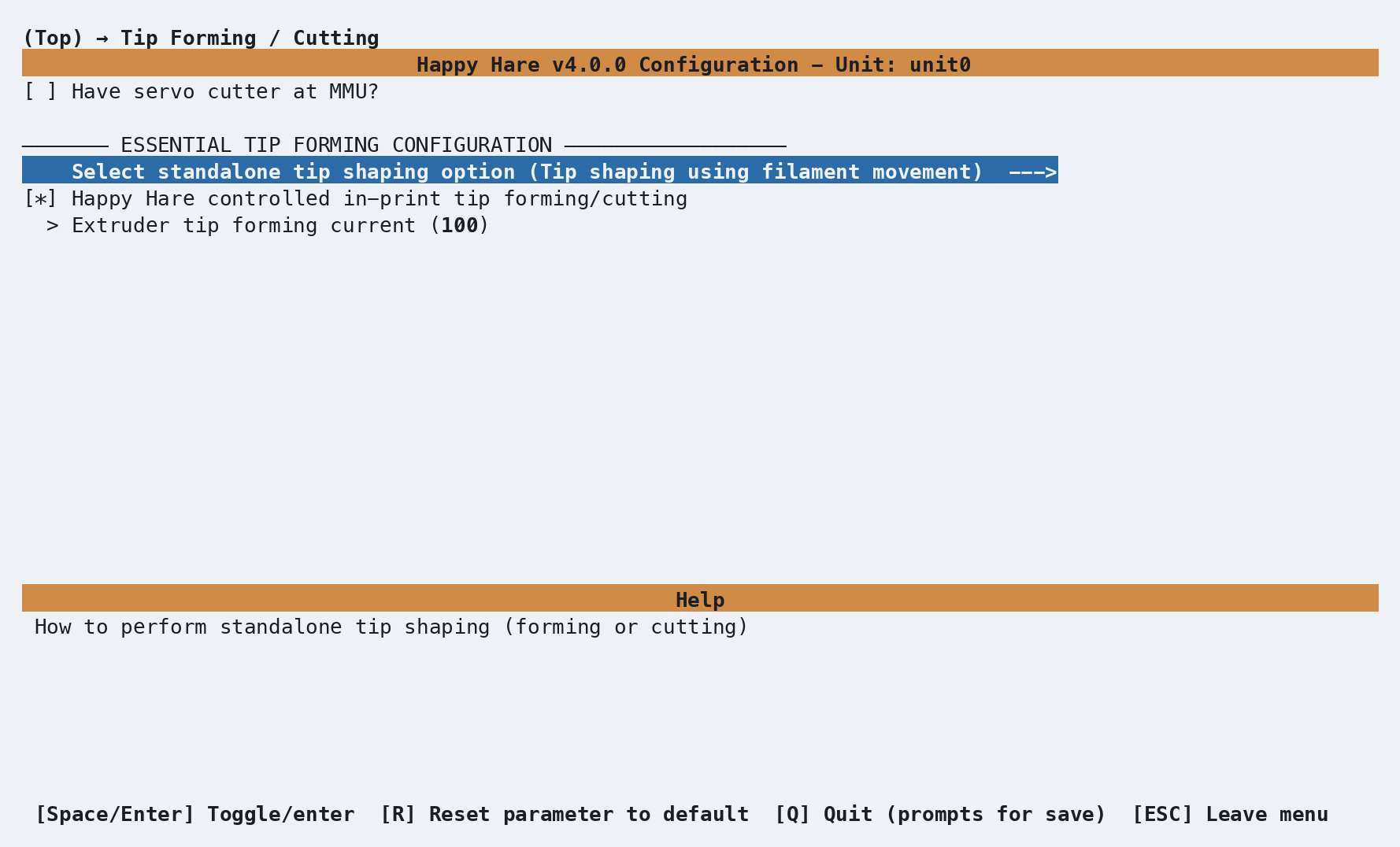
The other settings on this screen control when and how forming runs:
| Setting | Purpose |
|---|---|
| Have servo cutter at MMU? | Enables the separate MMU-mounted cutter. That cutter is additive and does not replace this tip-shaping selection. |
| Happy Hare controlled in-print tip forming/cutting | Leave enabled to run _MMU_FORM_TIP during prints and disable the slicer's own tip forming. Disable it when the slicer will form the tip; menuconfig then exposes Slicer tip park pos. |
| Extruder tip forming current | Percentage of normal extruder current to use while forming. 100 disables the boost; increase it only as needed, up to 150. |
Configuration
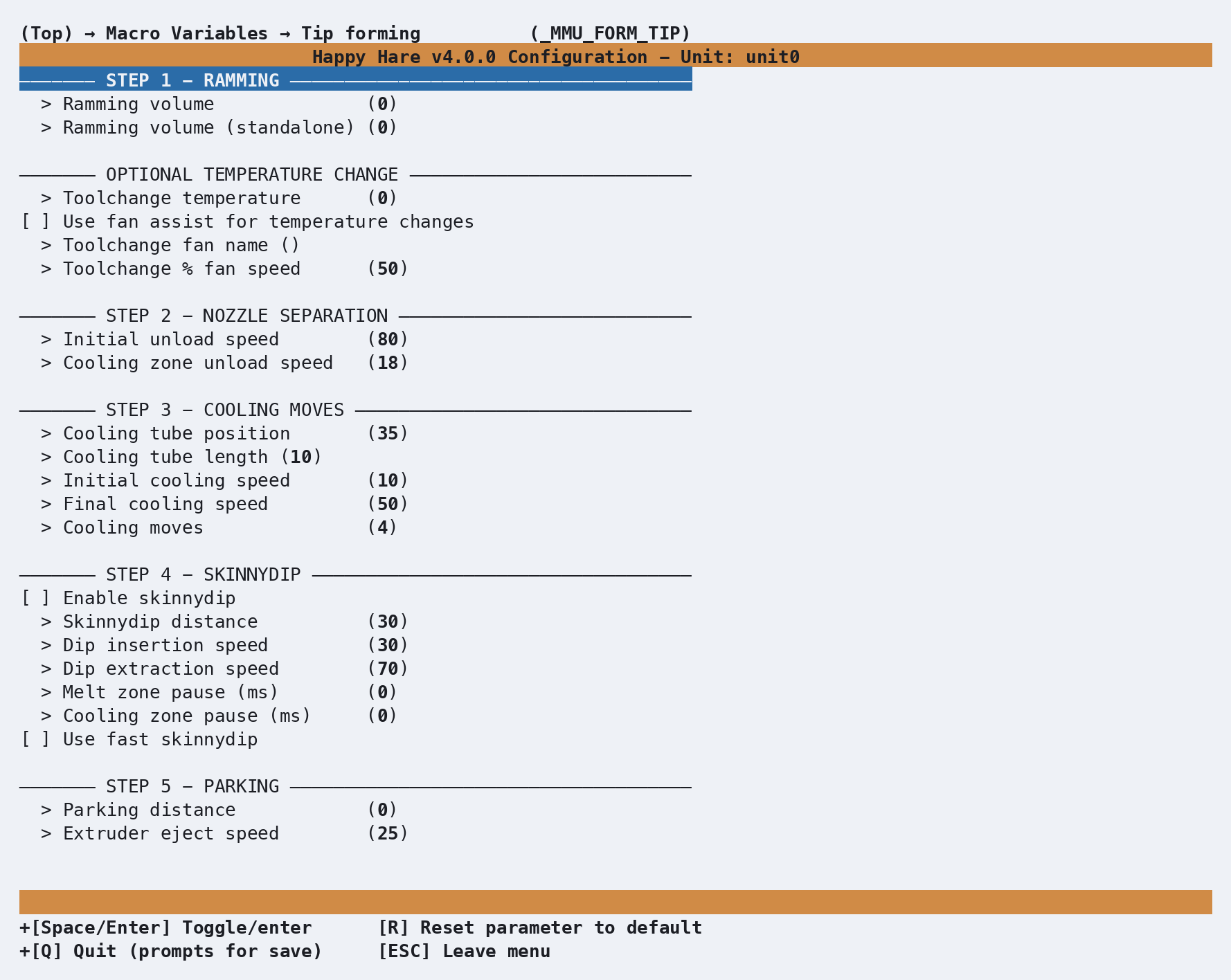
_MMU_FORM_TIP_VARS in mmu_macro_vars.cfg, reachable from menuconfig's
Macro Variables → Tip forming (_MMU_FORM_TIP) screen shown above,
grouped by the same five steps the tuning workflow walks through. Full
variable table: Macro Variables: Tip
forming.
Hotend starting points
cooling_tube_position/cooling_tube_length are toolhead-specific -
tuning from scratch is slow, so start from your hotend's known geometry
rather than the shipped default:
| Hotend | cooling_tube_position |
cooling_tube_length |
|---|---|---|
| DragonST | 35 mm |
15 mm |
| DragonHF | 30 mm |
10 mm |
| Mosquito | 30 mm |
20 mm |
| Revo | 35 mm |
10 mm |
| RapidoHF | 27 mm |
10 mm |
See also
- Feature: Tip Forming and Purging -
concept and the full
MMU_TEST_FORM_TIPtuning workflow - Macro Variables: Tip forming -
every
_MMU_FORM_TIP_VARSsetting in full - Tip Shaping: Toolhead Cutting - the alternative that skips tip forming entirely
- Macro Customization -
form_tip_macro, the replacement point that chooses between this macro and its alternatives