Tip Shaping: Toolhead Cutting
What it does
An alternative to filament-movement tip forming: a toolhead-mounted cutter trims the tip cleanly instead, skipping the forming step (and its per-filament tuning) entirely. See Feature: Tip Forming and Purging for the concept, trade-offs, and the cut routine itself - this page covers the variables behind it. For worked toolhead-parking examples around a cutter specifically, see Toolchange Movement: Tip Cutting Options.
Where it's applied
_MMU_CUT_TIP, defined in mmu_cut_tip.cfg. Active once
form_tip_macro: _MMU_CUT_TIP in mmu.cfg, which itself only becomes an
available choice once a toolhead cutter is enabled (Toolhead
sensors/settings → Has toolhead cutter? in menuconfig) - that's a
separate capability from the choice of tip-forming method itself.
Selecting toolhead cutting
First enable Has toolhead cutter? under menuconfig's Toolhead
sensors/settings ---> screen. Then open Tip Forming / Cutting --->,
open Select standalone tip shaping option, and choose Tip cutting
using toolhead cutter. This writes form_tip_macro: _MMU_CUT_TIP to
mmu.cfg.
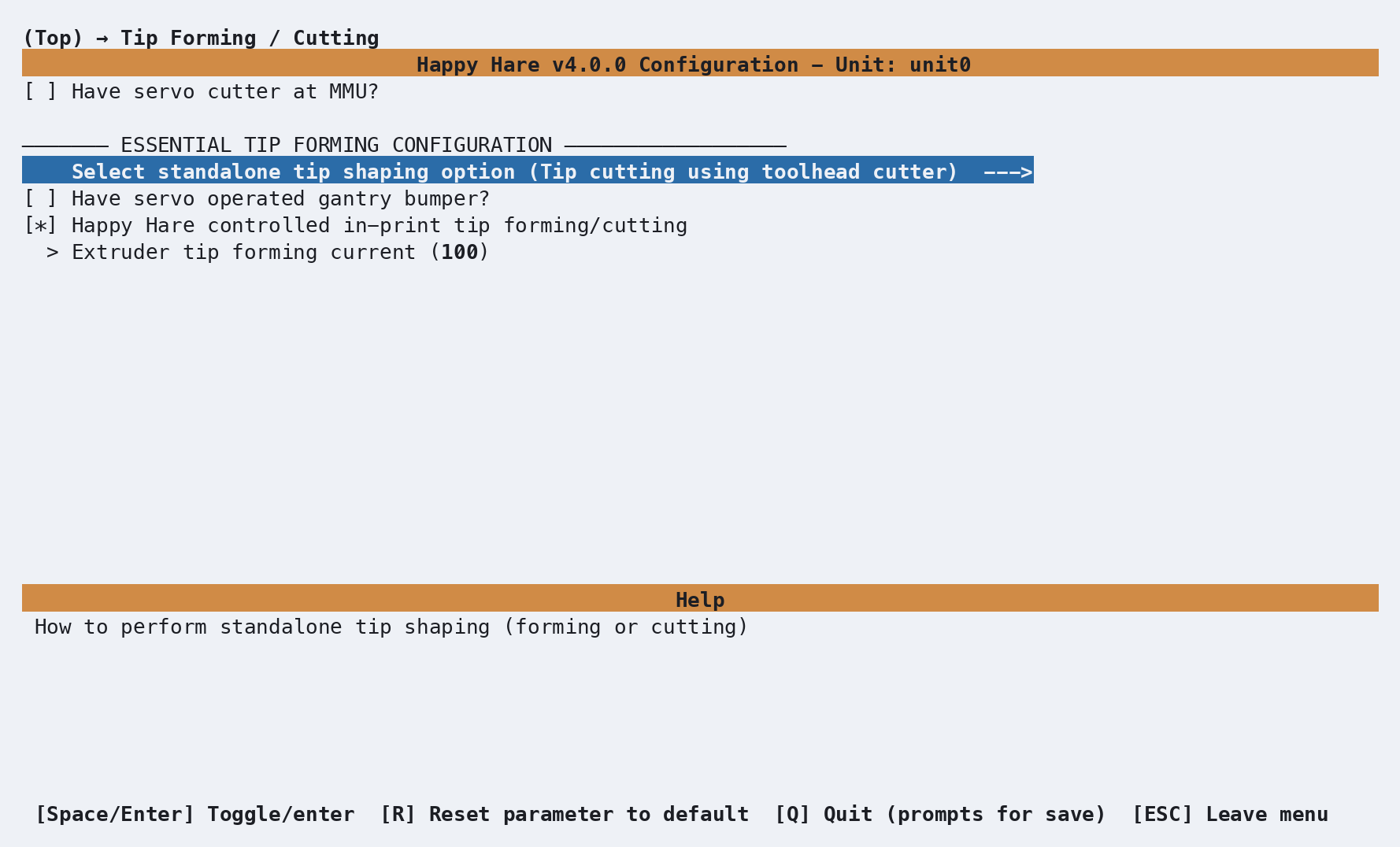
Leave Happy Hare controlled in-print tip forming/cutting enabled when
using the cutter, and disable the slicer's own tip forming. The optional
Have servo operated gantry bumper? setting appears with this method;
enable it and enter the servo pin only when the cutter is pressed against a
deployable gantry-mounted bumper. Extruder tip forming current can
temporarily boost the extruder from 100 to 150 percent during the cut
sequence; 100 disables the boost.
Have servo cutter at MMU? is a different, additive cutter at the MMU end of the bowden. It is covered under Tip Shaping: MMU Cutting.
Configuration
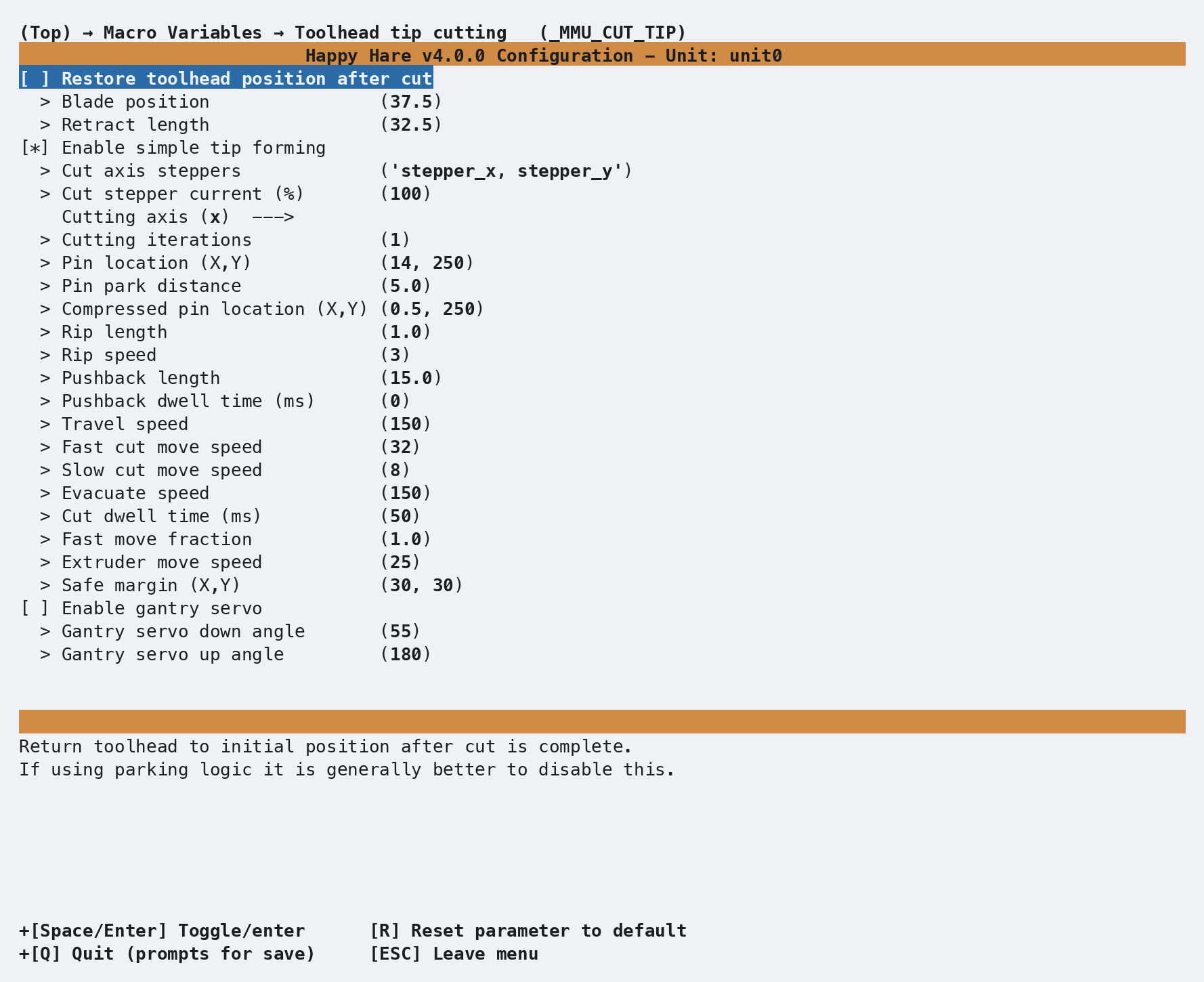
_MMU_CUT_TIP_VARS in mmu_macro_vars.cfg, reachable from menuconfig's
Macro Variables → Toolhead tip cutting (_MMU_CUT_TIP) screen shown
above, once the capability flag above is on. Full variable table: Macro
Variables: Toolhead tip cutting.
Tune the same one-variable-at-a-time way as tip forming (see Feature: Tip
Forming and Purging) -
the variables themselves just live in this different section.
A few settings are worth knowing about specifically:
pin_loc_xy/pin_loc_compressed_xyare the depressor pin's real and fully-compressed X,Y coordinates - both toolhead-specific and not something to copy from another build.cutting_axis(xory) andcut_axis_steppers/cut_stepper_currentchoose which axis the cut motion happens on, and an optional temporary current boost (up to ~150%) on the steppers doing the cutting move.cut_iterationsrepeats the cut - raise it if your cutter struggles with a particular filament.pushback_lengthpushes the cut fragment back into the hotend so it can't cause a future clog - a PTFE-tube-length-plus-a-few-mm starting point, not the couple of millimeters that might look sufficient at first glance.
See also
- Feature: Tip Forming and Purging - concept, trade-offs, and the cut routine
- Toolchange Movement: Tip Cutting Options - worked parking examples for a toolhead cutter
- Macro Variables: Toolhead tip cutting -
every
_MMU_CUT_TIP_VARSsetting in full - Tip Shaping: Forming - the default alternative this macro replaces
- Tip Shaping: MMU Cutting - a different, MMU-mounted cutter that trims after unload instead, additive rather than a replacement for either of the above