Installation
Happy Hare is a set of Klipper "extra" modules, a Moonraker component, and a
set of macros and config templates. Installing it is the same shape as
installing Klipper itself: clone the repository, then run its install script.
This page covers the parts that are the same regardless of which MMU you're
setting up — cloning, the installer's command-line flags, the optional client
macros, and upgrading later. The actual first-run walkthrough (the
menuconfig screens you'll see and the choices worth pausing on) is one page
per MMU type - see the getting started guides for popular machines as examples.
Cloning Happy Hare
Log into the machine running Klipper (most commonly a Raspberry Pi) as the user you
used to install klipper over SSH using PuTTY, KiTTY, MobaXterm, ssh or similar utility
(e.g. ssh pi@myprinter.local), then clone the repository:
cd ~
git clone https://github.com/moggieuk/Happy-Hare.git
cd Happy-Hare
Running the Installer
Consult the Getting Started guide for your particular MMU type (or pick a design
similar to yours because there is often a lot of overlap) for a walk-through of
essential menuconfig screens and hardware verification. In the unusual case
you need special install options keep reading.
./install.sh
The very first time this runs, there's no config yet, so it drops straight
into menuconfig automatically - no flag needed for that first pass. On every
later run, ./install.sh with no flags just re-applies your existing choices
(a safe re-install/upgrade); to go back into menuconfig and change
something, add -i:
./install.sh -i
./install.sh -k <klipper_home_dir> -c <klipper_config_dir> -m <moonraker_home_dir>
Note
An existing install is never overwritten outright - it's moved to a
timestamped backup directory (e.g. mmu.old-20260807-102329) and the new one is
rebuilt from your previous choices plus whatever you change this run.
Naming an MMU unit
On a first installation, open Name → Klipper object name in menuconfig to
choose the first unit's name. It defaults to unit0, but is not fixed. Use a
lowercase letter first, followed by lowercase letters, digits, _ or -.
For example, choosing box produces sections such as [mcu box] and
[mmu_unit box], pin prefixes such as box:PA1, and per-unit files such as
mmu_hardware_box.cfg and mmu_parameters_box.cfg. Configuration examples in
these guides commonly use unit0; substitute your configured name when copying
unit-specific sections, pins or commands.
Name → Display name is a separate label for Mainsail, Fluidd and KlipperScreen and may contain spaces. Changing this label leaves the Klipper object name intact.
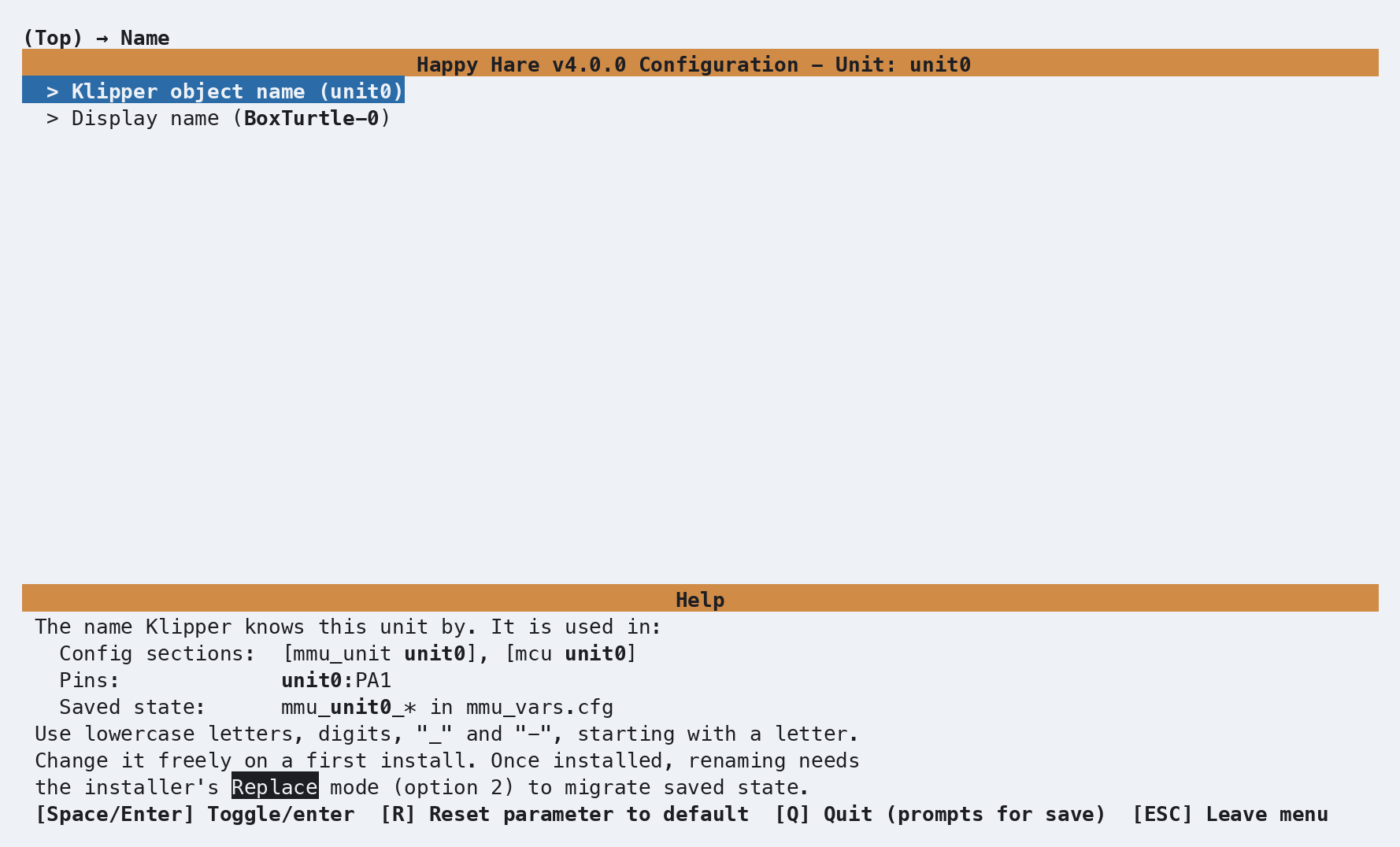
To rename an already installed unit, run ./install.sh -i and choose
Replace (option 2) so the installer can migrate its files and saved state.
In multi-unit mode, names are edited in the shared MMU units list; each unit's
Name menu displays its object name but does not edit it. See
Unit renaming for the complete
procedure and the effect of Replace mode on manual configuration edits.
Arguments & other common install options
./install.sh --help
Usage: ./install.sh [-i] [-u] [-d] [-y] [-l] [-p] [-z] [-s] [-t] [-r]
                    [-b <branch>]
                    [-k <klipper_home_dir>] [-c <klipper_config_dir>] [-m <moonraker_home_dir>]
                    [-a <kiauh_alternate_klipper>] [config_file]

(no flags for safe re-install / upgrade)
[config_file] is optional, if not specified the default config filename (.mmu_config) will be used.
  -i for interactive install (open menuconfig)
  -u, -d for uninstall
  -b <branch> to switch to specified feature branch (sticky)
  -n to specify a multiple MMU unit setup
  -k <dir> non-default klipper home directory
  -c <dir> non-default klipper config directory
  -m <dir> non-default moonraker home directory
  -p, --prev choose a MMU backup and recover its configuration

  Advanced:
  -y, --yes automatically answer yes to all y/n prompts
  -l, --last recover .mmu_config files from the last config backup
  -f to just restore klipper/moonraker symlinks (recover after hard klipper update)
  -z skip github update check (nullifies -b <branch>)
  -s to skip restart of services
  -a <name> to specify alternative klipper-service-name when installed with Kiauh
  -r allow running install.sh from a root login (not through sudo)
  -e, --emu Enables multi MCU support (e.g. for EMU design)
  -o override compatibility checks (e.g. unknown MIPS layout)
  -t  activate test mode - write config to /tmp/mmu_test instead of your real install
  (-q verbose make for debugging)
  (-v verbose builder for debugging)
Tip
Nervous about running the installer against a live config? -t builds
and generates configuration in an isolated /tmp directory instead of touching your real
printer config, so you can review results before committing to it.
This is enabled by specifying -t e.g.
./install.sh -i -t
Running in test mode to simulate without changing real configuration
Forcing flags '-s -c /tmp/mmu_test/printer_data/config -k /tmp/mmu_test/klipper -m /tmp/mmu_test/moonraker /tmp/mmu_test/.mmu_config'
Happy Hare can manage multiple MMUs connected to the same printer. Each unit has its own Klipper object name and display name.
This is enabled by specifying -n e.g.
./install.sh -i -n
The existing unit keeps its chosen name when converting to multi-unit mode.
Later runs detect multi-unit mode automatically with ./install.sh -i.
See Multiple MMU Units for adding, renaming,
reordering and removing units.
For MMU's like EMU that use dedicated controllers/MCU's per lane, support needs
to be enabled by specifying -e or --emu e.g.
./install.sh -i -e
Once your configuration has per-gate MCU support enabled, later runs turn it
on automatically, so -e isn't needed again.
Client Macros
menuconfig's final section asks:
Install default client macros supplied with Happy Hare? (STRONGLY recommended)
Saying yes (the default) includes client_macros.cfg - ready-made
PAUSE/RESUME/CANCEL_PRINT macros that already know how to work with
Happy Hare's own toolhead-parking logic on an MMU error, rather than just the
plain Klipper versions. If you already have your own PAUSE/RESUME macros and
want to keep them, say no here - see
Operation for what your own
macros need to account for.
Info
The installer will insert [include mmu/optional/client_macros.cfg] into
printer.cfg after the last [include ... ] block, or at the end of
printer.cfg to ensure these macros are used in preference to
any other PAUSE/RESUME/CANCEL_PRINT macros.
Upgrading
Happy Hare registers itself with Moonraker's update manager, so routine updates show up the same way any other Klipper plugin's do - Mainsail/Fluidd will offer an update when one's available (allow up to 24 hours, or click the refresh arrow to check immediately).
Occasionally an update needs more than a code pull - a config or menuconfig change that update manager alone can't apply. When that happens, re-run the installer with no flags from your Happy-Hare checkout:
cd ~/Happy-Hare
./install.sh
This is always safe to run speculatively - if there's nothing to do it does
nothing, and every run backs up your existing config to a fresh timestamped
directory first regardless. Custom paths given with -k, -c or -m are
saved in .mmu_config, so later runs use them without the flags. To change
them, use the Paths & Services menu in menuconfig.
If an upgrade goes wrong, see Recovering Configuration from a Backup to restore one of those backups.
Choosing an upgrade mode
When you run ./install.sh -i over an existing configuration, the installer asks
how to reconcile your menuconfig choices with edits made directly to your Happy
Hare .cfg files. Managing Configuration Changes
shows the prompt; this section compares the two modes in detail.
Both modes start the same way: the configuration is regenerated from your
menuconfig choices, which are stored in .mmu_config. The modes differ in how
much of your existing .cfg files is then copied back on top.
Note
./install.sh without -i doesn't ask and doesn't open menuconfig. It keeps
every value in your .cfg files, apart from the few structural options
menuconfig always sets (see the comparison below), and adds any new options,
with no import step.
Comparison
| 1) Merge/Refresh (default) | 2) Replace (recommended) | |
|---|---|---|
| Which wins | Your .cfg files, except for settings you change in menuconfig this run |
menuconfig |
Values edited in a .cfg file, such as currents, speeds, distances, pins and macro variables (_MMU_*_VARS, _BLOBIFIER_VARS) |
Kept. Values menuconfig can show are offered for import before it opens |
Overwritten |
Settings changed in menuconfig this run |
Applied. A hand edit they replace is reported as a warning | Applied |
Settings not changed in menuconfig this run |
Keep their .cfg values |
Rebuilt from menuconfig |
| New options and sections from a newer release | Added | Added |
| Options and sections you added yourself | Dropped, and listed in the install output | Dropped |
Configuration below the # EXCLUDE FROM CONFIG BUILDER line in mmu.cfg and mmu_hardware.cfg |
Kept unchanged | Regenerated, so your additions are kept only in the backup |
Optional mmu_parameters settings that the template doesn't list, such as default_gate_material or error_macro |
Kept | Kept |
Edited gcode: bodies of Happy Hare macros |
Lost | Lost |
The unit list and encoder/buffer references ([mmu_machine] units, [mmu_unit] encoder and buffer) |
Always set by menuconfig. A hand edit is listed before menuconfig opens |
Always set by menuconfig |
| Renaming, removing or reordering units | Not allowed | Possible |
| Backup of the existing configuration | Yes | Yes |
| Summary of changes at the end of the install | Yes | Yes |
When to use each mode
1) Merge/Refresh: you edit .cfg files directly, or want to bring menuconfig up to date with them
- Use it to upgrade Happy Hare and pick up new options without losing any value
you have tuned in a
.cfgfile. - Use it to change a few settings in
menuconfigwhile keeping your hand edits. Only the settings you change inmenuconfigare applied; every other option keeps its.cfgvalue, apart from the exceptions in the comparison. - Not every edit can be imported back into
menuconfig: for example, a valuemenuconfigbuilds from several settings, or one that would also change another option. Those values stay in your.cfgfile and keep working, butmenuconfiggoes on showing its own value. Run./install.sh -i -vto list them, with the reason each can't be imported, then set them inmenuconfigyourself if you want it to match. See Importing.cfgvalues into menuconfig. - If you are unsure, choose Merge/Refresh. It doesn't change any value you
haven't changed in
menuconfigduring the run.
2) Replace: menuconfig is your single source of truth
- Use it when you make all configuration changes through
menuconfig. - Use it when changing hardware, such as a new MMU type, controller board or selector.
- Use it to return to a known-good starting point after the configuration has drifted.
- It is required to rename, remove or reorder units. See Multiple MMU Units.
- Everything edited by hand is replaced. Run Merge/Refresh first and accept the
import, so that
menuconfigholds your tuned values, then copy any value it couldn't import intomenuconfigby hand. The previous files remain in the backup directory. - This includes the configuration below the
# EXCLUDE FROM CONFIG BUILDERline. Replace regenerates it, because some MMU types put hardware thatmenuconfigmanages there, and it must follow unit renames and hardware changes. Copy anything you added there back from the backup afterwards, or keep it in a file of your own (see Recommendations).
Importing .cfg values into menuconfig
When you choose Merge/Refresh, the installer compares your installed .cfg files
with what menuconfig would generate before menuconfig opens. If the files hold
values that menuconfig can show, it lists them by file and section, then asks
once whether to import them:
These .cfg values will be imported into menuconfig:

> mmu_macro_vars.cfg:
[gcode_macro _MMU_SOFTWARE_VARS]
variable_home_mmu: True

> mmu_parameters_unit0.cfg:
[mmu_unit_parameters unit0]
gear_load_speed: 123
gear_unload_speed: 88

Import these .cfg values into menuconfig (y/n)?
The list includes your hand edits, and also old default values that your .cfg
files still hold after a release changed the default. If nothing needs
importing, the installer doesn't ask. -y answers yes.
- Yes:
menuconfigopens showing the values you are actually running. - No:
menuconfigopens showing its previous values, and your.cfgfiles keep theirs. A setting you then change inmenuconfigis still applied, replacing the value in your.cfgfile.
A few structural options always come from menuconfig in every mode, because
they name sections menuconfig generates: units in [mmu_machine], and
encoder and buffer in [mmu_unit]. If you edited one by hand, it is listed
before menuconfig opens, under "These .cfg values are always set by menuconfig,
so your edits will be replaced", and menuconfig's value is installed.
A value can be imported when its option takes its whole value from a single
menuconfig setting, including pins and per-gate values, and when that setting
appears in menuconfig or follows one toggle or list that does. The value must
be one menuconfig accepts, within its range, and importing it must change no
other option. A value that already matches menuconfig's default isn't imported,
so .mmu_config keeps treating it as a default rather than a value you set.
To take a release's new default instead of the old value your .cfg file
holds, accept the import, then press R on that setting in menuconfig to
reset it. The reset counts as a change and is applied. Declining the import
keeps the old value.
Anything else stays in your .cfg file. Run ./install.sh -i -v to also list
those values with the reason each can't be imported, and to see the
menuconfig value each import replaces. -v is a developer option that also
makes the rest of the install output much longer.
Important
The import doesn't run when converting to multi-unit mode with -n. In that
run, Merge/Refresh keeps every value already in your .cfg files, even for
settings you change in menuconfig. Run ./install.sh -i again afterwards
to import your values and make further changes.
Summary of changes
Every install over an existing configuration ends by summarizing what it changed
in your Happy Hare .cfg files. That includes ./install.sh -i in either mode
and a plain ./install.sh. A first install has nothing to compare with, so it
prints no summary. The summary appears once the new files are installed, before
Klipper and Moonraker restart and the "Happy Hare is ready" banner. For example,
after changing one setting in menuconfig:
----------------------------------------------------------------------------------------------------------

Summary of changes to your Happy Hare .cfg files (previous files are in 'mmu.old-20261016-145447'):

> mmu_parameters_unit0.cfg:
Changed:
[mmu_unit_parameters unit0]
gear_unload_accel: 100 -> 101

----------------------------------------------------------------------------------------------------------
The installer compares each file in mmu/base/ with the same file in the backup
directory named in the heading, which holds your previous files. It lists only
the files that changed. Under each file name, it shows up to three groups,
each listed by section:
Changed:options whose value is different, asold -> new. A line ending(your .cfg edit, replaced by a menuconfig change)was a value you had edited by hand, and a setting you changed inmenuconfigreplaced it. Replace doesn't mark lines this way, but every hand edit it overwrote appears here.Removed:options that are no longer in the file, with the value they had. A removed section appears as its[section]line alone. Options and sections you added yourself, which the templates don't render, appear here.Added:a count of new options and sections, such asAdded: 3 new option(s) and 1 new section(s). These come from a newer release or a feature you enabled.
Only values are compared, so changes to comments, layout or template wording
don't appear. Neither do gcode: bodies or anything below the
# EXCLUDE FROM CONFIG BUILDER line. If no value changed, the block shows
"No changes to the values in your Happy Hare .cfg files" instead.
With -v, Added: lists every new option with its value, and a word diff of
each file against the backup follows the block.
Recommendations
- If you are unsure, choose Merge/Refresh and accept the import.
- To move from hand-editing to
menuconfig, run Merge/Refresh with-vand accept the import. Copy any value listed as not importable intomenuconfig, then run Replace once. Use either mode from then on. - Keep your own macros and extra sections in a separate file included from
printer.cfg. No upgrade mode changes it. Configuration below the# EXCLUDE FROM CONFIG BUILDERline survives Merge/Refresh, but not Replace. - After an upgrade, read the summary of changes and any "have been dropped" warnings in the install output, and compare the new files with the timestamped backup if anything looks wrong. To restore a backup, see Recovering Configuration from a Backup.
Troubleshooting
- "
step pin not defined for..." at Klipper startup - usually means a Klipper update wiped the symlinks Happy Hare needs. Run./install.sh -fto restore just the symlinks without going through the rest of the installer. - Multiple Klipper instances on one machine (e.g. via Kiauh) - use
-a
  <service_name>
together with-k/-cpointed at that instance's directories. - "
Unknown MIPS layout" on an embedded printer - the installer knows the directory layout of Creality K1, Guppy K1 and FlyOS-Fast systems. On any other MIPS system, pass-k,-cand-mwith your actual directories, or add-oto continue without platform-specific path defaults.
See also
- Getting Started with Box Turtle
- Getting Started with BTT ViViD
- Getting Started with EMU
- Getting Started with ERCF
- Getting Started with Tradrack
- Getting Started with MMX
- Operation - what happens when the MMU pauses, and how to resume/recover