Errors
This page lists the errors and warnings Happy Hare can report, what has
probably happened, and what to try. Use your browser's find (Ctrl+F) with a
few distinctive words from the message; values in {braces} below stand for
the gate, tool, sensor or distance in your message.
Messages from bad command arguments (Invalid ..., ... must have maximum
of ...) and from Klipper itself are not listed individually: they name the
parameter or setting that is wrong.
Reading an Error
Where errors appear
Every error goes to the console in red, starting !!, and to mmu.log. What
else happens depends on when it occurs:
| When | Console shows | What happens |
|---|---|---|
| During a print | MMU issue detected. Print paused then Reason: ... |
The print pauses, the toolhead parks and, with show_error_dialog: 1, the pause dialog pops up. The nozzle heater turns off after disable_heater seconds. |
| While already paused | MMU issue detected whilst printer is paused then Reason: ... |
Nothing new pauses. If the dialog was closed, it is shown again headed Print is still paused. |
| Outside a print | MMU issue: ... |
The command stops. Nothing pauses, and a parked toolhead returns. |
A few problems are reported without stopping anything: these are marked warning below. Some commands refuse to start instead, such as when calibration is incomplete (see Commands that refuse to run).
How a message is built up
Most errors from a toolchange, load or unload are wrapped, so the line you look up is usually in the middle:
!! MMU issue detected. Print paused
Reason: Load sequence failed because:
Couldn't pick up filament at gate 1 (encoder didn't report enough movement)
Gate marked as empty. Use 'MMU_GATE_MAP GATE=1 AVAILABLE=1' to reset.
Occurred when changing tool: > T1
Load filament in gate 1 or remap the tool, then reload the tool (MMU_RECOVER first if needed) and RESUME
The same error in the Mainsail pause dialog:
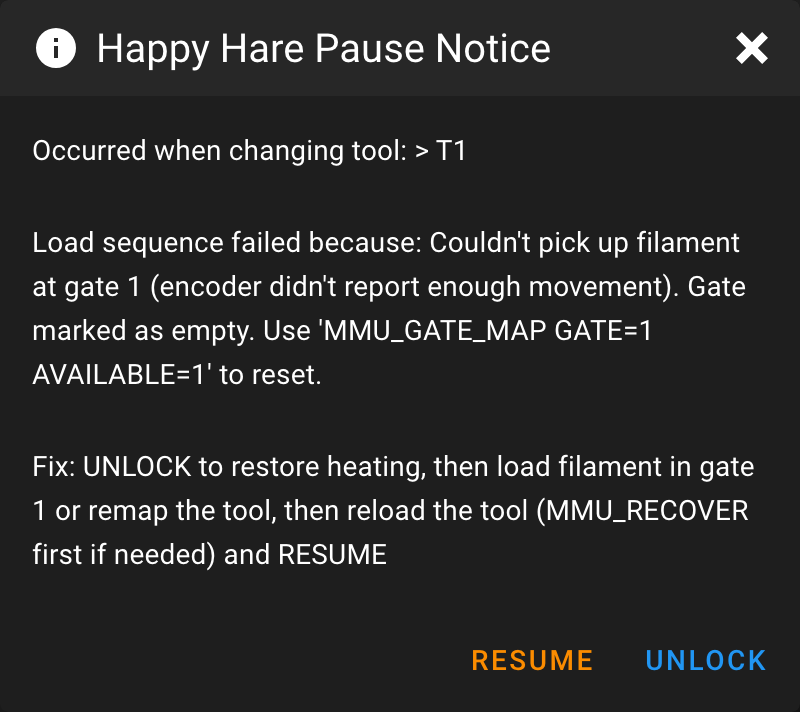
Load sequence failed because:orUnload sequence failed because:says which half of a toolchange failed. Look up the line after it.Occurred when changing tool: T1 > T2,Occurred when loading tool,Occurred when unloading toolorOccurred during EndlessSpool swap of ...says what was being attempted. The dialog shows this line first.- The last line is the advice, when the error has some. The dialog shows it
as
Fix: UNLOCK to restore heating, then .... Advice usually ends with then reload the tool (MMU_RECOVER first if needed) and RESUME:RESUMEcontinues the print but never reloads the tool itself, so get the filament where it should be first (see State Recovery). - Some commands add their own prefix:
Filament preload for gate {g} failed:,Filament eject for gate {g} failed:,NFC scan for gate {g} failed:,Failure during check gate {g} (T{t}):,Calibration of ... failed. Aborting because:, and_MMU_STEP_...:from custom load/unload sequences. Klipper error: {message}is a Klipper error, such asMove out of range, that happened part way through an MMU operation in a print. It pauses like any other MMU error, and a toolchange is not retried. Outside a print the command just fails with Klipper's own message.Error running {MACRO}: {message}is an error inside a macro Happy Hare called, such as tip forming, purging or one of the_MMU_PRE_*/_MMU_POST_*hooks and theiruser_*_extensions. Fix the macro or its settings. Park, save and restore position macros only log this and carry on.
With retry_tool_change_on_error: 1, a toolchange that fails first logs
... Retrying... and recovers the filament position; only a second failure
pauses.
Getting More Detail
The console shows the summary; mmu.log shows the steps that led up to it.
It is written next to Klipper's klippy.log (normally ~/printer_data/logs/)
and starts a new file each day.
log_file_level sets how much goes into mmu.log, and log_level how much
reaches the console:
| Level | Name | Adds |
|---|---|---|
0 |
Essential | Errors and essential messages only |
1 |
Info | Normal progress (the console default) |
2 |
Debug | Each step, measurement and decision (the mmu.log default) |
3 |
Trace | Sensor readings, positions and internal state |
4 |
Stepper | Every stepper move |
The default debug level is enough for most problems. If the cause still isn't clear, raise the file level for the current session, then repeat what failed:
MMU_TEST_CONFIG log_file_level=3
This lasts until Klipper restarts. To keep it, change Log file (mmu.log)
level in menuconfig, or log_file_level in mmu.cfg. When asking for
help, include mmu.log, klippy.log, the full error text and the output of
MMU_STATUS SHOWCONFIG=1.
Hardware Key
The Needs column says which hardware or feature an error depends on; any means it can happen on every MMU.
| Needs | Meaning |
|---|---|
| Encoder | A filament encoder (see Encoder) |
| Gate sensor | The sensor used to home at the gate: mmu_shared_exit, a per-gate mmu_exit, or the extruder sensor on an MMU with no bowden |
| Entry sensor | A per-gate mmu_entry sensor where filament enters the MMU |
| Extruder sensor | The extruder entry sensor (extruder) before the extruder gears |
| Toolhead sensor | A sensor after the extruder entry, inside the toolhead |
| Buffer | A sync-feedback buffer (see Sync-Feedback Buffer) |
| FlowGuard | FlowGuard clog and tangle detection |
| Linear selector | A selector driven along a rail to each gate, such as ERCF or Tradrack |
| Indexed selector | A rotating selector with an index switch per gate, such as BTT ViViD |
| Rotary selector | A rotary carriage that grips by position, such as 3D Chameleon |
| Servo selector | A selector positioned by a servo, such as PicoMMU or MMX |
Other entries name the feature: Blobifier, toolhead cutter, servo cutter, filament bypass, EndlessSpool, NFC, TD-1, Spoolman, heater, eSpooler.
Print Start
The start-of-print macros run in order: MMU_START_SETUP, MMU_START_CHECK,
your own PRINT_START, then MMU_START_LOAD_INITIAL_TOOL (see Print
Start/End and Slicer Setup).
A pause during start-up lists the tools the print needs and offers ABORT.
An error in the slicer's parameters stops the print rather than pausing it.
| Message | Needs | What happened | What to try |
|---|---|---|---|
Happy Hare gcode pre-processor is probably disabled or not setup correctly |
any | Warning. The slicer's tool list arrived as the placeholder !referenced_tools!, so Moonraker didn't pre-process the file. Only the initial tool is gate-checked and the multi-color bypass check is skipped. |
Enable the pre-processor in [mmu_server] (see G-code Preprocessing) and re-upload the file. |
Warning: Slicer defined extruder attributes have different lengths ... |
any | Warning. The slicer's color, temperature, material and name lists have different lengths. A temperature list shorter than the color list can also stop the print with an unable to parse error. |
Check the slicer's start gcode passes every list to MMU_START_SETUP, as in Slicer Setup. |
Warning: Looks like slicer is setup with {n} extruders but your MMU has {g} gates! ... |
any | Warning. The slicer has a different number of filaments to the MMU's gates. Fewer is fine, especially with automapping. | If the slicer has more filaments than gates, the print stops (next row). |
Error on 'MMU_SLICER_TOOL_MAP ...': NUM_SLICER_TOOLS must have maximum of {g} |
any | The slicer defines more filaments than the MMU has gates, and the print stops. The warning before it says it will continue; it can't. | Reduce the slicer's filaments, or merge tools, to no more than your gate count. |
Error on 'MMU_SLICER_TOOL_MAP ...': INITIAL_TOOL must have maximum of {n} |
any | The slicer's first tool is beyond the last gate, and the print stops. | Fix the slicer's filament list or initial tool. |
Incorrect number of values for PURGE_VOLUMES ... or Error parsing PURGE_VOLUMES: ... |
any | The slicer's purge volume matrix is the wrong size or has a non-number in it, and the print stops. The expected counts shown assume one filament per gate. | Check the PURGE_VOLUMES placeholder in the slicer's start gcode. |
Error during automapping followed by ... of tool {t} must be set ..., No gates found for tool {t} ..., No gate has a filament matching the desired material ..., Gates with {m} are missing color information... or Unable to find a suitable color for tool {t} ... |
any | With automap_strategy set, a tool the print uses couldn't be matched to a gate by name, material or color. Pauses (without the ABORT button). |
Fill in the gate map (MMU_GATE_MAP, Spoolman or NFC) for the missing attribute, map the tool yourself with MMU_TTG_MAP, then RESUME. See Gate/TTG Maps. |
Invalid automap strategy '{s}' or 'spool_id' automapping strategy is not yet supported ... |
any | Error, no pause. automap_strategy isn't one Happy Hare supports, so no automapping happens. |
Correct automap_strategy in mmu_macro_vars.cfg. |
Bypass selected for multi-color print |
Filament bypass | The bypass is selected and loaded, but the print uses more than one tool. | Unload the bypass, select or load the initial tool, then RESUME. Or ABORT. |
Load bypass or initial tool before resuming print |
any | Nothing is loaded and either the bypass is selected, or MMU_START_SETUP didn't run so the print's tools are unknown. |
Load the bypass or the initial tool, then RESUME. If you expected MMU_START_SETUP to run, check the slicer's start gcode. |
Gate check completed with unavailable or unchecked gates: followed by Required Tool T{t} on gate {g} marked EMPTY or Gate {g} could not be checked: ... |
Gate sensor or Encoder | MMU_START_CHECK (with check_gates: True) found a gate the print needs empty, or couldn't check it. Every gate is checked before it pauses. |
Load the gate, or remap the tool with MMU_TTG_MAP, or if the gate really has filament, MMU_GATE_MAP GATE={g} AVAILABLE=1. Then RESUME. See MMU_CHECK_GATE for the other messages it can give. |
Warning: Calibration steps are not complete for MMU {unit}: |
any | Error, no pause. The gate check or initial tool load refused to run because calibration is missing (see below), and the print carries on without it. | Cancel the print and finish the listed calibration steps. |
Unknown command:"T{n}" |
any | Klipper message only. The slicer used a tool number with no T{n} macro, so no toolchange happened and the print continues with the wrong filament. |
Make the slicer's filament count match the MMU, or reduce it. |
Failures of the homing (home_mmu: True), gate check and initial tool load
appear in the sections below. A failure of the slicer's own start gcode, such
as G28 in user_pre_initialize_extension, stops the print with Klipper's
message.
Gate Pickup, Preload and Eject
| Message | Needs | What happened | What to try |
|---|---|---|---|
Couldn't pick up filament at gate {g} (gate endstop '{endstop}' didn't trigger) with Gate marked as empty ... |
Gate sensor | The gear motor drove for gate_homing_max (after gate_load_attempts tries) without filament reaching the gate sensor. The gate is now marked empty. |
Check the spool has filament that reaches the gear, the gate isn't tangled, and the sensor works (MMU_SENSORS). Load the gate or remap the tool, then MMU_GATE_MAP GATE={g} AVAILABLE=1 if needed. |
Couldn't pick up filament at gate {g} (encoder didn't report enough movement) with Gate marked as empty ... |
Encoder | The same, but homing to the encoder: the encoder didn't see filament move. | As above, and check the encoder is clean and calibrated. |
Couldn't pick up filament at gate {g} (...) with Filament position is uncertain. Check the path and recover before continuing. |
any | During MMU_CHECK_GATE, a gate failed to home, but something moved or a sensor sees filament, so it isn't simply empty. |
Look at the gate's filament path, then MMU_RECOVER and try again. |
Cannot preload gate {g}: shared '{endstop}' path is already occupied (filament from another gate still loaded?) |
Gate sensor | The gate shares its homing sensor with other gates, and that sensor already sees another gate's filament. | Unload the other filament first (MMU_UNLOAD), or MMU_RECOVER if Happy Hare has the position wrong. |
Failed to unload {gate}: filament did not clear sensor '{endstop}' after moving {n}mm (also Failed to preload ...) |
Gate sensor | Parking at the gate, the filament never moved back past the gate sensor. | Check for filament stuck or tangled at the gate, or a sensor stuck on. |
Failed to unload {gate}: filament did not clear the encoder after moving {n}mm (also Failed to preload ...) |
Encoder | Parking at the gate, the encoder kept seeing movement, so the filament never left it. | Check for a tangle at the gate or the encoder wheel slipping. |
Filament did not exit gate homing sensor: {sensor} |
Gate sensor (per-gate mmu_exit) |
Ejecting, the filament never cleared the gate's exit sensor. | Pull the filament back by hand and check the sensor. |
Attempting to load gate, but sensor '{sensor}' is not configured or is disabled (also unload, preload) |
Gate sensor | gate_homing_endstop or gate_preload_endstop names a sensor that is missing or turned off. |
Re-enable it (MMU_SENSORS) or fix the setting. |
Attempting to load using encoder but encoder is not configured or is disabled |
Encoder | Gate homing is set to encoder, but the encoder is missing or disabled. |
Check the encoder is configured and enabled, or choose a sensor for gate_homing_endstop. |
Unsupported gate homing endstop '{e}' |
any | gate_homing_endstop has a value Happy Hare doesn't recognize. |
Fix it in mmu_parameters.cfg. |
Operation not possible: Can't crossload on this mmu type |
any | Error, no pause. You asked to preload, eject or scan another gate while one is loaded, and this MMU can't move two filaments at once. | Unload first. |
Operation not possible: Perhaps no exit sensors or filament still loaded |
any | Error, no pause. MMU_PRELOAD can't be used on this setup or while loaded. |
Unload first, or load the gate normally. |
Filament detected by entry sensor on gate {g} but was not able to complete preload |
Entry sensor | Warning. The entry sensor sees filament but preloading it to the gate failed. The gate is marked unknown. | Push the filament a little further in, then MMU_PRELOAD GATE={g}. |
Bowden
| Message | Needs | What happened | What to try |
|---|---|---|---|
Failed to load bowden from {gate}. Perhaps filament is stuck in the gate. Gear moved {n}mm, encoder measured {m}mm. |
Encoder | The encoder measured much less movement than the gear made, beyond bowden_move_error_tolerance. |
Check the spool turns freely, the filament isn't snagged and the gear grips (servo or grip position). Check the bowden length and encoder calibration. |
Bowden pre-unload test failed. Filament appears to be stuck in the extruder or the filament was not loaded. |
Encoder | Before a full unload, a short pull back didn't move the encoder, so the filament is held in the extruder (a bad tip) or wasn't loaded. | Check the tip and nozzle, then MMU_RECOVER. If your tips are fine, consider bowden_pre_unload_test: 0. |
Warning: Excess slippage was detected in bowden tube load ... |
Encoder | Warning. The bowden load measured short even after correction moves. Details are in mmu.log. |
Check the gear grip, the gate's rotation distance (MMU_CALIBRATE_GATE) and encoder calibration. |
Warning: Excess slippage was detected during bowden tube unload ... |
Encoder | Warning. The unload measured short. Parking at the gate deals with it. | As above. |
Warning: Possible sensor malfunction - {sensor} sensor indicated no filament present prior to unloading bowden. |
Gate sensor | Warning. A sensor before the bowden reads empty with filament loaded. | Check the sensor and its wiring (MMU_SENSORS). |
Warning: gate {g} not calibrated! Using default rotation distance |
any | Warning. The gate's gear rotation distance hasn't been calibrated. | MMU_CALIBRATE_GATE GATE={g} (with an encoder) or calibrate the gear. |
Warning: Restricting bowden load length to calibrated value of {n}mm |
any | Warning. A requested length was longer than the calibrated bowden. | Usually harmless. Recalibrate the bowden if it changed. |
Auto calibration is not possible with 'extruder_homing_endstop: none' |
any | The bowden isn't calibrated and there is no extruder homing point to calibrate it automatically. | Calibrate it with MMU_CALIBRATE_BOWDEN (see Bowden Length). |
Extruder and Toolhead Loading
| Message | Needs | What happened | What to try |
|---|---|---|---|
Filament from {gate} did not reach extruder '{endstop}' endstop after moving {n}mm |
Extruder sensor, Buffer or Encoder | After the bowden move, homing to the extruder entrance didn't trigger within extruder_homing_max. |
Check for a jam in the bowden or at the extruder entrance. If the bowden is longer than calibrated, recalibrate it or increase extruder_homing_max. |
The {endstop} sensor triggered before homing. Check filament and sensor operation |
Extruder sensor or Buffer | The extruder homing sensor already saw filament before the load reached it. | Clear the extruder path, check the sensor, then MMU_RECOVER. |
Cannot home to extruder using 'collision' method because encoder is not configured or disabled! |
Encoder | extruder_homing_endstop: collision needs an encoder. |
Enable the encoder or choose a different extruder_homing_endstop. |
Possible toolhead sensor malfunction - filament detected before it entered the extruder. |
Toolhead sensor | The toolhead sensor reported filament before loading reached it. | Clear the toolhead, check the sensor (MMU_SENSORS), then MMU_RECOVER. |
Filament from {gate} did not reach the toolhead sensor after moving {n}mm |
Toolhead sensor | The extruder didn't pull the filament to the toolhead sensor within toolhead_homing_max. |
Check the extruder gears gripped the filament and the toolhead path is clear. Check the filament tip shape. |
Move to nozzle failed (encoder didn't sense any movement) ... or ... (encoder didn't sense sufficient movement) ... |
Encoder | The final move to the nozzle didn't move the encoder, or moved it too little (beyond toolhead_move_error_tolerance). The extruder probably didn't grip the filament. |
Check the extruder gears gripped the filament, the tip is good and the nozzle isn't blocked. |
Failed to load filament passed the extruder entrance (sync-feedback buffer didn't detect neutral tension) or ... (proportional sensor still compressed after {n}mm) |
Buffer, no toolhead sensor | With toolhead_entry_tension_test on, the buffer stayed compressed, so the extruder didn't take the filament. |
Check the extruder grips (tension, tip shape). If loads are fine, turn the test off. |
Cannot load extruder because filament already in extruder (state: {n}). Unload first |
any | Happy Hare thinks filament is already in the extruder. | Unload first, or MMU_RECOVER if that is wrong. |
Warning: 80% of 'extruder_homing_max' was used homing ... |
any | Warning. Homing nearly ran out of distance. | Recalibrate the bowden or increase extruder_homing_max. |
Warning: Significant slippage was detected whilst homing to the extruder ... |
Encoder | Warning. Collision homing slipped. | Reduce extruder_collision_homing_current, or improve the gear grip. |
Unloading
| Message | Needs | What happened | What to try |
|---|---|---|---|
Filament did not clear the extruder entry sensor after moving {n}mm |
Extruder sensor | Unloading, the filament never left the extruder: usually a bad tip or a jam. | Free the filament from the extruder (check the tip or the cut), then MMU_RECOVER and RESUME. Tune tip forming or cutting. |
Filament did not clear the toolhead sensor after moving {n}mm |
Toolhead sensor | As above, but the toolhead sensor still sees filament. | As above. |
Toolhead or extruder sensor failure. Extruder sensor reports no filament but toolhead sensor is still triggered. |
Extruder sensor and Toolhead sensor | The two sensors disagree at the start of the unload. | Check both sensors (MMU_SENSORS), and for a broken piece of filament in the toolhead. |
Warning: Toolhead sensor reports filament is still present in the toolhead, but the extruder sensor does not detect filament. Possible sensor malfunction. |
Extruder sensor and Toolhead sensor | This one pauses, despite saying warning. The filament cleared the extruder sensor but the toolhead sensor still sees some. | A broken piece of filament may be left in the toolhead. Check, then MMU_RECOVER. |
No encoder movement: Concluding filament is stuck in extruder |
Encoder and Toolhead sensor | Tip forming didn't move the encoder, so the filament didn't move. | Check for a clogged nozzle or filament stuck in the extruder. |
Cannot unload extruder because filament not detected in extruder! (state: {n}) |
any | You asked to unload just the extruder, but Happy Hare thinks nothing is there. | MMU_RECOVER if that is wrong. |
Warning: Encoder not sensing any movement during final extruder retraction move ... (or sufficient movement) |
Encoder | Warning. Unloading continues, but the encoder didn't confirm the final retract. Often a sign of tip forming ejecting the filament completely, or a jam. | Watch the next unload; tune tip forming. |
Warning: Filament was not detected by the extruder (entry) sensor at the start of extruder unload. (or ... by the toolhead sensor ...) |
Extruder sensor or Toolhead sensor | Warning. The sensor saw no filament at the start of the unload, and unloading continues. | Check the sensor; the position may have been wrong. |
Warning: Possible encoder malfunction (free-spinning) during final filament parking |
Encoder | Warning. The encoder moved when it shouldn't. | Check the encoder wheel and filament path. |
Tip Forming, Cutting and Sequence Macros
Errors inside these macros appear as Error running {MACRO}: {message}.
| Message | Needs | What happened | What to try |
|---|---|---|---|
Filament tip forming macro '{m}' not found |
any | form_tip_macro names a macro that doesn't exist. |
Fix form_tip_macro in mmu_parameters.cfg. |
Tip forming performed by slicer but 'slicer_tip_park_pos' not set |
any | Error, no pause. The slicer formed the tip but Happy Hare doesn't know where it was left. | Set slicer_tip_park_pos (see Tip Forming and Purging). |
Warning: output_park_pos was reported as 0mm ..., Warning: park_pos ({n}mm) cannot be greater than 'toolhead_extruder_to_nozzle' ... or Warning: Calculated filament remaining after cut is negative ... |
Toolhead cutter | Warning. The cut position the macro reported doesn't make sense. | Check the cutter macro's settings and toolhead_extruder_to_nozzle (see Toolhead Cutting). |
Warning: Printer part fan is not defined. Ignoring 'toolchange_use_fan' option |
any | Error, no pause. Fan assist is on but there is no part cooling fan. The setting is toolchange_fan_assist in mmu_macro_vars.cfg. |
Turn off toolchange_fan_assist, or set toolchange_fan_name. |
The value 'mmu_gantry_servo' is not valid for SERVO |
Toolhead cutter | The gantry servo is enabled but [mmu_servo mmu_gantry_servo] isn't configured. |
Configure the servo or turn off gantry_servo_enabled. |
The value 'cut_servo' is not valid for SERVO |
Servo cutter | [mmu_servo cut_servo] isn't configured. |
Configure the cutter servo (see MMU Cutting). |
_SAFE_G1 {axis} adjustment {n}mm exceeds the 5mm limit; check macro positions, gcode offsets and skew compensation |
any | A park, cut or purge position is more than 5mm outside the printer's limits once gcode offset and skew are applied. In a park this only skips the move; in a pre-load, pre-unload or post-tip-forming park, a cutter or Blobifier it pauses. | Move the macro's coordinates inside the build volume. MMU_CHECK_POSITION checks a position. See Skew & Build Envelope. |
Warning: Move to ({...}) adjusted to ({...}) to stay within axis limits ... |
any | Warning. The same, but less than 5mm out: the move was adjusted. Shown once per print. | As above. |
Warning: Klipper reported out of range gcode position ... |
any | Error, no pause. The saved toolhead position was outside the axis limits and was adjusted. | Check gcode offsets and skew compensation. |
Can't load - already in extruder!, Can't unload - already unloaded! or Can't unload extruder - already unloaded! |
Custom sequence | From the example custom load/unload sequence macros. | MMU_RECOVER, or fix your sequence macro. |
Error running _MMU_PARK: ... (also _MMU_SAVE_POSITION, _MMU_RESTORE_POSITION, _MMU_ERROR, _MMU_POST_PRELOAD) |
any | Error, no pause. The macro failed and Happy Hare carried on, so the toolhead may not have parked or returned. | Fix the macro settings named in the message. |
Cannot park because XY not homed |
any | Message only. The toolchange happens where the nozzle is. | Home before printing, or set auto_home. |
Purging and Blobifier
| Message | Needs | What happened | What to try |
|---|---|---|---|
Empty purge bucket! |
Blobifier | The bucket holds max_blobs. |
Empty the bucket, reset the count by removing and replacing the bucket (with a bucket switch) or with _BLOBIFIER_COUNT_RESET, then RESUME. |
BLOBIFIER: Not homed! Home xyz before blobbing |
Blobifier | Message only. The purge was skipped and the print continues, so the next color may be contaminated. | Make sure the printer is homed before toolchanges. |
BLOBIFIER: QGL not applied! run quad_gantry_level before blobbing |
Blobifier | Message only. As above, on a printer with [quad_gantry_level]. |
Run QUAD_GANTRY_LEVEL in your print start. |
Please home (and QGL) before parking |
Blobifier | Message only. The toolhead wasn't parked on the tray. Also shown on printers without [quad_gantry_level]. |
Home (and level) before printing. |
Blobifier has not been initialized. Run BLOBIFIER_INIT first |
Blobifier | Initialization at startup didn't finish, often because of a servo or stepper error. | Run BLOBIFIER_INIT and fix what it reports. |
Blobifier configuration is not defined for your printer or Blobifier is not correctly installed ... |
Blobifier | purge_macro is BLOBIFIER but Blobifier isn't installed, so no purging happens. |
Re-run ./install.sh -i and enable Blobifier, or change purge_macro. |
Shutdown due to BLOBIFIER: ... |
Blobifier | A Blobifier setting is out of range, and Klipper shuts down at startup. | Correct the setting named, then FIRMWARE_RESTART. |
The value 'blobifier' is not valid for SERVO |
Blobifier | The Blobifier servo isn't configured. | Check the Blobifier hardware config (see Blobifier). |
BLOBIFIER: No toolmap or PURGE_LENGTH. Using default |
Blobifier | Message only. The slicer didn't pass purge volumes, so the default purge_length is used. |
Pass PURGE_VOLUMES to MMU_START_SETUP. |
Purge macro '{m}' not found |
any | Warning. purge_macro names a missing macro, so no purge happened. |
Fix purge_macro. |
Runout, Clog, Tangle and FlowGuard
These pause the print when the selected filament stops moving or runs out. See EndlessSpool & Runout Detection and FlowGuard.
| Message | Needs | What happened | What to try |
|---|---|---|---|
Runout detected on T{t} (gate {g}) by {sensor} with EndlessSpool mode is off - manual intervention is required |
Entry sensor, Gate sensor or Encoder | The filament ran out. | Load a new spool (MMU_UNLOAD the old filament first if needed), reload the tool, then RESUME. |
Runout detected on T{t} (gate {g}) by {sensor} with No alternative gates available ... |
EndlessSpool | The filament ran out and no other gate in the EndlessSpool group has filament. | As above, or load a gate in the group. |
Filament runout occurred at the extruder entry on T{t} (gate {g}). Manual intervention is required |
Extruder sensor | The filament ended or broke between the MMU and the extruder. | Find and clear the end, reload the tool, then RESUME. |
A clog has been detected on T{t} (gate {g}) by {sensor} and requires manual intervention with FlowGuard trip reason: Compression stuck after ... |
Buffer, FlowGuard | The buffer stayed compressed while the extruder should have been pulling: the nozzle or extruder isn't taking filament. | Check the nozzle and extruder for a clog. If it was a false trip, increase flowguard_max_relief (see FlowGuard tuning). |
A tangle has been detected on T{t} (gate {g}) by {sensor} and requires manual intervention with FlowGuard trip reason: Tension stuck after ... |
Buffer, FlowGuard | The buffer stayed in tension: the filament is held back between the spool and the MMU. | Check the spool for a tangle or snag. |
FlowGuard detected a clog. (or tangle) followed by Reason for trip: ... |
Buffer, FlowGuard | The first line of a FlowGuard trip; the pause message follows. If the buffer sensor was disabled, FlowGuard turns off without pausing. | As above. |
A clog/tangle has been detected on T{t} (gate {g}) and requires manual intervention |
Encoder | The encoder stopped moving while the extruder printed, but filament is still there, so it is a clog or tangle rather than a runout. | Check the nozzle and extruder for a clog and the spool for a tangle. If false trips persist, see Encoder. |
Filament runout on an unknown or bypass tool (or clog, tangle) |
any | A runout or clog fired with the bypass or an unknown tool. Happy Hare can't swap spools here. | Fix it by hand, then RESUME. |
Filament runout/clog/tangle occurred but filament is marked as not loaded(?) |
Encoder | The encoder reported a runout while Happy Hare thinks nothing is loaded. | MMU_RECOVER to correct the position. |
Runout handler suspects sensor malfunction on {sensor} ... (also Insert handler, Remove handler) |
Entry sensor, Gate sensor or Extruder sensor | Reported as an assertion and ignored: the sensor changed back straight away. | Check the sensor and wiring for bounce. |
Espooler assist temporarily suspended because of suspected malfunction ... |
eSpooler | Error, print continues. The assist trigger stayed on too long. | Check the assist sensor isn't stuck (see eSpooler). |
EndlessSpool and Empty Gates
| Message | Needs | What happened | What to try |
|---|---|---|---|
Gate {g} is empty (and EndlessSpool on load is disabled) |
any | The tool's gate is marked empty. | Load the gate, remap the tool, or if it does have filament, MMU_CHECK_GATE GATE={g} or MMU_GATE_MAP GATE={g} AVAILABLE=1. |
Gate {g} is empty! with No alternatives gates available after checking for T{t} ... |
EndlessSpool | The gate is empty and no other gate in its group has filament. | Load a gate in the group, then RESUME. |
Gate {g} is empty! Checking for alternative gates ... then Remapping T{t} to gate {n} |
EndlessSpool | Error, no pause. The tool moves to another gate in its group and continues. | Nothing, unless the remap is wrong. |
A runout has been detected. Checking for alternative gates ... |
EndlessSpool | Error, no pause. The start of an automatic spool swap. | Nothing. |
{error}. then Occurred during EndlessSpool swap of T{t} (gate {g}) to gate {n} |
EndlessSpool | The automatic swap failed: look up the first line. | Fix that, reload the tool, then RESUME. |
Selector and Servo
| Message | Needs | What happened | What to try |
|---|---|---|---|
Selector is not calibrated on {unit} |
Linear, Rotary or Servo selector | The selector positions haven't been calibrated. | Calibrate the selector. |
Selector is not homed on {unit} |
Linear or Rotary selector | The selector lost its position (motors off, a homing failure or a blockage). | MMU_HOME. |
Homing selector failed because of blockage or malfunction. Klipper reports: {message} |
Linear or Rotary selector | Homing the selector failed; Klipper's message says how. | Check nothing (such as filament in a gate) is in the way, the endstop works and the selector moves freely. |
Cannot home {unit} because it may have filament loaded. Unload filament first |
Linear or Rotary selector | Homing could tear filament that is still in a gate. | MMU_UNLOAD, then MMU_HOME. |
Cannot home {unit} because filament state or gate ownership is unknown. Use MMU_RECOVER GATE=xx first |
Linear or Rotary selector | Happy Hare doesn't know where the filament is. | MMU_RECOVER GATE={g}, then MMU_HOME. |
Selector touch operation detected blockage perhaps by filament in another gate or too much friction |
Linear selector with touch homing | The selector stopped part way to a gate. | Check for filament sticking out of another gate, and that the selector slides freely. |
Unblocking selector failed because unable to move filament to clear, Unblocking selector failed because: ... or Unblocking selector recovery failed. Path is probably internally blocked |
Linear selector with touch homing | Filament in the current gate blocked the selector and automatic recovery failed. | Clear the gate by hand, then MMU_RECOVER and MMU_HOME. |
Failed to locate selector index for gate {g} |
Indexed selector | The selector turned a full revolution without the gate's index switch triggering. | Check the index switch and its wiring. |
Extra endstop {unit}_gate{n} not defined on the selector stepper |
Indexed selector | An index switch is missing from the selector config. | Check mmu_hardware.cfg. |
Operation not possible because gate position is not calibrated (also release gate position) |
Rotary selector | Error, no move. The operation carries on without gripping or releasing. | MMU_CALIBRATE_ROTARY_SELECTOR. |
Operation not possible because selector gate angle is not calibrated (also release gate position, bypass angle is not configured) |
Servo selector | Error, no move. The operation carries on without moving the servo. | MMU_CALIBRATE_SERVO_SELECTOR. |
Selector doesn't allow or not configured to allow filament release |
filament_always_gripped: 1 |
Error. This MMU always grips the filament, so MMU_RELEASE does nothing. |
Nothing to fix, or turn off Filament always gripped? if the design can release. |
MMU gear stepper could not be synced with extruder |
any | Warning. MMU_SYNC_GEAR_MOTOR couldn't sync: the selected gate couldn't be gripped (for example an uncalibrated servo gate), no gate is selected or the selector isn't homed. The sync request isn't kept. |
Calibrate, MMU_HOME or MMU_SELECT GATE={g}, then retry. |
No servo fitted to selector on MMU {unit} |
any | MMU_SERVO on an MMU without a selector servo. |
Nothing to fix. |
Warning: Selector angles not found in mmu_vars.cfg. Using configured defaults |
Servo selector | Warning. The servo selector hasn't been calibrated. | MMU_CALIBRATE_SERVO_SELECTOR. |
Error running {select_tool_macro}: ... |
Macro selector | Error, no pause. Your selector macro failed. | Fix the macro. |
Gate Check
From MMU_CHECK_GATE, including the check during print start.
| Message | Needs | What happened | What to try |
|---|---|---|---|
Cannot check gate {g}: filament path is not safely unloaded. |
any | Filament is loaded, or the toolhead sensor sees some. | MMU_UNLOAD, or MMU_RECOVER if the position is unknown. |
Cannot check gate {g}: shared '{endstop}' path is occupied by another gate. |
Gate sensor | Another gate's filament is in the shared path. | MMU_UNLOAD, or MMU_RECOVER if the position is unknown. |
Gate {g} marked EMPTY (or ... (no filament detected during homing)) |
Gate sensor or Encoder | Message only. No filament was found in the gate. In a print it becomes part of the pause below. | Load the gate. |
Gate {g} could not be checked: {message} |
any | Message only. The check failed before anything moved. | Look up the message. |
Failure during check gate {g} (T{t}): followed by a message |
any | Checking the gate failed after the filament moved. | Look up the message; MMU_RECOVER if the position is now unknown. |
Gate check completed with unavailable or unchecked gates: |
any | In a print, at least one gate the print needs is empty or unchecked. | See Print Start. |
Failure re-selecting Tool {t}: |
any | The check finished but the original tool couldn't be selected again. | Look up the message, then select the tool. |
Filament position is unknown. Use MMU_RECOVER to establish it |
any | After a failure that moved filament, Happy Hare doesn't guess where it is. | MMU_RECOVER. |
Resume and Recovery
| Message | Needs | What happened | What to try |
|---|---|---|---|
Cannot resume because filament position not indicated as fully loaded (or unloaded). |
any | RESUME was refused: the filament is part way. |
Finish loading or unloading, run MMU_RECOVER (MMU_RECOVER LOADED=1 if it is loaded to the nozzle), then RESUME. |
Loaded check failed: with Filament not detected by sensors: {sensors} |
Gate, Extruder or Toolhead sensor | After a toolchange, load or RESUME, a sensor that should see filament doesn't. |
Check the filament really reached the nozzle and the sensors work, then MMU_RECOVER and RESUME. |
Print is not paused. Resume ignored. |
any | Message only. RESUME while not paused. |
Nothing. |
Filament detected but tool/gate is unknown. Please use MMU_RECOVER GATE=xx to correct state |
any | Error, no pause. At startup Happy Hare sees filament but not which gate it is from. | MMU_RECOVER GATE={g}. |
Filament not detected as either unloaded or fully loaded. |
any | Error, no pause. At startup the filament position is part way. | Check, then MMU_RECOVER. |
Filament appears to be in the bowden, but these sensors are not triggered: {sensors} |
Gate sensor | Warning. Recovery thinks filament is in the bowden but the sensors disagree. | Check the sensors and that the right gate is selected, then MMU_RECOVER again. |
Alert: Automatically heating extruder to ... temp ... |
any | Shown in red so it isn't missed. An operation needed the nozzle hot. | Nothing. |
Calibration
| Message | Needs | What happened | What to try |
|---|---|---|---|
Calibration of bowden length on gate {g} failed. Aborting because: followed by a message |
any | MMU_CALIBRATE_BOWDEN failed. The message says why: a sensor already triggered, not reaching the extruder, or All {n} attempts at homing failed. |
See Bowden Length. |
The {endstop} sensor was not triggered at start of movement ... |
Gate sensor | Manual bowden calibration started without filament at the gate sensor. | Load the filament to the extruder gear by hand first. |
Did not home to gate sensor after moving {n}mm |
Gate sensor or Encoder | Manual bowden calibration couldn't find the gate on the way back. | Check the gate sensor. |
Calibration of encoder failed. Aborting, because: or Filament not detected in encoder. Ensure filament is available and try again |
Encoder | MMU_CALIBRATE_ENCODER failed or saw no filament. |
Load filament past the encoder and try again (see Encoder). |
Warning: Encoder is not detecting the expected number of counts ... |
Encoder | Warning. The resolution is more than 20% from the expected value. | Check the encoder is clean and the wheel teeth are intact. |
Calibration for gate {g} failed. Aborting, because: |
Encoder | MMU_CALIBRATE_GATE failed. |
Look up the message. |
Calibration ignored because it is not considered valid (>20% difference from reference gate {g}) |
Encoder | Warning. The gate's result is far from gate 0's. | Check the gear grip on that gate and try again. |
Failed to reach toolhead sensor after moving {n}mm, Failed to home to toolhead sensor or Failed to reverse home to ... |
Toolhead sensor | MMU_CALIBRATE_TOOLHEAD couldn't find a sensor. |
Check the sensors and that filament reaches them (see Toolhead). |
Measurements did not make sense. Looks like probing went past the blade pos! ... |
Toolhead sensor, Toolhead cutter | Cutter calibration gave impossible results. | Don't hold the blade closed, and remove any cut filament from the extruder. |
Selector didn't find home position or Selector didn't find home position or distance moved ({n}mm) was larger than expected. |
Linear or Rotary selector | Selector calibration didn't reach the endstop. | Align the selector with gate 0, remove filament, check the endstop. |
Selector move measured {n}mm. More than the anticipated maximum of {m}mm. Save disabled |
Linear or Rotary selector | Warning, not saved. The MMU dimensions don't match the configured model. | Check the vendor, version and cad_* settings. |
You configured your MMU for {n} gates but I counted {m}! Please update 'num_gates' |
Linear selector | Error, not saved. Automatic calibration counted a different number of gates. | Fix num_gates, or check the calibration ran the full length. |
Failed to detect selector gate {g} or Failed to measure selector gate {g} endstop width |
Indexed selector | Index calibration didn't find a gate's switch. | Check that gate's index switch. |
Proportional (analog sync-feedback) sensor not found or not active ... or Sensor malfunction. Could not read valid ADC output ... |
Buffer (proportional) | MMU_CALIBRATE_PSENSOR can't read the sensor. |
Set analog_pin in [mmu_buffer] and check the wiring. |
Warning: calibration did not find both compression and tension limits ... |
Buffer (proportional) | Warning. The sensor's range wasn't fully found. | Check buffer_maxrange, or run again with a larger MOVE=. |
Invalid configuration or options provided. Perhaps you tried COLLISION=1 without encoder ... |
any | No bowden calibration method is available. | Use a method your hardware supports. |
Sorry this feature requires a toolhead sensor |
Toolhead sensor | MMU_CALIBRATE_TOOLHEAD needs a toolhead sensor. |
Set the toolhead distances by hand (see Toolhead). |
NFC, TD-1 and Spoolman
| Message | Needs | What happened | What to try |
|---|---|---|---|
NFC scan for gate {g} failed: {message} |
NFC | Moving the filament past the reader failed; the message says how. | Check the gate for a jam. See NFC/RFID Reading. |
Could not home to the gate to start the NFC scan for gate {g} - is the filament loaded in the gate? or Could not reach the gate to establish a datum ... |
NFC | The scan couldn't find its starting point. | Make sure the gate is preloaded. |
could not re-park filament in gate {g} after scanning - check for a jam |
NFC | Parking after the scan failed. | Check the gate for a jam. |
Gate {g} has no NFC reader to scan, Gate {g} NFC reader is disabled ... or Operation not possible: No NFC reader configured for gate {g} |
NFC | The gate's reader is missing or turned off. | MMU_NFC GATE={g} ENABLE=1, or check the reader config. |
NFC: reader '{r}' did not respond during init or NFC: error initializing reader '{r}': ... |
NFC | The reader didn't answer at startup. | Check its wiring, address and power. |
NFC: read error on reader '{r}': ... |
NFC | Error, no pause. A read failed. | Usually a tag or wiring problem; try again. |
NFC: gate {g}: tag {uid} belongs to gate {n} and could not be moved out of the way ... or NFC: gate {g}: could not confirm this gate's own tag ... |
NFC | Warning. A neighboring gate's tag was in the reader's field, so the read was discarded rather than given to the wrong gate. | Follow the advice in the message. |
NFC: scanned tag ... is not registered against any spool in Spoolman |
NFC, Spoolman | Error, no pause. The tag was read but Spoolman doesn't know it. | Register the tag (MMU_SPOOLMAN_TAG). |
TD-1: Moonraker response timed out, TD-1: Moonraker bridge unavailable: ... or TD-1: scanner {s} is disconnected |
TD-1 | The TD-1 couldn't be reached through Moonraker. | Check the Moonraker [td1] component and the USB connection. See TD-1. |
TD-1: no fresh measurement for gate {g} |
TD-1 | Warning. Filament passed the scanner but no reading arrived in time. | Try again; check the scanner. |
Error while ... spoolman ... with Moonraker/spoolman may not be configured (check moonraker.log) |
Spoolman | Error, no pause. A Spoolman request through Moonraker failed. | Check moonraker.log and the Spoolman settings (see Spoolman). |
Spoolman mode is 'pull': ... or Cannot use NEXT_SPOOLID feature with spoolman_support: pull ... |
Spoolman | Error. The change isn't allowed in pull mode. |
Change the spool in Spoolman, or use push mode. |
Heaters, Fans and eSpooler
| Message | Needs | What happened | What to try |
|---|---|---|---|
No MMU heater configured on {unit} |
Heater | MMU_HEATER on a unit without a heater. |
Check the unit, or configure a heater (see Heater & Environment Manager). |
MMU already in filament drying cycle. Stop current cycle first |
Heater | A drying cycle is already running. | Stop the current cycle first. |
Exceeded max concurrent heaters |
Heater (per gate) | Too many gate heaters were asked to run at once. | Dry fewer gates at a time. |
MMU environment sensor not found. Check 'environment_sensor' configuration |
Heater | Warning. Drying needs an environment sensor. | Configure one. |
Warning: Gate {g} drying temperature {t}°C is greater than that recommended for {material} ... |
Heater | Warning. The requested temperature is above the material's recommended drying temperature. | Check the temperature and the gate's material. |
No manageable fans on this unit |
any | MMU_FAN on a unit without fans it controls. |
See Fans & Airflow. |
Gate {g} is not empty so cannot rotate ... |
eSpooler | Warning. Drying with rotation needs the filament end out of the gate. | Remove the filament end from the gate and secure it to the spool. |
Commands That Refuse to Run
These stop the command before it starts. Nothing pauses.
| Message | What to do |
|---|---|
Warning: Calibration steps are not complete for MMU {unit}: followed by Required: and the MMU_CALIBRATE_... commands to run |
Run the listed calibration. Lines under Optional (handled by autocal/autotune) don't stop anything. |
Operation not possible. MMU is disabled. Please use MMU ENABLE=1 to use |
MMU ENABLE=1 |
Operation not possible. Printer is actively printing |
Wait for the print to finish or pause it. |
Operation not possible. MMU is currently using bypass. Unload or select a different gate first |
Unload the bypass or select a gate. |
Operation not possible. MMU selector is not homed |
MMU_HOME |
Operation not possible. Filament is loaded or ... Filament is not loaded |
Unload or load first. |
Operation not possible. No MMU gate selected |
MMU_SELECT GATE={g} |
Operation not possible. Filament may be loaded or its state is unknown |
Unload, or MMU_RECOVER. |
No encoder fitted to {unit}, No sync-feedback buffer fitted to {unit}, No espoolers fitted or Spoolman support is currently disabled |
The command needs hardware or a feature this MMU doesn't have. |
No tool associated with gate {g}. Check tool-to-gate mapping with MMU_TTG_MAP |
Map a tool to the gate with MMU_TTG_MAP. |
Startup and Configuration Errors
Most configuration mistakes stop Klipper starting and are shown by Klipper itself, naming the section and option. A few to look out for:
| Message | What happened | What to try |
|---|---|---|
Looks like Happy Hare is not installed correctly - cannot find 'happy_hare_version' in klipper config |
Happy Hare's config files aren't included. | Re-run ./install.sh. |
Calibration settings file (mmu_vars.cfg) not found ... |
The [save_variables] file is missing. |
Check [save_variables] in mmu_macro_vars.cfg, and that it is defined only once. |
MMU requires [pause_resume] to work, please add it to your config! |
Klipper's [pause_resume] section is missing. |
Add [pause_resume]. |
... has different number of entries than the number of gates, tool_to_gate_map has different number of values ... |
A per-gate list in the config has the wrong length. | Give one value per gate. |
Option '{option}' is not valid in section '{section}' |
Klipper doesn't recognize an option, often one retired from Happy Hare. | Re-run ./install.sh, which removes retired options, or delete the line. |
Warning: Some persisted state was ignored because it contained errors: |
Warning. Saved state in mmu_vars.cfg didn't match the config, such as a gate count change. |
Check the gate map and TTG map (MMU_GATE_MAP, MMU_TTG_MAP). |
Skipping autohome of {unit} because it may have filament loaded ... |
Warning. The selector wasn't homed at startup. | MMU_RECOVER, then MMU_HOME. |
Warning: filament_switch_sensor '{name}' found in printer configuration. ... |
Warning. A Klipper filament sensor may pause prints behind Happy Hare's back. | Remove it, or turn off its pause_on_runout. |
Happy Hare Assertion: ... |
An unexpected internal error; the details are in mmu.log. |
Report it with mmu.log and klippy.log. |
See also
- What Happens When the MMU Pauses - the pause, the dialog and recovering
- State Recovery -
MMU_RECOVERand the filament position - Debugging Problems
- Command Reference - every command named here
- Config Parameters - every setting named here